

If you are tired of re-explaining your company’s product roadmap, writing style, or technical constraints in every single chat session, you have likely turned to persistent AI workspaces. Both OpenAI and Anthropic have built features to solve this context-reset problem. But comparing ChatGPT Projects vs Claude Projects reveals that beneath their similar interfaces lies a massive architectural divide.
While most listicles will tell you that your choice depends on which model you prefer, the real-world choice comes down to silent limitations, pricing traps, and how each platform handles your data.
Here is our unfiltered verdict: ChatGPT Projects wins for dynamic, multi-tool workflows, style-learning memory, and handling massive individual files. Claude Projects is superior for deep, static document analysis—but only if you stay under its strict RAG threshold.
The 30-Second Answer
- Pick ChatGPT Projects if: You need your workspace to actually learn from your chats over time (via Project Memory), you work with massive files (up to 512MB), or you need integrated tools like Canvas, web search, and image generation.
- Pick Claude Projects if: You are doing heavy, static document analysis (like reviewing a 200-page lease or digesting a codebase) and you prioritize Claude’s superior, human-sounding writing tone—provided you keep your file count at 12 or fewer.
ChatGPT Projects vs Claude Projects: The 2026 Comparison
| Feature | ChatGPT Projects (Plus) | Claude Projects (Pro) |
|---|---|---|
| Entry Price | $20/month (Plus) as of July 2026 | $20/month (Pro) as of July 2026 |
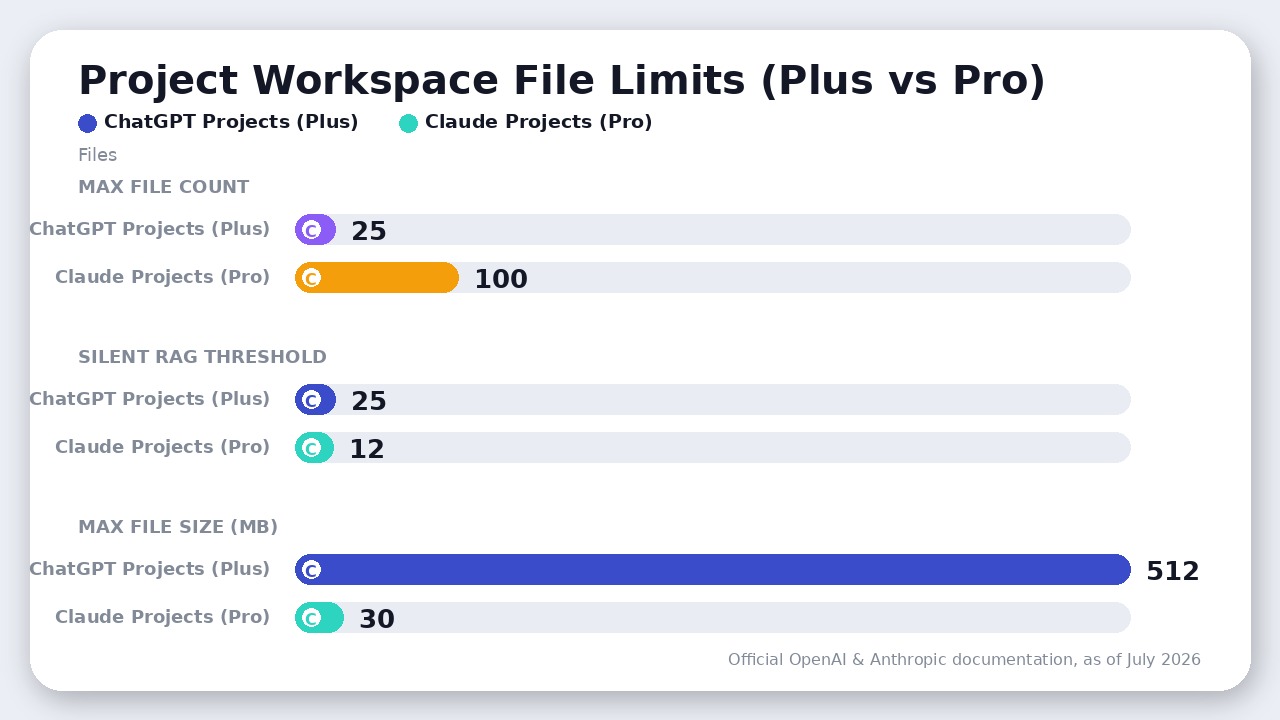
| Max File Count | 25 files | 100 files |
| Max File Size | 512 MB per file | 30 MB per file |
| Silent Fallback | None (hard limit) | Switches to RAG at 13+ files |
| Project Instructions | 8,000 characters | No published limit |
| Project Memory | Yes (dynamic across chats) | No (static / disabled in projects) |
| Core Models | GPT-5.6 Sol / Terra / Luna | Claude Sonnet 5 / Opus 4.8 / Haiku 4.5 |
The Silent RAG Trap: Why Claude Projects Silently Fail at Scale
Anthropic’s marketing pitch for Claude Projects highlights a highly capacious knowledge base where you can dump your team’s reference files. But power users on GitHub and Reddit consistently report a frustrating, undocumented limitation: the silent RAG fallback.
When you upload files to a Claude Project, the system is supposed to load those files directly into the 200,000-token context window so Claude can read everything with 100% accuracy. However, as documented in GitHub Issue #25759, the moment your project reaches 13 files, Claude’s system silently activates a Retrieval-Augmented Generation (RAG) search mode using the project_knowledge_search tool.
This means:
1. Lost Context: Instead of reading your entire document set, Claude only pulls partial, fragmented text snippets.
2. Hallucinations: In RAG mode, Claude frequently misses cross-file connections, leading to fabricated data and missed details.
3. The 40KB Markdown Wall: Users consistently report that Markdown (.md) or text files over 40KB often get stuck in a permanent indexing spinner, rendering them completely unreadable inside new chats.
If you are a developer already using a dedicated AI IDE like Cursor vs Windsurf, you know how critical codebase context is. Relying on Claude Projects to store a multi-file repository will result in Claude hallucinating code structures because of this silent RAG transition.
The ChatGPT File-Count Paradox: How to Bypass the 25-File Limit
In contrast, OpenAI takes a brute-force approach. On the ChatGPT Plus plan ($20/month as of July 2026), you are hit with a hard limit of 25 files per project (which increases to 40 files on the $200/month Pro tier as of July 2026).
While this sounds more restrictive than Claude’s 100-file limit, ChatGPT’s file size limit is a massive 512MB per file (roughly 2 million tokens). This creates a highly effective loophole: the Merging Strategy.
Instead of uploading 50 individual PDF or text files, you can simply merge them into 2 or 3 massive documents and upload them to ChatGPT. Because ChatGPT Projects do not use a silent RAG fallback for project files, it will load the entire merged context directly into the chat session. For researchers and marketers handling massive document sets, this makes ChatGPT Projects far more reliable at scale than Claude’s fragmented search.
Project Memory vs. Static Knowledge: Who Actually Remembers Your Work?
The second major differentiator is how each tool handles memory.
ChatGPT’s Dynamic Project Memory
ChatGPT Projects feature an isolated Project Memory system. As you chat, ChatGPT automatically learns your preferences, style guidelines, and project decisions, carrying those facts forward into every new conversation started within that specific project folder. Crucially, these memories are completely isolated from your general, main-chat memories, preventing cross-contamination between different clients or personal projects.
Furthermore, while OpenAI’s July 2026 update tripled the global Custom Instructions limit to 5,000 characters (up from 1,500), ChatGPT Projects natively support up to 8,000 characters for project-level instructions, giving you ample room to paste a comprehensive Master Prompt of your style rules.
Claude’s Static Reference System
While Anthropic rolled out a global, cross-session Memory feature to all Claude users in March 2026, this system is disabled inside Claude Projects to prevent global memory bleed. As a result, web-based Claude Projects remain fundamentally static. The Project Instructions block and uploaded files are the only way to hardcode behavior. While Claude has introduced an automated memory system (the CLAUDE.md memory system) for its desktop Cowork and Claude Code terminal tools, the web-based Claude Projects do not dynamically update their knowledge based on your conversations.
If Claude learns something new in Chat A, it will not carry that fact over to Chat B unless you manually copy-paste the new insight into the Project Instructions or upload an updated reference file.
Where Claude Actually Wins
Despite these limitations, Claude Projects remain the gold standard for specific professional workflows:
- Superior Writing and Tone: Claude Sonnet 5 and Opus 4.8 write with a natural, restrained, and human-like tone that beats ChatGPT’s tendency to overcook professional communication with buzzwords and structured fluff. For marketers and copywriters, this output quality is worth the manual memory management.
- Artifacts and Interactive Workspaces: Claude’s side-panel Artifacts allow you to view, run, and iteratively edit code, diagrams, and HTML mockups in real time. ChatGPT’s Canvas is a strong competitor, but Claude’s rendering and execution of interactive dashboards remain unmatched.
- Default Data Privacy: According to Anthropic’s official privacy documentation, Claude does not train its models on your Pro or Team plan data by default. OpenAI requires users to actively opt out or upgrade to the $20/seat ChatGPT Business plan (billed annually as of July 2026) to guarantee data privacy.
The Verdict
Choose ChatGPT Projects as your primary daily driver. It is the more robust, reliable workspace for complex workflows. It handles massive file sizes (up to 512MB), features an isolated Project Memory that dynamically learns as you work, and integrates seamlessly with Canvas, DALL-E image generation, and deep web search.
Choose Claude Projects only if your workflow is strictly focused on static, long-document analysis (under 13 files) or high-end copywriting where Claude’s superior natural writing voice is non-negotiable.
If you are a power user whose business relies on both, paying $40/month (as of July 2026) to run both side-by-side—using ChatGPT Projects for multi-tool execution and Claude Projects as a specialist editor—is the ultimate productivity stack.
The Verdict
ChatGPT Projects wins for most teams due to its dynamic Project Memory, massive 512MB file limits, and integrated tools, while Claude Projects is best for static analysis under 13 files.

Leave a Reply