

Supabase vs Firebase is the classic backend matchup, but in 2026, the reason to pick one over the other isn’t the one you’d guess. For years, the decision was a simple architectural choice: do you want the relational power of SQL or the schemaless speed of NoSQL?
But in 2026, that boundary has dissolved. Google recently rebranded Firebase Data Connect to Firebase SQL Connect, bringing managed PostgreSQL to the Firebase ecosystem. Meanwhile, Supabase has scaled its managed Postgres capabilities to handle enterprise-grade workloads.
The real decision-maker today isn’t SQL vs. NoSQL—it’s billing architecture and vendor lock-in. Supabase’s predictable, compute-based resource model offers a safe harbor from Firebase’s volatile, per-operation billing traps. Unless you are building a highly specialized mobile-first app that relies on Firestore’s undefeated offline-first SDK, Supabase is the superior [backend-as-a-service] platform for production teams.
The 30-Second Answer
- Pick Supabase if: You are building a web application, B2B SaaS, or AI-driven product that requires complex data relations, predictable monthly hosting costs, and a clear exit strategy. Supabase gives you a standard PostgreSQL database with full ownership of your data and zero vendor lock-in.
- Pick Firebase if: You are shipping a mobile-first app (iOS/Android) where offline-first data synchronization is a core feature, or you are already deeply integrated into the Google Cloud ecosystem and want to leverage free push notifications and native mobile analytics.
Supabase vs Firebase: At a Glance
| Dimension | Supabase | Firebase |
|---|---|---|
| Primary Database | PostgreSQL (Relational) | Firestore (NoSQL) or Firebase SQL Connect (PostgreSQL) |
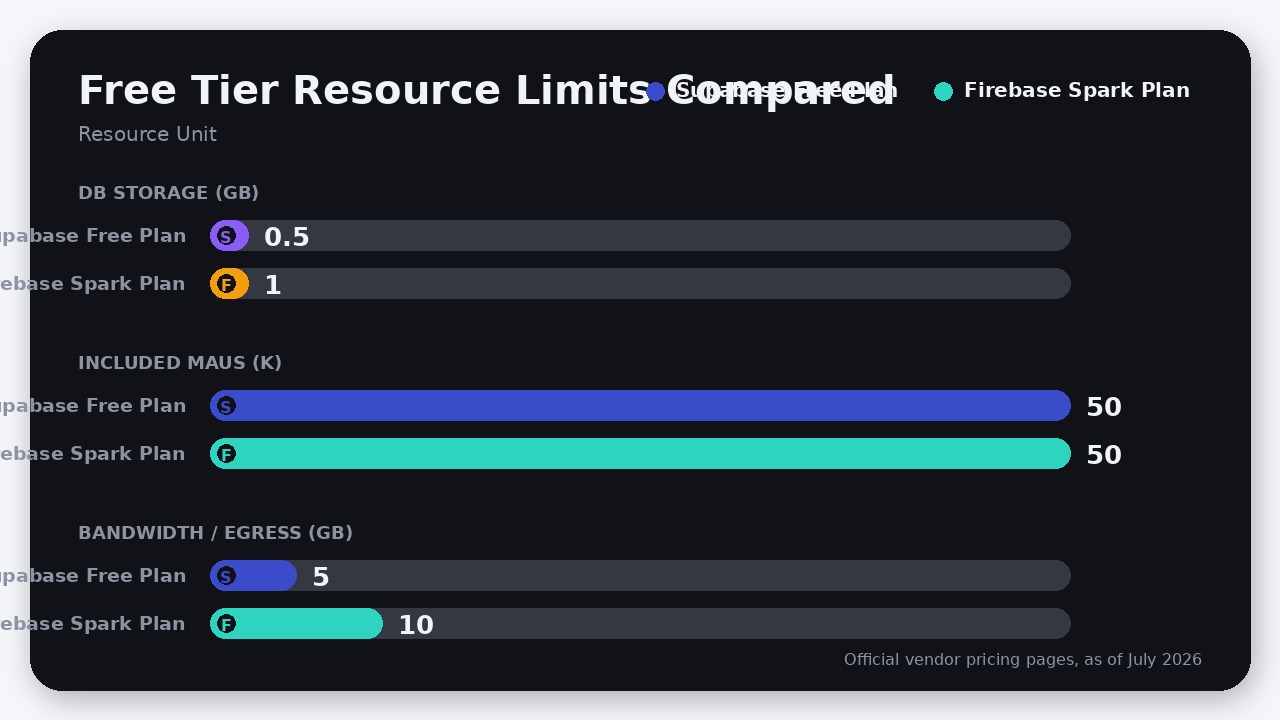
| Free Tier Limits | 500 MB DB space, 50k MAUs, 5 GB egress | 1 GiB Firestore storage, 50k reads/day, 50k MAUs, 10 GB egress |
| Base Paid Plan | $25/month (Pro Plan) | Pay-as-you-go (Blaze Plan) |
| Scaling Model | Resource-based (Compute instances) | Per-operation (Reads/writes/invocations) |
| Offline Sync | Requires third-party libraries | Native, highly mature SDKs |
| Portability | High (Standard SQL export, self-hostable) | Low (Proprietary APIs, Google Cloud hosting) |
Pricing and limits verified against official vendor documentation as of July 2026.
1. The Billing Architecture: Compute vs. Per-Operation
The single biggest pricing trap in the backend-as-a-service space is Firebase’s pay-as-you-go Blaze plan. Because Firebase charges purely by consumption—specifically metering every document read, write, and delete—it penalizes successful applications.
A single runaway useEffect loop in your frontend code or an unindexed query can trigger millions of Firestore reads in a matter of hours. Founders routinely report their monthly Firebase bill spiking from $50 to $5,000 overnight after a minor deployment mistake or an unexpected surge in traffic.
Supabase handles scaling fundamentally differently. On the Supabase Pro Plan ($25/month per project as of July 2026), your database is treated as a dedicated virtual machine. The Pro plan bundles 8 GB of database disk size, 100k MAUs, and 250 GB of bandwidth, alongside a $10/month compute credit that fully covers a Micro compute instance.
If your app goes viral on Supabase, your database might experience CPU throttling or slow response times under heavy load, but it will not bankrupt you. You scale by upgrading your compute tier (e.g., moving from a Micro instance to a Small or Medium instance) rather than paying a tax on every single database operation. This predictable resource-based model makes Supabase pricing far safer for bootstrapped startups and growing SaaS companies.
2. The SQL Plot Twist: Supabase Postgres vs. Firebase SQL Connect
For years, Firebase advocates argued that NoSQL’s horizontal scalability outweighed the benefits of SQL. However, Google conceded this point by launching Firebase SQL Connect (officially rebranded from Firebase Data Connect on April 29, 2026).
Firebase SQL Connect allows developers to connect their client applications to a fully managed PostgreSQL database backed by Google Cloud SQL. It auto-generates strongly typed client SDKs directly from GraphQL schemas and supports advanced Postgres extensions like pgvector.
While this closes the relational database gap, Firebase SQL Connect introduces its own set of limitations and hidden costs:
- The GraphQL Tax: Firebase SQL Connect forces you into a GraphQL-first workflow. While raw SQL querying was introduced in early 2026, writing and maintaining schema files, GraphQL mutations, and generated code adds friction compared to Supabase’s direct, native SQL access.
- The Cloud SQL Pricing Trap: Firebase offers a 90-day no-cost trial for SQL Connect, provisioning a PostgreSQL 17 instance equivalent to a
db-f1-micro(1 vCPU, 10 GB SSD, 628 MB memory). Once that trial ends, however, you must upgrade your project to the Blaze (pay-as-you-go) plan to keep the instance active, at which point you are billed standard Google Cloud SQL rates. A production-grade Cloud SQL instance with High Availability (HA) and automatic backups can easily start at $60–$100/month as of July 2026 before you even factor in application egress or Firebase’s execution charges. - Supabase’s Postgres Superiority: Supabase is Postgres-native. You get direct access to the database via standard SQL, your favorite ORMs (like Prisma or Drizzle), or Supabase’s auto-generated REST API. Features like Row Level Security (RLS) are handled directly at the database level, and extensions like
pgvectorare ready to use with a single click—no Google Cloud IAM configuration required.
3. Realtime & Offline Sync: Firestore’s Undefeated Edge
While Supabase dominates on database architecture and pricing, Firebase retains a massive, undisputed advantage in mobile-first development: Firestore’s offline-first synchronization.
Firestore was built from day one to handle unreliable network connections. The Firestore SDKs for iOS, Android, and Web automatically cache data locally. When a mobile user goes offline (e.g., entering a subway tunnel), the app continues to read and write to the local cache seamlessly. Once the connection is re-established, the SDK syncs the changes back to the cloud and resolves conflicts in the background without requiring the developer to write custom synchronization logic.
Supabase offers a robust Realtime engine that broadcasts database changes using PostgreSQL’s logical replication. While this is excellent for web-based chat apps, live dashboards, or collaborative documents, Supabase does not have a first-party, offline-first synchronization SDK. If your mobile app needs to work offline, you are forced to stitch together complex third-party tools like RxDB, WatermelonDB, or ElectricSQL to handle local caching and conflict resolution.
4. Lock-In and the “Exit Door”
When you build on Firebase, you are signing a long-term lease with Google. Firestore’s query patterns, security rules, and SDKs are entirely proprietary. If you ever decide to migrate off Firebase because of rising costs or platform instability, you cannot simply export your database. You must write custom scripts to extract nested JSON documents, design a relational schema from scratch, and completely rewrite your application’s data access layer—a process that can take weeks of engineering effort.
Supabase, on the other hand, is built entirely on open-source technologies. The core database is standard PostgreSQL. If you ever outgrow Supabase’s managed platform, you can run a standard pg_dump to export your entire database—including your tables, indexes, views, and data—and restore it on AWS RDS, Neon, or your own self-hosted Docker container. Your Postgres skills and database schema remain 100% portable.
Where Firebase Actually Wins
Despite Supabase’s momentum, Firebase remains the superior choice for specific use cases:
- The Mobile Ecosystem: Firebase is more than a database; it is a comprehensive mobile app platform. Firebase Cloud Messaging (FCM) allows you to send push notifications across iOS, Android, and Web completely free of charge, with no volume caps.
- Integrated Product Analytics: Firebase integrates natively with Google Analytics (GA4) to track user funnels and crash reports (via Crashlytics) out of the box. Supabase doesn’t offer built-in analytics, meaning you will need to wire up an external platform like PostHog to get the same level of user insight.
- Rapid Prototyping: If you need to spin up a basic mobile MVP in a weekend, Firebase’s Spark plan offers a generous playground with 50,000 free MAUs and all standard authentication methods included out of the box.
The Verdict
The choice between Supabase and Firebase in 2026 comes down to your primary platform and your tolerance for unpredictable billing:
- Choose Supabase if you are building a B2B SaaS, a web application, or an AI-focused product. It provides the relational integrity of Postgres, predictable resource-based pricing, and a zero-lock-in architecture that ensures you actually own your database.
- Choose Firebase only if you are building a mobile-first app that absolutely requires Firestore’s bulletproof offline-first sync SDK, or if your team is already deeply committed to Google Cloud and wants to leverage its free push notification and mobile analytics ecosystem.

Leave a Reply