

For developers, writers, and technical teams, choosing between ChatGPT Projects and Claude Projects isn’t just about picking a favorite large language model. It is about choosing how you organize your context, how much data you can feed your AI assistant, and whether you can tolerate your workspace suddenly losing its conceptual thread.
While both platforms promise persistent workspaces that combine custom instructions and uploaded files to eliminate the friction of starting chats from scratch, they operate under completely different architectural philosophies. One is a multi-tool agentic Swiss Army knife; the other is a deep, highly focused reasoning engine with a hidden context trap.
Here is the unfiltered truth about how they stack up in 2026.
The 30-Second Answer
- Pick Claude Projects if: You are a developer, technical writer, or analytical creator who needs high-fidelity reasoning, code synthesis, and side-by-side editing (via Artifacts). You must be willing to manage your files carefully to avoid triggering Claude’s automatic RAG mode, which can degrade holistic synthesis.
- Pick ChatGPT Projects if: You are a marketer, researcher, or cross-functional team that needs multi-tool execution (Deep Research, Voice Mode), massive file uploads (up to 512MB), or affordable team collaboration without steep seat-minimum pricing traps.
Evaluating ChatGPT Projects vs Claude Projects: The Core Differences
| Feature / Dimension | ChatGPT Projects | Claude Projects |
|---|---|---|
| Free Tier Access | Unlimited projects, max 5 files/project | Max 5 projects, limited usage |
| Paid Individual Tier (as of July 2026) | $20/month (Plus) | $20/month (Pro, or $17/mo billed annually) |
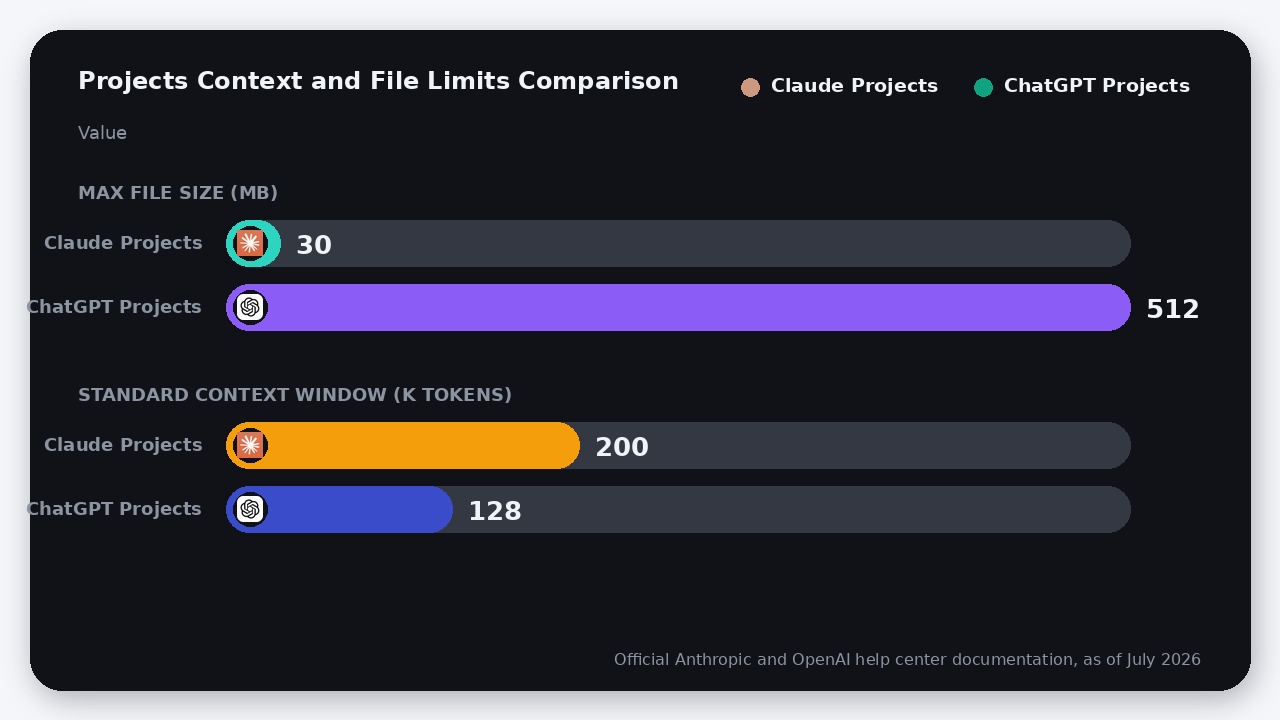
| Max File Size limit | 512MB per file | 30MB per file |
| Project File Count Cap | Plus: 25 files | Pro/Team: 40 files | Unlimited files (triggers RAG mode) |
| Large Knowledge Handling | In-context processing with background search | Auto-RAG mode (up to 10x context expansion) |
| UI Workspace Tools | Canvas (inline editing), Voice, Deep Research | Artifacts (interactive side panel) |
| Team Collaboration (as of July 2026) | Business: $20–$25/user/mo (minimum 2 seats) | Team: $20–$25/user/mo (minimum 2 seats) |
| Source Line | Official OpenAI help docs as of July 2026 | Official Anthropic help docs as of July 2026 |
The Context Trap: Claude’s Invisible RAG vs. ChatGPT’s Hard Caps
To understand the fundamental difference between these two tools, you have to look at how they handle your files when your workspace gets crowded.
Claude’s Automatic RAG Mode
Claude Projects operates on a standard 200K token context window (roughly 150,000 words). However, Anthropic uses an automatic Retrieval Augmented Generation (RAG) for Projects. When your uploaded knowledge base approaches the context limit, Claude seamlessly switches to RAG mode to expand your project’s capacity by up to 10x.
The Trap: While this sounds like a feature, power users consistently report that once RAG is enabled, Claude’s output quality for holistic, complex reasoning drops significantly. Instead of holding your entire codebase or book in active memory, Claude begins “retrieving” only the most relevant chunks. If you are asking Claude to refactor code across multiple files or analyze a complex theoretical argument, the model loses its ability to see the big picture. It is no longer synthesizing; it is searching.
ChatGPT’s Hard Storage Caps
ChatGPT Projects approaches the problem with rigid boundaries. On the Plus plan, you can upload a maximum of 25 files per project. On Pro, Business, Enterprise, or Edu plans, that cap increases to 40 files.
However, ChatGPT’s individual file limits are incredibly generous: up to 512MB per file and a standard 128K token context window. ChatGPT does not transparently flag when it is using semantic search versus in-context processing, but its ability to ingest massive raw datasets, spreadsheets, and dense PDFs without choking makes it far more robust for data-heavy workflows.
The Tooling Ecosystem: Artifacts vs. Deep Research
Once your context is loaded, the tools you can deploy within your project define your day-to-day productivity.
Why Developers and Writers Prefer Claude Projects
Claude’s killer feature is Artifacts. When Claude generates code, vector graphics, or structured documents, it renders them in a dedicated side-by-side interactive panel. You can preview live HTML/JS, edit code inline, and iterate on drafts without cluttering your main chat window.
Furthermore, if you are already using an AI IDE like Cursor, Claude Projects serves as a perfect companion for high-level architectural planning before you commit code to your local terminal.
Why Marketers and Researchers Prefer ChatGPT Projects
ChatGPT Projects is designed for multi-threaded execution. Inside a single project, you can trigger:
* Deep Research: OpenAI’s multi-step web search agent that can autonomously browse the web, synthesize findings, and write comprehensive reports directly into your project files.
* Advanced Voice Mode: Allowing you to speak naturally to your project assistant, brainstorm ideas, and capture transcripts.
* Custom GPTs: As of mid-2026, you can bring your specialized Custom GPTs directly into your project workspaces to combine their programmed behaviors with your project-specific knowledge bases.
The Collaboration Pricing Matchup
If you are a founder or team lead looking to deploy shared workspaces for your company, you will find that pricing is remarkably aligned.
- ChatGPT Business costs $20/user/month (billed annually) or $25/user/month (billed monthly) as of July 2026. Crucially, there is a minimum requirement of 2 seats, making it highly affordable for small teams of 2 or 3 to collaborate on shared projects.
- Claude Team also costs $20/user/month (billed annually) or $25/user/month (billed monthly) as of July 2026. Anthropic enforces a minimum of 2 seats, meaning a team of two will pay exactly $40/month on an annual plan or $50/month on a monthly plan for either platform. The steep 5-seat minimum that Anthropic previously enforced has been retired, leveling the playing field for small startups.
Where ChatGPT Projects Actually Wins
While Claude is often praised for its “human” writing voice and superior coding logic, ChatGPT Projects dominates in several practical areas:
1. File Size Flexibility: Claude’s strict 30MB limit per file means you have to manually compress or split large PDFs, datasets, or code exports before uploading. ChatGPT’s 512MB limit handles almost anything without preparation.
2. Tool Integration: The ability to run Deep Research, generate images via DALL-E, and use Voice Mode within the same project workspace makes ChatGPT a far superior general-purpose assistant.
3. Free Tier Generosity: ChatGPT Free users can create unlimited projects with up to 5 files per project. Claude Free users are strictly capped at 5 projects total.
The Verdict
Choose Claude Projects if:
You are a developer, technical writer, or analytical creator who needs high-fidelity reasoning. The combination of Artifacts, Claude Code, and the superior conceptual nuance of the Claude model family makes it the gold standard for deep, focused work. Just keep your project knowledge base lean (under 100K tokens) to prevent the auto-RAG system from degrading your context.
Choose ChatGPT Projects if:
You are a marketer, researcher, or business team that relies on multi-step research, handles massive files, or wants to share workspaces across a small team. ChatGPT Projects is the superior operational engine for daily, multi-tool business workflows.
FAQ
Can I share chats from ChatGPT Projects?
Yes. As of recent 2026 updates, both ChatGPT Projects and Claude Projects allow you to share snapshot links of specific chats within a project, though the underlying knowledge base files remain private.
Does Claude Projects support image generation?
No. Claude models focus strictly on text, code, and static image analysis. If you need to generate images or video within your project workspace, you must use ChatGPT Projects.
What happens when I hit the file limit in ChatGPT Projects?
If you hit the 5-file (Free), 25-file (Plus), or 40-file (Pro/Team) limit, you must delete existing files from your project sources before uploading new ones. Alternatively, you can merge multiple text or code files into a single master document to bypass the count limit.

Leave a Reply