

Webflow vs Framer is no longer a debate about layout engines or Figma imports. Following massive pricing and feature overhauls from both platforms in May 2026, the decision (as of July 2026) has shifted entirely to content operations and team scale.
The verdict: Webflow is the clear winner for scaling B2B marketing sites, relational content hubs, and teams that need bulletproof SEO control. However, if your goal is to launch highly interactive, design-forward marketing pages at breakneck speed without a developer, Framer’s Figma-native canvas is unbeatable.
Webflow vs Framer: The 30-Second Answer
| Pick Webflow If | Pick Framer If |
|---|---|
| You need a complex relational CMS (up to 20,000 items, as of July 2026) | You are a designer-led team or startup that wants to go from Figma to live in minutes |
| You require granular SEO controls, native localization, and strict hosting compliance | You need jaw-dropping canvas animations and smooth hover transitions |
| Your site is a multi-market brand asset that must scale without custom-code workarounds | You want to pay flat editor fees ($20/mo) and cheap content-only seats ($10/mo) (as of July 2026) |
The May 2026 Pricing Realignment: What Actually Changed?
If you are looking at comparison guides written before mid-2026, throw them out. Both platforms completely rewrote their pricing rules in May 2026, fundamentally altering the total cost of ownership for agencies and marketing teams (as of July 2026).
Webflow’s Premium Pivot
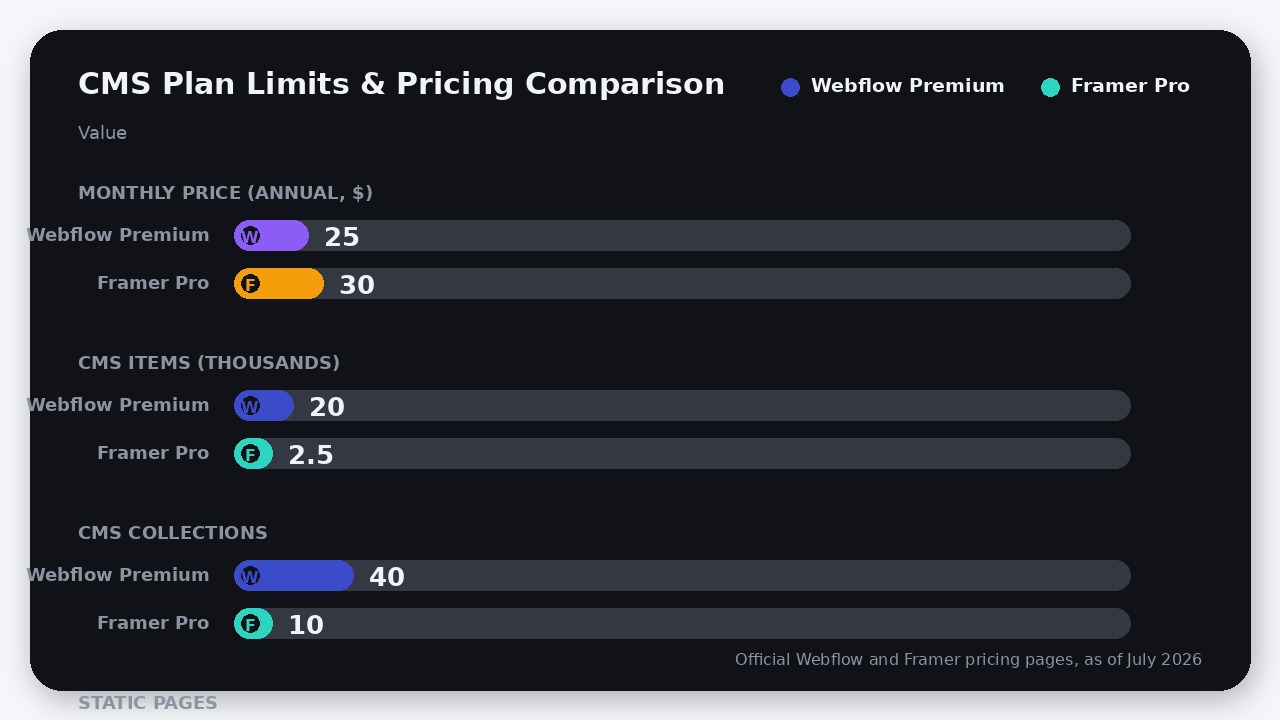
On May 13, 2026, Webflow simplified its Site plans from four tiers to three. It killed the old CMS ($23/mo billed yearly) and Business ($39/mo billed yearly) plans, merging them into a single Premium Site plan at $25/month billed yearly ($39/month billed monthly, as of July 2026).
While this represents a price increase for basic CMS users, it unlocked massive technical limits. The Premium plan now includes 20,000 CMS items (up from 2,000 on the old CMS plan) and 40 CMS collections (up from 20). Additionally, Webflow’s entry-level Basic Site plan increased to $15/month billed yearly ($25/mo monthly, as of July 2026) but doubled its static page limit from 150 to 300.
Framer’s Aggressive Counter-Move
Exactly two weeks later, on May 27, 2026, Framer responded with a new billing system. While keeping its core site plans unchanged—Basic at $10/month and Pro at $30/month billed yearly (as of July 2026)—Framer did two things to directly target Webflow’s agency and team market:
1. Slashed Editor Seats: Full editor seats were cut to a flat $20/month across all plans (previously $40/month on Pro and Scale, as of July 2026).
2. Introduced Content Editors: Framer introduced a new $10/month seat type (as of July 2026) for team members who only manage CMS content, localization, and on-page edits.
3. Upgraded the Basic Plan: Framer’s $10/mo Basic plan now includes 50 GB of bandwidth (up from 10 GB) and 2 CMS collections (up from 1) at no extra cost (as of July 2026).
The Hidden Pricing Trap: Workspace vs. Flat Seats
SaaS platforms love to market their base site plans, but the real cost divergence happens when you add human beings to the project. This is where Webflow has built a massive pricing trap for growing teams.
In Webflow, you cannot simply buy a site plan and invite your team. You must buy a Workspace plan on top of your Site plan. If you have more than 3 collaborators, you must upgrade to the Growth Workspace at $49/month billed annually (which includes 1 Full seat). Additional Full seats cost $39/seat/month and Limited seats cost $15/seat/month billed annually (as of July 2026).
Let’s look at the math for a marketing team of 4 (1 designer, 2 editors, 1 writer) running a CMS-driven marketing site, assuming everyone needs full design/edit access (Full seats, as of July 2026):
- The Webflow Bill: Premium Site plan ($25/mo) + Growth Workspace base ($49/mo) + 3 additional Full seats (3 * $39 = $117/mo) = $191/month billed annually.
- The Framer Bill: Pro Site plan ($30/mo, includes 1 editor) + 2 extra Full Editors (2 * $20 = $40/mo) + 1 Content Editor ($10/mo) = $80/month billed annually.
For a team of four requiring full access, Webflow is nearly 2.4 times more expensive than Framer. Even if you optimize Webflow by using cheaper Limited seats ($15/mo each) for the two editors and the writer, your bill is still $119/month ($25 Site + $49 Workspace + $45 seats)—nearly 50% more than Framer’s $80/month. If you are a startup watching your burn rate, this seat-licensing premium is impossible to ignore.
CMS Architecture: The Relational Powerhouse vs. The Flat List
While Framer wins the pricing argument for teams, Webflow justifies its premium the moment you build a database.
Webflow’s CMS is a true relational database. It supports complex multi-reference fields, conditional visibility, and highly structured data models. If you are building a B2B SaaS site with a resource library, where “Blog Posts” need to link to “Authors,” “Categories,” and “Related Features,” Webflow handles this natively and elegantly. With the May 2026 update, the Premium plan’s 20,000 CMS item limit (as of July 2026) means you won’t hit a scaling wall for years.
Framer’s CMS, by contrast, feels like a flat spreadsheet. While it supports basic relations, managing complex, deeply nested data structures is a chore. More importantly, Framer’s CMS limits are highly restrictive. The Pro plan ($30/mo, as of July 2026) caps you at just 2,500 CMS items. If you need to scale beyond that, you must upgrade to the Scale plan at $100/month (which only offers annual billing, as of July 2026) to get 10,000 items.
If you are building a content-heavy ecosystem, Webflow’s database structure is simply in a different class.
Design Workflow: Code-First Structure vs. Figma-Native Freedom
The fundamental difference in how these tools build pages is philosophical.
Webflow is a visual interface for writing clean HTML and CSS. It forces you to respect the box model, div blocks, and class structures. If you do not understand flexbox, CSS grid, and semantic nesting, Webflow will feel incredibly frustrating. However, this code-first approach ensures that the output is highly performant, semantic, and easily accessible.
If you are looking to build highly complex web applications rather than standard marketing sites, you might want to look at our comparison of Lovable vs Bolt.new to see how full-stack AI coders compare.
Framer is essentially Figma brought to life. It throws out the strict constraints of the CSS box model in favor of an infinite canvas where you can draw, position, and stack elements with absolute freedom. Designers love Framer because they do not have to translate their designs into code structures; they can copy-paste frames directly from Figma and publish them.
However, this freedom comes with a cost. Because Framer allows you to design visually without worrying about DOM depth, it is incredibly easy for inexperienced designers to produce bloated, unoptimized pages that suffer from poor mobile responsiveness and slow load times.
Where Framer Actually Wins
Despite Webflow’s technical superiority in database management, Framer wins several critical workflows:
- Motion and Animations: Framer’s animation engine is built on React Spring. Creating complex, scroll-triggered animations, interactive hover states, and seamless page transitions is infinitely easier and looks smoother than Webflow’s native animation builder.
- Framer Agents & AI: Framer 3.0 (released on June 16, 2026) introduced highly capable AI design agents directly on the canvas. While Webflow has AI layout generation, Framer’s agents can write, analyze, and structurally organize pages on the fly based on natural language prompts.
- Client Handoff: For freelance designers, Framer’s billing model is a dream. Pro Experts get free edit access to client projects, and the $10/mo Content Editor seat (as of July 2026) means you can hand over a site to a client and they only pay a fraction of the cost to manage their blog.
The Verdict
We do not believe in “it depends.” Here is exactly how to make your decision:
Choose Webflow if you are building a B2B SaaS website, a content-heavy resource center, or a multi-lingual corporate site. If your site relies on a relational database, strict SEO controls, and clean semantic code for accessibility, Webflow is the industry standard for a reason. Do not let the workspace pricing scare you off if the site is a core revenue-generating business asset.
Choose Framer if you are a startup, a creative agency, or a solo designer who needs to ship beautiful, highly interactive landing pages yesterday. If your primary bottleneck is design execution speed rather than database complexity, Framer’s Figma integration and flat-rate editor pricing make it the most cost-effective and satisfying tool on the market.
FAQ
Can I migrate my Webflow site to Framer?
Yes, but it is not a one-click process. While you can copy-paste visual elements from Figma to Framer easily, your Webflow CMS databases must be exported as CSVs and rebuilt inside Framer’s CMS, which has much tighter item limits (2,500 on Pro vs 20,000 on Webflow Premium, as of July 2026).
Does Framer support native e-commerce in 2026?
No. While Webflow has native e-commerce plans, Framer relies on third-party integrations like LemonSqueezy, Shopify, or Outseta to handle checkouts and digital storefronts.
What are Webflow and Framer AI credits used for?
Both platforms now use a credit-based system for their built-in AI features. These credits power AI layout generation, translation, copy generation, and in Framer’s case, the execution of canvas-based design agents.

Leave a Reply