


Notion wins this matchup for most engineering, product, and knowledge-focused teams, but the reason isn’t that its database engine is better. It wins because its writing interface is fluid, its document search is friction-free, and non-technical employees actually adopt it. However, if your team relies on multi-table relational math, automated external syncs, and interactive button triggers inside docs, choosing Notion is an architectural mistake that will force you into paying for third-party automation tools like Zapier or Make.
The real battle between Notion and Coda isn’t just a feature comparison—it’s a fundamental divergence in philosophy and pricing architecture.
The 30-Second Answer
– Pick Notion if you need a centralized company wiki, streamlined team documentation, fast writing workflows, and an intuitive UI that every department adopts instantly.
– Pick Coda if you want to build internal micro-apps, complex spreadsheets-disguised-as-docs, automated operational trackers, and interactive team tools—especially if you have an ops-heavy team where a few people build workflows for many viewers.
Notion vs Coda at a Glance
Pricing and plan specifications verified against official vendor documentation as of August 2026.
| Dimension | Notion | Coda |
|---|---|---|
| Primary Philosophy | Document-first wiki & knowledge workspace | Application-first canvas with spreadsheet power |
| Core Billing Metric | Per Workspace Member | Per “Doc Maker” (Viewers & Editors are free) |
| Entry Paid Tier | Plus: $10/user/mo (annual) / $12/user/mo (monthly) | Pro: $10/maker/mo (annual) / $12/maker/mo (monthly) |
| Mid-Tier / Team | Business: $20/user/mo (annual) / $24/user/mo (monthly) | Team: $30/maker/mo (annual) / $36/maker/mo (monthly) |
| Free Tier Limits | Block limits when adding 2+ members; 5MB upload limit | Unlimited unshared docs; object & size limits on shared docs |
| Database & Formulas | Basic relational database views; lightweight formula language | Spreadsheet-grade formulas; multi-table relational math |
| Automations | Database property triggers (single database scope) | Multi-step trigger/action loops & scheduled jobs |
| Integrations | Native connections (Slack, GitHub, Figma, Jira) | 600+ two-way native Packs (Stripe, Jira, Google Apps) |
The Pricing Trap: Per-Seat vs. Doc Maker Billing
Most software comparisons list monthly prices without analyzing how billing architecture behaves at scale. As of August 2026, Notion Plus ($10/user/month billed annually) looks cheaper on paper than Coda Team ($30/Doc Maker/month billed annually). In practice, your team structure radically flips which tool is cheaper.
Notion charges for every seat in your workspace. If you add a team member, designer, or contractor who only reads meeting notes or checks task status, they cost $10/month on Plus or $20/month on Business.
Coda uses Doc Maker Billing. Only members who create new documents or top-level canvases are billed as Doc Makers. Anyone who edits existing pages, adds rows to tables, leaves comments, or presses interactive buttons is an Editor or Viewer—and editors and viewers are 100% free.

Consider a 30-person operations team (as of August 2026 pricing) where 5 operations engineers build trackers and 25 employees consume data, update statuses, and log entries:
- Notion Plus: 30 members × $10/mo = $300/month ($3,600/year).
- Notion Business: 30 members × $20/mo = $600/month ($7,200/year).
- Coda Pro: 5 Doc Makers × $10/mo = $50/month ($600/year).
- Coda Team: 5 Doc Makers × $30/mo = $150/month ($1,800/year).
In this asymmetric operational setup, comparing corresponding entry tiers (Notion Plus vs Coda Pro) yields $3,000 in annual savings ($250/month). Comparing team/business tiers (Notion Business vs Coda Team) yields $5,400 in annual savings ($450/month). Coda Team saves between $1,800 and $5,400 per year compared to Notion’s two paid tiers.
Now consider a 30-person creative agency or consulting firm where every single person creates client documents, notes, and proposals from scratch:
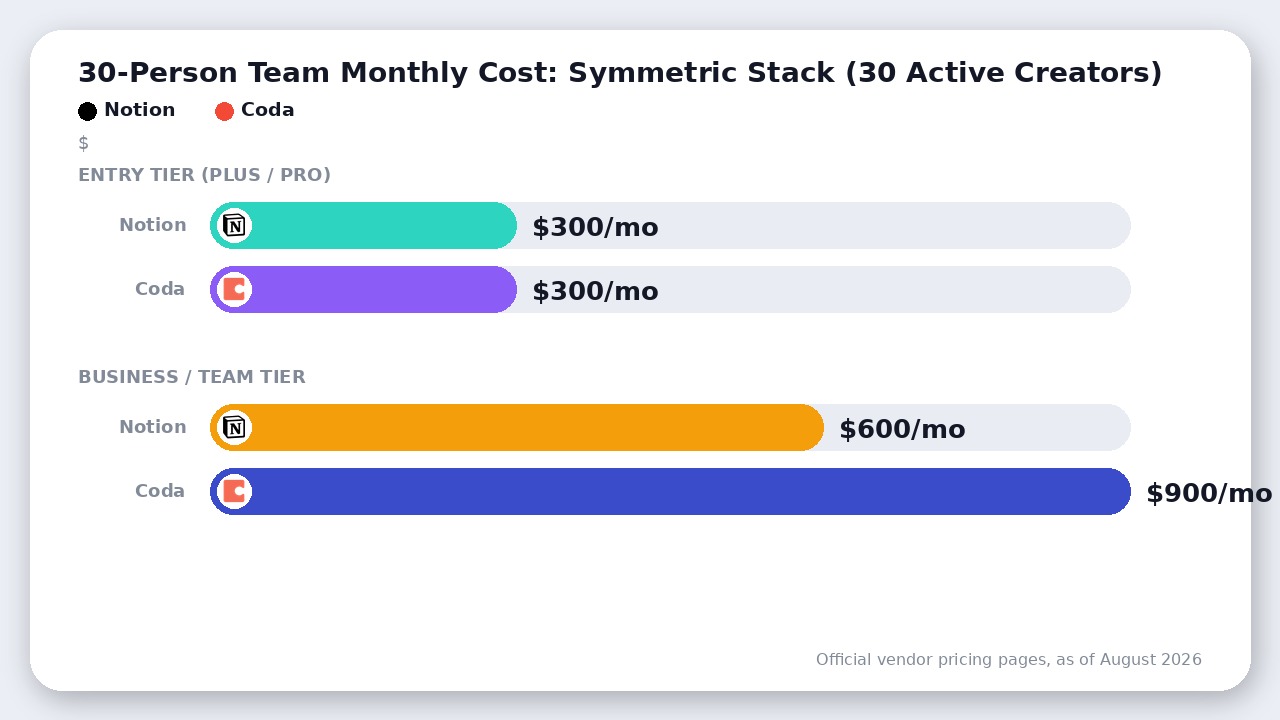
- Notion Plus: 30 members × $10/mo = $300/month ($3,600/year).
- Notion Business: 30 members × $20/mo = $600/month ($7,200/year).
- Coda Pro: 30 Doc Makers × $10/mo = $300/month ($3,600/year).
- Coda Team: 30 Doc Makers × $30/mo = $900/month ($10,800/year).
When everyone builds, Notion Plus ($300/mo) is 66.7% cheaper than Coda’s Team tier ($900/mo). Before deciding based on listed prices, audit your team: how many people construct tools versus how many simply input data?
Writing and Knowledge Management: Notion Wins
If your workspace’s main job is company documentation, team onboarding, meeting notes, and knowledge base wikis, Notion is significantly superior.
Notion’s block-based editor feels like a natural extension of thought. Text selection, drag-and-drop reorganizations, callouts, and toggle lists execute with snappy performance. Page nesting in Notion forms a clean hierarchical sidebar tree, making company-wide knowledge navigation effortless.
Coda treats documents like app canvases. While you can write prose in Coda, the interface feels noticeably heavier. Long, text-heavy documents in Coda suffer from visual clutter and slightly slower loading times. Furthermore, Coda’s document navigation mimics an app sub-menu structure rather than an organic document tree, creating friction for team members who just want to quickly find an HR policy or engineering spec.
Additionally, Notion’s global search (enhanced by Notion AI and Ask Notion) searches deep within database properties, embedded pages, and sub-blocks faster than Coda’s search engine. For organizations trying to replace legacy wikis, Notion delivers a cleaner experience.
Data, Formulas, and Workflows: Coda Wins
Where Notion acts as a document platform with basic tables, Coda acts as a full relational app builder disguised as a doc.
Notion’s databases handle basic task tracking, Kanban boards, and simple relational rollups smoothly. However, Notion formulas are deliberately limited. You cannot easily reference data across disparate tables without explicit relation properties, nor can you trigger dynamic multi-step conditional events natively.
Coda’s formula engine uses full named object references (similar to Excel or Google Sheets formulas, but human-readable). In Coda, any table row can reference data from any other table anywhere in the doc without needing manual relational linking properties.
Key capabilities unique to Coda’s data engine include:
- Interactive Canvas Buttons: Place a button inside a doc or database row that sends a Slack message, updates three separate tables simultaneously, and marks an item as approved in one click.
- Native Pack Integrations: Coda Packs (over 600 available as of August 2026) support true two-way sync. You can pull live Jira issues or Stripe payments into a Coda table, edit them inside Coda, and sync those changes straight back to external services.
- Native Time- and Event-Based Automations: Set up automated rules directly inside Coda—such as “Every Monday at 9 AM, scan the tasks table for past-due items and send a summary email to the assignee.”
Achieving these workflows in Notion requires chaining external webhooks through automation services like Zapier or Make, adding subscription costs and maintenance overhead.
Where Coda Actually Wins
To make a credible decision, you must acknowledge Coda’s clear technical high ground in complex operational software:
- True Multi-Table App Building: Coda allows you to construct custom CRMs, inventory managers, and sprint planners that rival standalone SaaS platforms.
- Control and Doc Locking: Coda provides granular doc-locking capabilities, allowing builders to protect section formulas while letting editors freely manipulate specific rows or canvas elements.
- No-Code Automation Depth: Coda includes built-in trigger/action execution natively on its Team tier ($30/maker/month as of August 2026) without needing external orchestration platforms.
- Packs Ecosystem: Two-way data synchronization with tools like Google Calendar, GitHub, and Figma directly inside tables outclasses Notion’s standard embedded previews.
If your goal is to reduce software expenses by building custom internal software that replaces dedicated tracking platforms, Coda’s capability headroom is far higher.
Limitations Buried in the Docs
Neither marketing page highlights the performance boundaries you hit in production:
- Coda Document Lag: Because Coda loads the entire document and its relational formula engine into browser memory, docs containing tens of thousands of rows, heavy lookup formulas, and multiple active Packs become laggy or unresponsive. Coda is an app builder for team workflows, not an enterprise-scale big-data warehouse.
- Notion Database Permission Caps: Notion’s granular permissions allow page-level access, but restricting individual database rows or specific database properties without breaking relational rollups remains a known friction point for sensitive HR or financial databases.
- Notion Block Limits on Free: On Notion’s Free plan, inviting a second workspace member activates a shared 1,000-block limit, forcing an upgrade to Plus ($10/user/month as of August 2026) for collaborative team use.
The Verdict
Do not pick between Notion and Coda based on benchmark feature checklists. Pick based on whether your workspace needs to explain work or compute work.
- Choose Notion if your primary goal is building a company wiki, maintaining clear team documentation, tracking lightweight projects, and ensuring high adoption across marketing, sales, and executive teams. Notion provides the superior writing environment, faster search, and lower per-seat costs for teams where everyone creates content.
- Choose Coda if you are an ops-heavy product, engineering, or logistics organization building custom interactive trackers, automated approval loops, and complex relational tables. Coda’s Doc Maker pricing model makes it drastically more cost-effective when a small group of power-builders creates tools for a large operational workforce.
Final Recommendation
Notion wins for most organizations needing an intuitive, fast company wiki and team documentation hub. Coda wins when documents must act as interactive, automated applications, backed by a billing model that saves ops-heavy teams thousands annually.

Leave a Reply