

Choose Notion if you need a collaborative team workspace with relational databases, automated project boards, and multiplayer doc editing. Choose Obsidian if you want a local-first personal knowledge base where your notes remain plain Markdown files on your device with instant offline access, zero cloud lock-in, and linked-thought graph mapping.
Choose Notion if you need an all-in-one collaborative workspace where teams run relational project boards, publish wikis, and brainstorm in real time. Choose Obsidian if you want an unkillable personal knowledge base where your notes live on your own hard drive as plain Markdown files, opening with zero latency and zero risk of cloud lock-in.
Most software comparisons treat Notion vs Obsidian as a cosmetic preference between nested page trees and visual graph networks. That misses the fundamental architectural split. Notion is a cloud-hosted relational database pretending to be a document editor. Obsidian is a local file viewer layered on standard text files. Everything—from offline reliability and speed to team permissions and recurring subscription bills—flows directly from this architectural divide.
The 30-Second Answer
- Pick Notion if: You manage team projects, coordinate client deliverables, need shared relational databases with rollups and formula properties, or want ready-to-run collaborative sprint planning out of the box.
- Pick Obsidian if: You are a researcher, solo founder, writer, or software developer building a lifelong Second Brain where total data privacy, offline speed, and plain text durability matter more than team comment threads.
Notion vs Obsidian: Feature & Architecture Breakdown
| Dimension | Notion | Obsidian |
|---|---|---|
| Storage Model | Cloud-first (Hosted PostgreSQL/AWS) | Local-first (Plain .md files on your device) |
| Offline Capability | Partial (Manual opt-in caching, 50-row database limit) | Native (Full functionality, 100% offline default) |
| Database Architecture | True relational databases (Rollups, Relations, Formulas 2.0) | Frontmatter/YAML-driven views via native Obsidian Bases & Dataview |
| Multiplayer Collaboration | Real-time live cursor editing, comments, mentions | Single-player; shared vaults rely on file sync or Git (no live cursors) |
| Data Ownership & Longevity | Vendor-locked proprietary blocks (JSON export required) | 100% open plain-text Markdown; readable in any editor forever |
| Core Pricing (August 2026) | Free ($0); Plus at $10/user/mo (billed annually) | Free forever (Personal & Commercial use) |
| Sync Add-On Pricing | Included in cloud account | Obsidian Sync: $4/mo (Standard 1GB) or $8/mo (Plus 10GB, annual) |
Pricing verified against official vendor documentation as of August 2026.
1. Architecture: Cloud Blocks vs. Local Markdown
Notion views every paragraph, image, embed, and bullet point as an independent block stored on remote servers. This makes dragging elements, rearranging page layouts into columns, and converting headers into toggle lists effortless. However, it also introduces latency: every document load, search query, and page expansion relies on cloud API roundtrips. If Notion experiences downtime or you have high ping, your workflow stutters.
Obsidian, by contrast, does not possess a private database backend. Your vault is simply a folder on your computer filled with .md text files, standard subfolders, and image attachments. Obsidian is an Electron-based GUI that indexes your local folder in memory. Because search operates across local disk storage, querying 10,000 files in Obsidian returns results in milliseconds. If Obsidian the company shut down tomorrow, you could open your entire vault inside VS Code, Apple Notes, or any plain text reader without converting a single byte.
For users exploring similar cloud-native alternatives with structured docs, our analysis in Notion vs Coda and Notion vs Superhuman Docs highlights how cloud-first architectures trade file sovereignty for computational power.
2. Databases vs. Obsidian Bases
For years, Notion’s insurmountable edge was its relational database engine. A single Notion database can be displayed simultaneously as a Kanban board, a calendar, a timeline Gantt chart, a gallery, or an interactive table. You can link rows across distinct databases, pull data through multi-level rollups, and build complex algorithmic calculations using Notion Formulas 2.0.
Notion Formula 2.0 Example:
lets(
  daysLeft, dateBetween(prop("Due Date"), now(), "days"),
  if(daysLeft < 0, "⚠️ Overdue", if(daysLeft == 0, "🚨 Due Today", daysLeft + " days left"))
)
Obsidian answered this gap with Obsidian Bases (a core plugin shipping natively across desktop and mobile) alongside community staples like Dataview. Obsidian Bases reads YAML frontmatter properties placed at the top of your markdown files and presents them in clean, filterable table and card layouts:
---
title: "Sprint 24 Architecture"
status: "In Progress"
priority: "High"
due_date: 2026-09-01
tags: [engineering, backend]
---
The Crucial Difference: Obsidian Bases extracts structured views from static text files. It does not provide the relational integrity of an SQL-backed workspace. If you need two-way relations across complex project hierarchies, sprint velocity tracking, or automated workflow triggers when a task changes status, Notion remains substantially more capable. If you only need clean metadata tables for reading lists, daily logs, and research categorizations, Obsidian Bases solves the problem without leaving local Markdown.
3. The Offline Reality Check
One of the most persistent complaints against Notion was its inability to function without an internet connection. While Notion rolled out dedicated offline mode capabilities, its implementation relies on selective caching:
- You must manually toggle Available offline on a per-page basis (paid plans automatically cache favorited and recent pages).
- Nested child pages do not automatically download when you mark a parent page offline.
- Databases opened offline truncate at 50 rows.
- Offline editing does not work inside standard web browsers.
Obsidian requires no offline configuration. It never needs an internet handshake to create notes, edit files, query databases, or view Canvas boards. If you frequently work on flights, in remote field environments, or in secure enterprise networks with strict egress filtering, Obsidian provides uninterrupted reliability where Notion stumbles.
4. Collaboration vs. Solo Thinking
Notion is built for multiplayer interaction. Multiple team members can type simultaneously on the same page with live color-coded cursors, leave threaded inline comments, assign tasks to colleagues via @mentions, and configure granular role-based permissions across specific teamspaces. It functions as a complete company operating system.
Obsidian is deliberately a single-player environment. You can share an Obsidian vault with teammates using Obsidian Sync or private Git repos, but there is no real-time collaborative editing. If two people modify the same markdown file at the exact same minute, Obsidian Sync produces a conflict copy rather than merging keystrokes live. Attempting to run a 20-person agency’s operations inside an Obsidian vault is an exercise in friction.
5. Pricing and Total Cost of Ownership
Evaluating the true cost of both platforms requires looking past headline tiers to find the synchronization and team licensing requirements.
Notion Pricing (as of August 2026)
- Free: $0. Unlimited pages and blocks for solo users, 10 guest collaborators, 7-day page history, and 5MB file upload ceiling. (Workspaces sharing a free tier with multiple members hit a trial block cap before requiring an upgrade).
- Plus: $10 per member/month billed annually ($12 billed monthly). Unlimited blocks for teams, unlimited file uploads, 30-day page history, and up to 100 guest invites.
- Business: $20 per member/month billed annually ($24 billed monthly). SAML SSO, private teamspaces, advanced permissions, 90-day history, and up to 250 guests.
- Enterprise: Custom pricing via sales. Adds zero-data-retention AI governance, SCIM provisioning, audit logs, and unlimited history.
- Notion AI Add-on: Usage-based or $8–$10 per member/month for AI autofill and agent workspaces.
Obsidian Pricing (as of August 2026)
- Obsidian Core App: $0. Free forever for both personal and commercial use with zero feature restrictions.
- Obsidian Sync Standard: $4 per user/month billed annually ($5 monthly). 1 GB encrypted storage, 1 synced vault, and 1-month version history.
- Obsidian Sync Plus: $8 per user/month billed annually ($10 monthly). 10 GB encrypted storage (expandable to 100 GB for $16/mo), up to 10 synced vaults, and 12-month version history.
- Obsidian Publish: $8 per site/month billed annually ($10 monthly). Turns selected notes into a hosted, customizable public site.
- Commercial License (Optional Supporter): $50 per user/year for organizations wishing to support ongoing development (no longer mandatory).
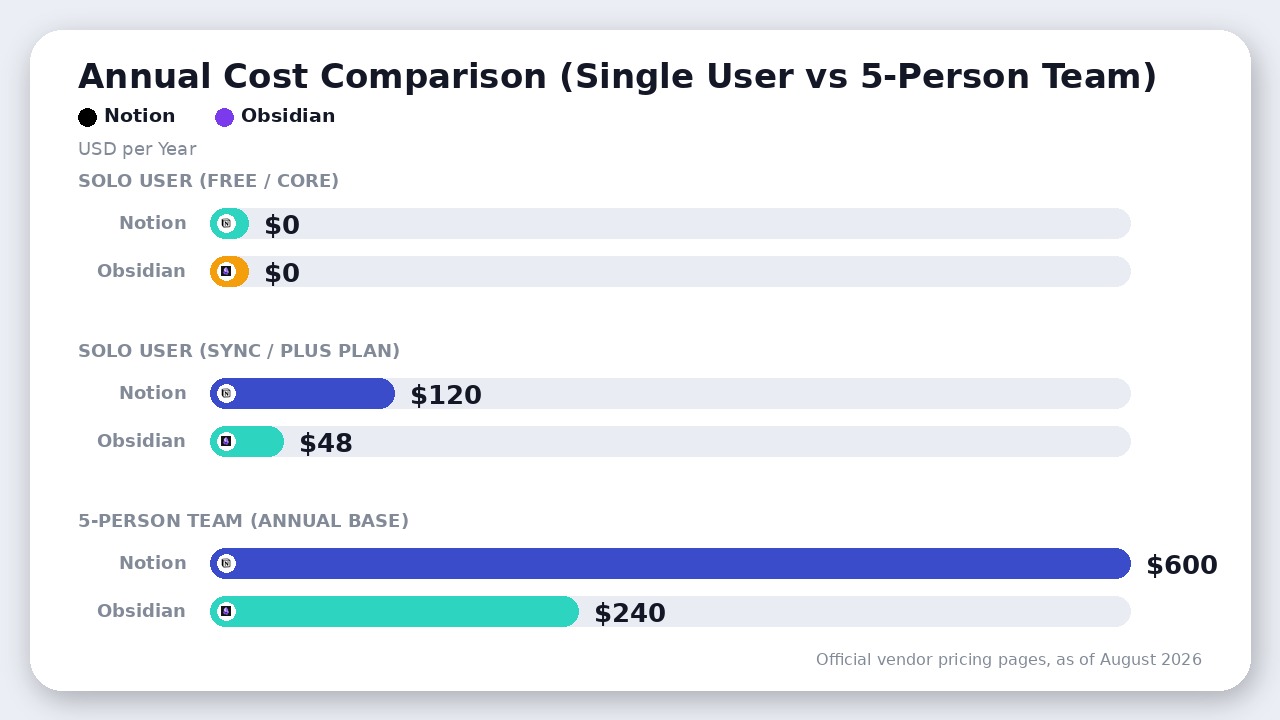
For a solo operator needing cross-device mobile sync, Obsidian Sync ($48/year) costs less than half of Notion Plus ($120/year). For a 5-person team, Notion Plus runs $600/year while delivering full multiplayer infrastructure that Obsidian cannot match even with paid add-ons.
Where Obsidian Actually Wins
If you judge software purely by team feature checklists, Notion wins every category. But for deep personal knowledge work, Obsidian holds massive, structural advantages:
- Bidirectional Thought Linking: Obsidian’s
[[wikilink]]syntax and unlinked mentions discover organic connections across thousands of notes. The dynamic Graph View visualizes clusters of ideas that standard hierarchical folders hide. - Zero-Latency Canvas: Obsidian Canvas lets you visually spread out markdown notes, PDFs, images, and live web pages on an infinite, locally rendered 2D board with zero browser lag.
- Community Plugin Ecosystem: With over 1,500 open-source community plugins (such as Tasks, Excalidraw, Omnisearch, and Local LLM connectors), you can tailor Obsidian into a hyper-customized IDE for thinking without waiting on a corporate product roadmap.
- End-to-End Encryption: When using Obsidian Sync, your notes are encrypted locally with AES-256 before leaving your machine. Obsidian staff cannot read your vault data under any circumstances. Notion retains cloud server decryption access unless an enterprise custom contract dictates otherwise.
The Verdict
This matchup comes down to operating systems vs. thinking environments:
- Choose Notion if you operate with a team or build relational workflows. The moment two people need to collaborate simultaneously on a sprint board, comment on product specs, or manage a multi-table CRM, Notion is worth every dollar of its per-seat subscription. Its database engine, automations, and polished multiplayer interface make it the gold standard for operational execution.
- Choose Obsidian if you are building an individual Second Brain. If your notes contain personal reflections, deep research, draft manuscripts, or proprietary code snippets, do not lock your intellectual property inside a proprietary cloud database. Obsidian gives you instant local search, total data privacy, infinite longevity, and complete control over your thinking tools.
Frequently asked questions
Can Obsidian replace Notion databases in 2026?
Partially. With the introduction of Obsidian Bases and community plugins like Dataview, Obsidian can display frontmatter metadata as interactive tables, lists, and cards. However, Notion still outclasses Obsidian for multi-database relations, rollups, visual timeline formulas, and collaborative team boards.
Is Obsidian completely free for commercial and business work?
Yes. Obsidian is free for personal, non-profit, and commercial use. While Obsidian offers an optional $50 per user per year commercial supporter license to fund development, purchasing it is no longer mandatory for enterprise employees.
Does Notion work completely offline now?
Notion supports offline viewing and editing, but it is not a true local-first app. Users must manually mark pages as Available offline (or rely on automatic caching of favorited and recent pages on paid plans), database offline rows are capped at 50, and sub-pages do not download automatically.
Can multiple people collaborate inside Obsidian in real time?
No. Obsidian is fundamentally a single-player, local-first editor. While teams can share vaults via Obsidian Sync or Git repositories, simultaneous edits on the same file lead to merge conflicts rather than live multiplayer cursor collaboration like Notion.
Final Recommendation
Notion wins as the superior operational engine for teams, projects, and structured relational data, while Obsidian remains the undisputed king of private, local-first personal knowledge management.

Leave a Reply