

Linear wins this matchup for most modern software development teams, but the reason isn’t just that it’s prettier or faster. The real battle between Linear vs Jira is a fundamental clash of architectural philosophies: local-first execution versus centralized enterprise governance.
For years, software teams accepted Jira fatigue as a cost of doing business. Today, fast-moving product organizations are opting for lightweight, developer-first tools like Cursor and Linear to eliminate administrative friction entirely. But choosing between them isn’t a simple matter of selecting the newer tool. If your organization relies on complex, cross-functional branching workflows, strict compliance audits, or integrated IT service desks, migrating to Linear will break your processes.
Here is the unfiltered truth about where these platforms diverge, the pricing traps buried in their documentation, and how to make the right choice for your team.
The 30-Second Answer
- Pick Linear if: You are a product-led engineering team (5 to 150 developers) that wants to move fast, hates configuration meetings, and values keyboard-driven, sub-50ms UI speed over custom workflows.
- Pick Jira if: You are a cross-functional enterprise, operate in a highly regulated industry (requiring custom transition rules and strict audit logs), or need a single tool to align engineering with HR, marketing, and customer support via Jira Service Management.
Linear vs Jira: At a Glance
| Dimension | Linear | Jira Cloud |
|---|---|---|
| UI Architecture | Local-first (SQLite in-browser), instant sync | Traditional cloud request-response |
| Interaction Latency | <50ms | 1.5s – 3s+ |
| Workflow Engine | Rigid, opinionated (Backlog, Todo, In Progress, Done) | Infinite custom states, branching, & transition rules |
| Ecosystem & Add-ons | Native integrations, clean API | Atlassian Marketplace (5,000+ apps) |
| Target Audience | Product & Engineering only | Cross-functional (Product, Marketing, HR, ITSM) |
| Free Tier | Unlimited users, 250 active issues max | Up to 10 users, 2 GB storage limit |
| Starting Price | $10/user/month (Billed annually, as of July 2026) | $7.91/user/month (Monthly list price, as of July 2026) |
1. The Architectural Gap: Local-First vs. Cloud Latency
Linear is not just fast for a web app. It is architected as a local-first application. When you load Linear, it syncs your workspace database directly into an in-browser SQLite database.
Every action you take—creating an issue, changing a status, filtering a backlog, or searching via the command palette (Cmd + K)—happens instantly on your local machine (<50ms interaction latency) and syncs to the cloud in the background. If your internet drops, Linear keeps working seamlessly.
Jira, by contrast, relies on a traditional cloud-based request-response model. Every click, transition, and page load triggers a round-trip network request to Atlassian’s servers.
According to user reports on Reddit and developer communities, loading a complex Jira board routinely takes 1.5 to 3 seconds. For an individual developer, a 2-second delay doesn’t sound like much. But across a team of 50 developers interacting with their issue tracker 30 times a day, assuming a 3-second page load latency and 20 working days a month, that latency translates to exactly 25 hours of wasted collective focus time every single month just waiting for pages to render.
2. The Workflow Paradox: Opinionated Defaults vs. Infinite Customization
This is where most teams miscalculate. They assume Jira’s complexity is a bug. In reality, it is Jira’s defining enterprise feature.
Linear’s Rigid Guardrails
Linear has a strictly opinionated data model. You cannot customize issue states beyond its basic categories: Backlog, Todo, In Progress, Done, and Canceled. You cannot build branching transition logic. A bug must follow the exact same state progression as a feature. Sprints (called Cycles) are strictly time-boxed, and when a cycle ends, unfinished issues are automatically rolled over or sent back to the backlog.
For a startup or mid-market engineering team, this rigidity is a massive blessing. It completely eliminates process bikeshedding—the hours spent debating whether an issue should go to Ready for QA or In Review.
Jira’s Infinite Flexibility
Jira allows you to build highly complex, custom workflow schemes. You can define per-project workflows with strict transition rules: for example, a bug can transition from Triage to Won’t Fix without passing through In Progress, but a user story cannot. You can enforce mandatory fields at specific transitions, require manager approvals, and tie transitions to external security scanning tools.
If you work in a regulated industry (like healthcare, finance, or aerospace) where every code change must map to a documented QA sign-off and an immutable audit trail, Linear’s lack of custom transition rules makes it a non-starter. Jira is built exactly for this level of compliance.
3. The Pricing Traps: Atlassian’s Flat Tiers vs. Linear’s Annual Lock
When comparing the sticker prices, Jira appears cheaper, but both vendors hide structural mechanisms that can drastically alter your actual bill.
The Atlassian Marketplace Trap
Jira Standard starts at $7.91/user/month (monthly billing) or $6.52/user/month (annual billing) as of July 2026. However, vanilla Jira lacks advanced features like test case management, resource timesheets, or complex Gantt charts. To get these, teams turn to the Atlassian Marketplace.
Here is the trap: Marketplace apps charge for your entire Jira user tier, not just the users using the app. If you have 100 users on Jira, and you install a test-management app like Zephyr Scale for your 5 QA engineers, you must pay for 100 seats of Zephyr. This licensing model can easily double or triple your monthly Atlassian bill.
Jira’s Flat Annual Tiers vs. Monthly MQB
If you pay monthly, Jira charges you based on Maximum Quantity Billing (MQB). This means your monthly bill is calculated using the highest number of seats assigned at any point during that billing cycle. If you add 10 contractors for a 3-day project and then deactivate them, you pay for those 10 seats for the entire month.
If you switch to Jira’s annual billing, you are forced into flat, rigid user tiers. As of July 2026, Atlassian’s official pricing page lists the following flat annual rates for Jira Standard:
* 1 – 10 Users: $900/year
* 11 – 15 Users: $1,350/year
* 16 – 25 Users: $2,250/year
* 26 – 50 Users: $4,550/year
* 51 – 100 Users: $9,050/year
If you have 26 users, you are forced to pay the flat 50-user price of $4,550/year, making your effective rate $14.58/user/month—nearly double the advertised $7.91 starter rate.
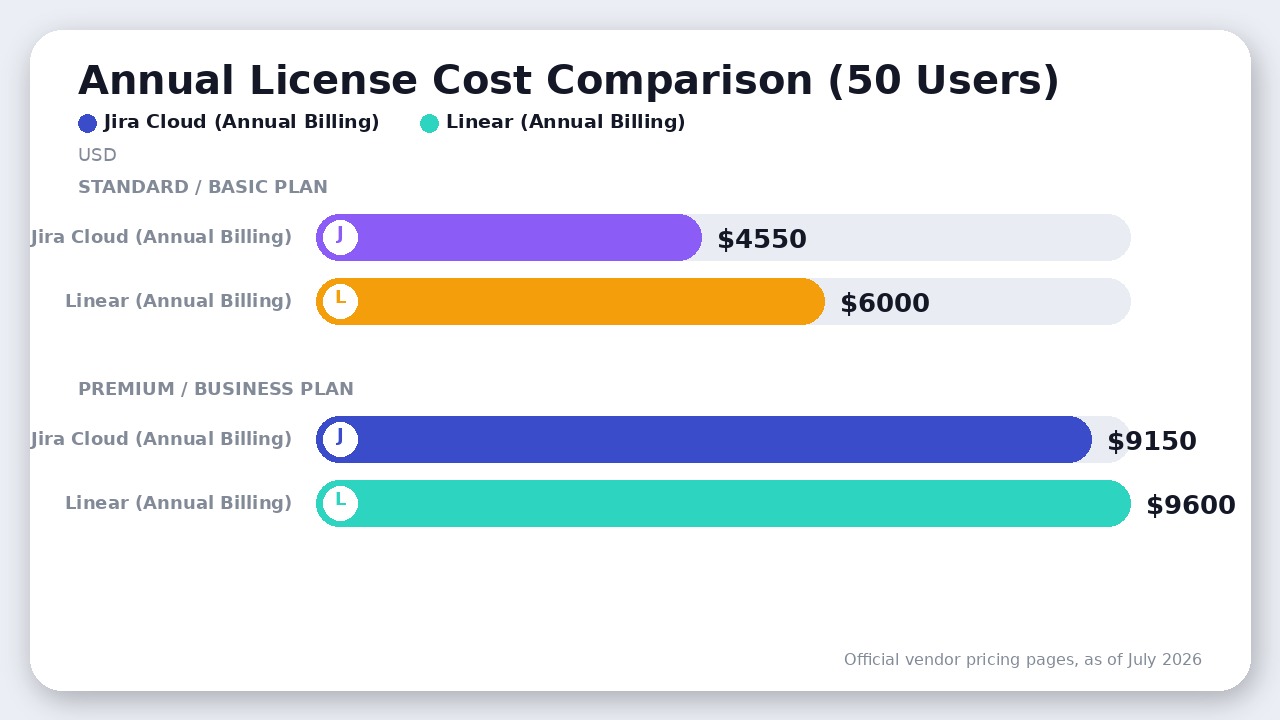
For a team of exactly 50 users, this annual tier model means you will pay a flat $4,550/year for Jira Standard or $9,150/year for Jira Premium (as of July 2026). By comparison, Linear’s annual billing for 50 users scales linearly to $6,000/year on the Basic plan ($10/user/month) and $9,600/year on the Business plan ($16/user/month) as of July 2026.
Linear’s Annual Lock and AI Credit Upsells
Linear’s pricing is highly transparent: Free ($0), Basic ($10/user/month billed annually), and Business ($16/user/month billed annually) as of July 2026.
However, Linear’s paid plans are heavily optimized for annual commitments. While monthly billing is supported, Linear does not publicly publish its monthly rates on its main pricing page, steering teams hard toward the annual contract.
Furthermore, if you want to use Linear’s advanced AI features (like Triage Intelligence, automatic duplicate detection, or loops), you must purchase additional AI Credits as an optional monthly add-on, which is not bundled into the base seat cost.
4. Where Jira Actually Wins: Cross-Functional Governance
Linear is built for product and engineering. It is a hostile environment for non-technical teams. It doesn’t support marketing campaign calendars, HR onboarding checklists, or sales pipelines natively. Its data model is strictly optimized for software issues.
Jira is a company-wide operating system. Because Atlassian consolidated Jira Software, Jira Work Management, and Jira Core into a unified Jira platform, a single instance can serve your entire organization.
- ITSM Integration: If your company uses Jira Service Management for IT helpdesk tickets, those tickets can link directly to engineering bugs in Jira Software.
- Enterprise Portfolio Management: Jira Premium ($14.54/user/month monthly, as of July 2026) includes Advanced Roadmaps, allowing program managers to track dependencies, capacity, and progress across dozens of different teams and projects simultaneously.
- The Wiki Advantage: Jira integrates natively with Confluence. Linear has no built-in wiki, meaning you will likely need to pay for a separate knowledge management tool like Notion ($8-$10/user/month as of July 2026), which adds to your total software stack cost.
The Verdict
Linear vs Jira
For 90% of pure software startups and scale-ups (under 150 developers), Linear is the winner. It is built for developer velocity. It gets out of the way, runs at sub-50ms speeds, and enforces clean, simple agile workflows that save teams from endless administrative overhead. If your bottleneck is engineering execution, buy Linear.
Jira remains the winner for enterprise scale and cross-functional alignment. If you are a heavily regulated organization (requiring custom workflow transition rules and strict compliance audits), have a dedicated project management office (PMO) running complex portfolio-level reporting, or need a unified platform that connects engineering directly to IT Service Management and business teams, you must choose Jira. Just budget for the Marketplace add-on costs and the administrative overhead required to keep it running smoothly.
Final Recommendation
Linear wins hands-down for software development teams prioritizing velocity, keyboard-first execution, and zero administrative overhead. Jira remains the necessity for cross-functional enterprises requiring complex custom workflows, compliance auditing, and integrated service desks.

Leave a Reply