

Notion vs Superhuman Docs is the matchup that defines modern team productivity in 2026. For years, this was the classic “Notion vs Coda” debate—a battle between a beautiful, document-first wiki and a powerful, database-first app builder. But on July 8, 2026, the landscape shifted permanently when Coda officially rebranded as Superhuman Docs following its acquisition by Grammarly’s parent company (now renamed Superhuman).
This isn’t just a cosmetic paint job. The rebrand has turned Superhuman Docs into a core pillar of a full-stack AI productivity suite that bundles writing assistance, elite email, and relational documents. Meanwhile, Notion has spent the last year doubling down on its own AI ecosystem, forcing users into higher pricing tiers to access its advanced AI agents.
If you are trying to decide which platform should host your team’s workspace, the decision is no longer about which editor you prefer. It is about your team’s structure, your database requirements, and how you want to pay for AI. Here is the unfiltered truth about how they stack up.
The 30-Second Answer
- Pick Notion if: You need a fast, intuitive team wiki, a clean note-taking environment, and straightforward project tracking. It is the superior platform for writing-first teams who want a centralized “second brain” that is easy for non-technical employees to adopt.
- Pick Superhuman Docs if: You are building interactive internal tools, complex database trackers, or automated workflows. It is also the obvious choice if you want to leverage the Superhuman Suite bundle to get world-class email (Superhuman Mail) and writing assistance (Grammarly) under a single subscription.
The Comparison Matrix
| Dimension | Notion | Superhuman Docs |
|---|---|---|
| Best For | Wikis, knowledge bases, simple PM | Operational dashboards, custom app-docs |
| Core Philosophy | Document-first, structured hierarchy | Spreadsheet-first, programmable canvas |
| Billing Model | Per-Seat (every member pays) | Maker Billing (only doc creators pay) |
| Pro Tier Price | $10/member/month (annual, as of July 2026) | $12/Doc Maker/month (annual, as of July 2026) |
| Business Tier Price | $20/member/month (annual, as of July 2026) | $33/Doc Maker/month (annual, as of July 2026) |
| AI Integration | Bundled in Business ($20/seat, as of July 2026) | Bundled in Pro ($12) & Business ($33) (as of July 2026) |
| Integrations | Basic (native + REST API) | Elite (600+ Packs + Claude/ChatGPT MCP) |
| Offline Mode | Yes (desktop/mobile apps) | Limited (browser-first) |
| Pricing and features verified as of July 2026. |
Notion vs Superhuman Docs: Maker Billing vs. Per-Seat Billing
The single biggest mistake teams make when comparing Notion vs Superhuman Docs is looking at the list prices ($10 vs. $12, or $20 vs. $33) and assuming Notion is cheaper. It usually isn’t.
Notion bills on a traditional per-member model. If you invite someone to your workspace as a member, they require a paid seat. On the Business plan (which you need for full AI features), that is $20 per user per month (billed annually, as of July 2026). If you have a 10-person team, your bill is exactly $200 per month, regardless of whether all 10 are actively designing pages or just reading them.
Superhuman Docs uses Maker Billing. You only pay for Doc Makers—the administrators and power users who design the structure of the docs, build the databases, and write the automations. Editors and viewers who edit text inside tables, add rows, and read pages are completely free.
Let’s look at the math for a 10-person team under three different scenarios:
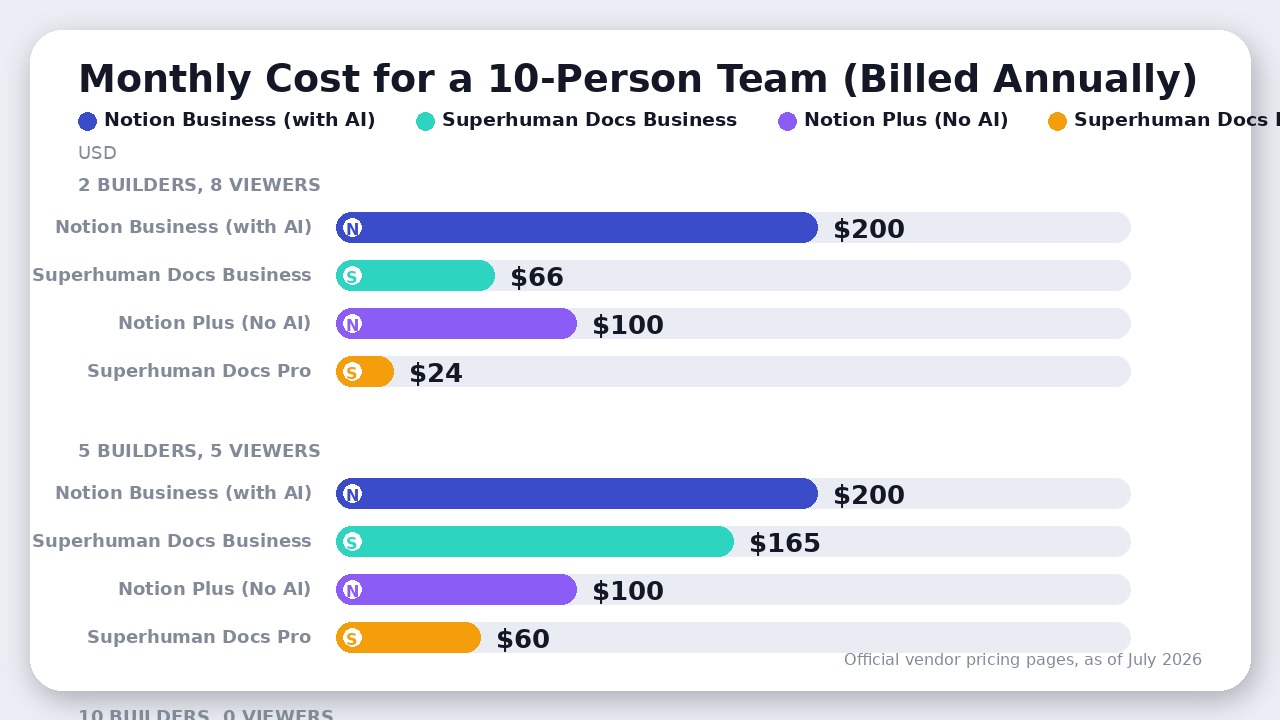
If your team has 2 power users who build the workspace and 8 team members who simply use it to update tasks and read docs, Superhuman Docs Business costs just $66 per month (2 makers x $33, as of July 2026). Notion Business for the same team costs $200 per month (10 seats x $20, as of July 2026).
However, if your culture is flat and all 10 employees need the permission to create new standalone documents from scratch, the math flips. Superhuman Docs Business would cost $330 per month (10 makers x $33, as of July 2026), while Notion Business remains $200 per month (as of July 2026).
The takeaway: If you have a clear division of labor between “builders” and “consumers,” Superhuman Docs will save you thousands of dollars. If everyone is a builder, Notion is the more economical choice.
AI Capabilities: Notion’s Forced Bundle vs. Superhuman’s Full-Stack Suite
Both platforms have made aggressive AI moves, but their packaging could not be more different.
Notion’s AI Strategy: The $20 Gate
In May 2025, Notion retired its standalone $10/user/month AI add-on for new customers. If you want the full power of Notion AI—including Notion Agent, AI search, and AI Meeting Notes—you are forced to upgrade to the Business plan at $20/member/month (as of July 2026).
Furthermore, Notion’s autonomous Custom Agents now operate on a credit system. After a small trial allocation, heavy agent usage will cost you an additional $10 per 1,000 monthly credits (as of July 2026). This means if your team relies heavily on AI agents to automate database updates, your monthly bill will have a variable, usage-based line item that is difficult to budget for.
Superhuman Docs’ AI Strategy: The Ultimate Bundle
Superhuman Docs has taken a completely different path by absorbing Coda’s database logic and wrapping it in Grammarly’s AI engine.
On the Pro plan ($12/Doc Maker/month, as of July 2026), you get unlimited doc size, Docs AI, and full integration with Grammarly and Superhuman Go (the context-aware writing and workflow assistants).
On the Business plan ($33/Doc Maker/month, as of July 2026), the value proposition becomes almost absurd. Your paid Doc Maker seats include:
1. Superhuman Docs: The full relational document and database engine.
2. Superhuman Mail: The elite, ultra-fast email client that normally costs $30/user/month on its own.
3. Grammarly Pro: The gold standard for AI-assisted writing and brand-voice enforcement.
4. Superhuman Go: The cross-app AI agent that can draft emails, schedule meetings, and summarize docs.
If your builders are already paying for separate email clients, writing assistants, and document tools, consolidating them into the Superhuman Suite is an immediate cost-cutter.
Additionally, Superhuman Docs has leapfrogged Notion in developer-facing AI by launching the Superhuman Docs MCP (Model Context Protocol). This allows you to connect your docs directly to external AI clients like Claude, ChatGPT, or Cursor. You can prompt Claude to read a table in Superhuman Docs, perform an analysis, and write the output back to the doc—all without leaving your IDE or chat window. It makes your docs behave like an external database for your favorite LLM.
Where Superhuman Docs Actually Wins: The Programmable Document
If you need your document to act like a custom application, Notion cannot compete with Superhuman Docs.
- Advanced Databases and Formulas: Notion’s databases are essentially glorified tables with basic filters, relations, and rollups. Superhuman Docs features a true, multi-dimensional relational database engine. You can write incredibly complex formulas that reference data across totally different tables, build conditional visual layouts, and use ‘canvas formulas’ to drop live data calculations directly into your text blocks.
- Interactive Buttons and Automations: You can build physical buttons inside Superhuman Docs that trigger sequences of events—like sending a Slack message, updating a row status, and generating a PDF invoice simultaneously. Its native automation builder runs background tasks on schedules or row triggers without needing third-party tools like Zapier or Make.
- The Packs Ecosystem: Superhuman Docs features over 600 ‘Packs’—deep, native integrations that allow your docs to two-way sync with external tools like Jira, GitHub, Figma, Salesforce, and HubSpot. You can pull live Jira issues into a table, edit them inside the doc, and have those changes automatically push back to Jira.
- Native Forms: Gathering data is seamless. Superhuman Docs has built-in form builders that feed directly into your database tables. Notion only recently introduced basic custom forms.
Where Notion Actually Wins: The Frictionless Workspace
While Superhuman Docs is technically more powerful, it is also significantly heavier. Notion wins on the day-to-day user experience.
- Frictionless Note-Taking and Writing: Notion is built for writing. The editor is incredibly fast, responsive, and supports seamless markdown shortcuts. Superhuman Docs (even after the 2026 rebrand) still suffers from performance lag in documents that contain thousands of rows or heavy lookup formulas. If you just want to open a page and start typing meeting notes, Notion feels instant; Superhuman Docs can feel like loading a heavy web app.
- Intuitive Wiki Hierarchy: Notion’s nested sidebar navigation is the gold standard for knowledge management. You can drag and drop pages inside pages infinitely, creating an intuitive folderless hierarchy that anyone can navigate. Superhuman Docs uses a more rigid structure of Workspaces, Folders, Docs, and Pages, which can feel clunky for a company-wide wiki.
- Superior Mobile and Desktop Apps: Notion’s native desktop and mobile applications are highly refined, fast, and support robust offline editing. Superhuman Docs’ mobile app has historically been a weak point. While the new 2026 mobile app is an improvement, customizing doc structures or managing complex tables on a phone remains highly frustrating.
- Ecosystem and Templates: Notion has a massive global community. If you need a template for a specific workflow, there are over 30,000 community-built options available. Superhuman Docs has a much smaller template library, meaning you will often have to build your custom trackers from scratch.
The Verdict
The choice between Notion vs Superhuman Docs comes down to what you are actually building.
Choose Notion if your primary goal is knowledge management, team alignment, and document collaboration. If you need a company wiki, a fast meeting-notes repository, and lightweight project tracking that your least technical team member can use on day one, Notion is the undisputed winner. Just be prepared to pay the $20/member/month Business tier if your team wants to leverage its built-in AI agents.
Choose Superhuman Docs if you want to build custom internal tools, interactive databases, and automated workflows. If your team is operations-heavy and needs a workspace that acts like a custom software application, Superhuman Docs is far superior. Furthermore, if you can take advantage of the Maker Billing model and want to consolidate your email (Superhuman Mail) and writing (Grammarly) into a single, highly integrated AI suite, it represents the best value on the market today.
FAQ
Can I still access my old Coda documents?
Yes. All existing Coda documents have been automatically migrated to Superhuman Docs (docs.superhuman.com) with no loss of data or functionality.
Does Notion work offline?
Yes. Notion has robust offline support on its desktop and mobile apps, allowing you to edit pages that will sync once you reconnect. Superhuman Docs has highly limited offline capabilities and is designed as a browser-first, online-always tool.
Can I use external AI models with Superhuman Docs?
Yes. With the launch of the Superhuman Docs MCP (Model Context Protocol), you can connect your docs directly to external AI clients like Anthropic’s Claude or OpenAI’s ChatGPT to read and write data.
Final Recommendation
Notion wins for knowledge management and frictionless wikis, but Superhuman Docs is the superior choice for operations-heavy teams building complex relational databases.

Leave a Reply