

Canva wins this matchup for roughly 85% of marketing teams, solo founders, and content creators, but the reason is rarely the one featured on software review sites. This is not a contest about which platform has the smarter AI model or the prettier landing page. It is an operational question: which tool allows a non-designer to produce a high-converting carousel, slide deck, or product graphic in under six minutes without wanting to tear their hair out?
Canva remains the unmatched king of frictionless layout. Its editor responds instantly, its template ecosystem reflects current cultural trends, and its third-party app marketplace makes routine media tasks effortless. However, Adobe Express is no longer the clunky, half-baked Adobe Spark rebrand it used to be. If your company is already paying for Adobe Creative Cloud or demands enterprise-grade copyright indemnification for generated images, choosing Canva is a financial and legal mistake.
Here is the unfiltered breakdown of where each tool wins, where both try to lock you in, and how to make the right call.
The 30-Second Answer
- Pick Canva if: You want the fastest path from a blank screen to a finished asset, you rely heavily on presentation decks, whiteboards, or video templates, and you do not want your marketing staff wrestling with complex layer hierarchies.
- Pick Adobe Express if: Your organization already pays for Adobe Photoshop, Illustrator, or InDesign (which gives you Express Premium for free), you need direct sync with linked Creative Cloud libraries, or your legal department mandates commercially safe generative AI trained exclusively on licensed stock.
Canva vs Adobe Express: Feature & Pricing Comparison
| Comparison Dimension | Canva | Adobe Express | Winner |
|---|---|---|---|
| Solo Plan Price (as of August 2026) | $15/mo ($120/yr billed annually) | $9.99/mo ($99.99/yr billed annually) | Adobe Express |
| Team Plan Price (as of August 2026) | Canva Business: $25/user/mo ($250/user/yr) | Adobe Express Teams: ~$4.99–$7.99/user/mo | Adobe Express |
| Free Plan Allowance | 5GB storage, 1.6M+ free templates | 5GB storage, 100k+ templates, 25 AI credits/mo | Canva |
| Stock Library Size | 100M+ photos, videos, graphics, audio tracks | 200M+ Adobe Stock photos, videos, & 20k+ Adobe Fonts | Adobe Express |
| Generative AI Engine | Magic Studio (Leonardo.Ai + third-party model mix) | Adobe Firefly (Commercially safe, licensed data) | Adobe Express |
| Creative Cloud Interop | Read-only imports, manual SVG uploads | Live linked PSD/AI assets via CC Libraries | Adobe Express |
| Template Diversity & Breadth | Industry-standard; huge creator marketplace | Clean but smaller; heavily corporate-focused | Canva |
| App Ecosystem & Plugins | 100+ native integrations (Runway, D-ID, Typecraft) | Growing add-on ecosystem; still comparatively sparse | Canva |
| Multi-Page Layout & Docs | Canva Docs, Whiteboards, Presentations, Sites | Multi-page graphics, Web pages, basic slides | Canva |
1. Pricing and the Team Seat Trap
The financial dynamic between these two tools shifted radically when Canva transitioned away from its legacy flat-rate team plans.
Historically, Canva allowed up to five users on a shared plan for around $120 to $150 per year. Under Canva’s current packaging, new teams must subscribe to Canva Business, which costs $25 per user per month (or $250 per user per year on annual billing). For a team of five content creators, your annual software expense jumps from $120 to $1,250 per year. If heavy generative AI usage is central to your workflow, Canva also sells a separate $100/user/month AI Pass add-on to lift rate limits.
Adobe Express attacks this exact budget pressure. As of August 2026:
* Adobe Express Premium costs $9.99 per month or $99.99 per year for solo creators.
* Adobe Express for Teams runs at an introductory rate of $4.99 per seat per month (regular list price $7.99 per seat per month, with a 2-seat minimum), billed annually at approximately $49.99 to $95.88 per user per year.
* Crucially, if anyone on your marketing or design team already has an individual paid license for Adobe Photoshop, Illustrator, InDesign, or the full Creative Cloud All Apps suite, they already have Adobe Express Premium included at $0 additional cost.
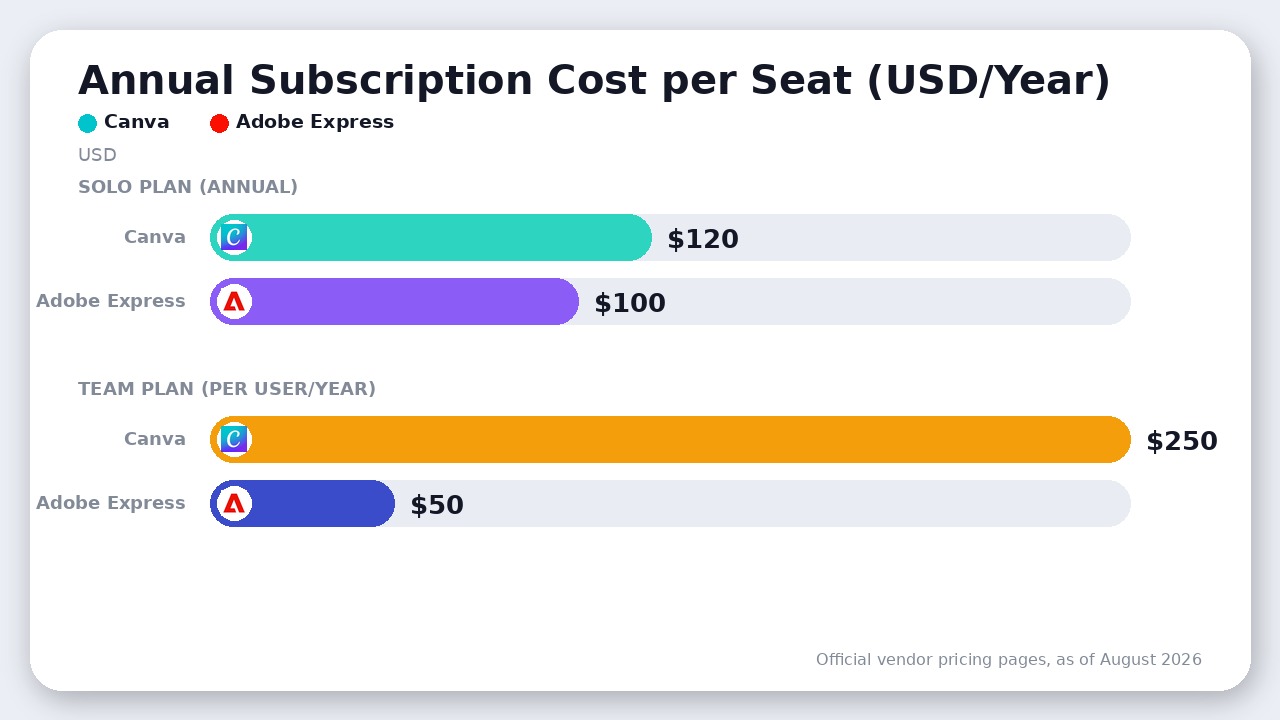
For an agency or scaling startup putting 10 non-designers on a platform to build social ads and banners, Adobe Express Teams costs between $500 and $960 per year, whereas Canva Business runs $2,500 per year. If cost per seat is your board’s primary KPI, Adobe Express takes the round decisively.
2. Usability and the Real Cost of Friction
Where Adobe Express gives you pricing savings, Canva takes it back in pure operational velocity.
The hardest truth for Adobe’s product team is that Canva is simply easier to use. Canva’s canvas interactions are predictable:
1. Dragging an image over a frame or canvas boundary snaps and clips it instantly.
2. Selecting all text elements and swapping brand hex codes or typography happens across an entire 40-slide deck in two clicks.
3. The left-hand sidebar exposes stock media, elements, audio, personal uploads, and third-party tools in a clean, zero-lag hierarchy.
Adobe Express has made massive strides with its unified editor, but users regularly encounter minor layout friction: awkward layer grouping, sluggish multi-page rendering on asset-heavy projects, and color swatches that require manual pasting across elements instead of global document updates.
When you hand a tool to an executive assistant, a junior copywriter, or a field sales rep to build a client-facing PDF, Canva generates a finished product with zero training. Adobe Express still occasionally feels like a pro-grade desktop app forced into a web browser shell.
3. Generative AI: Firefly vs Canva Magic Studio
Both platforms market generative AI aggressively, but their technical architectures serve completely different masters.
Generative AI Philosophy:
┌────────────────────────────────────────────────────────┐
│ Adobe Firefly (Express): │
│ Trained exclusively on licensed Adobe Stock + public │
│ domain data → 100% Commercial Indemnification for Org │
└────────────────────────────────────────────────────────┘
vs
┌────────────────────────────────────────────────────────┐
│ Canva Magic Studio: │
│ Multi-engine approach (Leonardo.Ai + third-party APIs) │
│ → Faster creative variance, but higher IP scrutiny │
└────────────────────────────────────────────────────────┘
Adobe Firefly (The Enterprise Standard)
Adobe Express relies natively on Adobe Firefly. Firefly’s core selling point is not just its rendering quality; it is commercial safety. Because Adobe trains Firefly exclusively on Adobe Stock images, openly licensed work, and expired copyright material, enterprise customers receive intellectual property indemnification. Firefly’s Generative Fill, Text-to-Template, and Text-to-Image tools avoid outputting trademarked character artifacts or copyrighted stylistic clones. Premium accounts receive 250 generative credits per month that renew automatically.
Canva Magic Studio (The Creative Sandbox)
Canva acquired generative AI platform Leonardo.Ai to reinforce its proprietary Magic Studio suite. Canva’s AI toolset includes Magic Expand, Magic Grab (which isolates foreground subjects from flattened photographs), Magic Switch (translating text and morphing dimensions simultaneously), and Magic Write.
Canva’s AI outputs often feel more diverse and visually exciting for social media creators because Canva is less restrictive with its underlying models. However, for corporate brands with strict compliance officers, Canva’s AI lacks the airtight copyright provenance that Adobe provides out of the box.
4. Ecosystem & Professional Workflows
If your company employs full-time graphic designers who work inside dedicated UI/UX or vector suites—like those we analyzed in our Figma vs Penpot breakdown—the integration dynamic matters more than any template count.
Adobe Express connects directly into Creative Cloud Libraries. A senior designer can create vector brand assets, custom iconography, or complex character cutouts in Adobe Illustrator or Photoshop. When saved to a shared library, those assets appear instantly in Adobe Express for marketing managers to use.
Even better: these links are live. If the lead designer tweaks a brand logo in Illustrator, that update propagates across every banner project in Adobe Express without anyone manually re-uploading files. Express also features native Adobe Acrobat PDF technology, allowing you to edit text inside existing PDFs or export print-ready, high-resolution CMYK vector PDFs without rasterization artifacts.
Canva approaches ecosystem value from the opposite end: third-party breadth. Canva’s App Marketplace lets you plug in D-ID for AI talking heads, Runway for video effects, Typecraft for warped vector lettering, and direct integrations with HubSpot, Mailchimp, and Google Drive. For a business that operates purely in the cloud without Adobe desktop software, Canva is a self-contained operating system.
Where Adobe Express Actually Wins
To evaluate this matchup honestly, you must recognize the concrete areas where Adobe Express genuinely beats Canva:
- The Creative Cloud Freebie: If your company already subscribes to Adobe Creative Cloud (whether single app or All Apps), Express Premium is already fully paid for. Paying Canva $120 to $250 per seat on top of your Adobe bill is redundant software sprawl.
- Typography Quality: Adobe Express includes access to over 20,000 Adobe Fonts with full licensing for commercial use, outclassing Canva’s standard font library.
- Multi-format PDF Handling: Adobe Express leverages native Acrobat engines. It can import complex multipage PDFs, preserve layer fidelity, edit raw vector text, and export unflattened print proofs far cleaner than Canva’s PDF importer.
- Budget Multi-Seat Scaling: Canva Business at $250/user/year gets expensive quickly for teams of 5 to 20 people. Adobe Express Teams delivers shared brand governance at a fraction of the cost.
Frequently Asked Questions
Can Adobe Express open Canva files directly?
No. There is no native .canva file format converter inside Adobe Express. You must export your Canva assets as SVGs, layered PDFs, or high-resolution PNGs and re-import them into Adobe Express.
Does Canva or Adobe Express have better video editing?
Canva has a superior video editing workflow for social content (TikTok, Reels, YouTube Shorts). Its magnetic audio-syncing, timeline snapping, and subtitle generation feel noticeably more responsive than Adobe Express’s video timeline, which can lag on longer clips.
Is the free version of Canva better than Adobe Express Free?
Yes. While both offer 5GB of cloud storage, Canva Free provides access to a much wider array of usable modern templates and intuitive graphic elements. Adobe Express Free restricts many of its best stock elements behind the Premium paywall.
The Verdict
Canva wins this matchup for most teams.
                 WHICH DESIGN TOOL SHOULD YOU CHOOSE?
                                  │
               Does your team already pay for Adobe CC
               or require 100% indemnified AI assets?
                                 ╱ ╲
                               YES  NO
                               ╱     ╲
                 ┌────────────────┐   ┌──────────────────────┐
                 │ ADOBE EXPRESS  │   │        CANVA         │
                 │ • Free via CC  │   │ • Superior UX speed  │
                 │ • Firefly safe │   │ • Trendier templates │
                 │ • Linked PSD/AI│   │ • Huge App ecosystem │
                 └────────────────┘   └──────────────────────┘
The reason is simple: software exists to eliminate bottlenecks. Canva’s massive template catalog, fluid drag-and-drop editor, multi-page document versatility, and vibrant third-party plugin ecosystem empower non-designers to produce polished marketing collateral with zero friction. The time your team saves by not fighting clunky UI quirks easily justifies Canva Pro’s $120 annual fee.
The one condition that flips the verdict: If your business is already invested in Adobe Creative Cloud, or if you manage a 10+ person marketing team on a strict budget, stop paying Canva’s steep per-seat Business fees. Adobe Express gives you 80% of Canva’s capability, direct bidirectional Photoshop/Illustrator sync, and commercially indemnified Firefly AI at a fraction of the total cost of ownership.
Final Recommendation
Canva wins for the vast majority of marketers, solopreneurs, and content creators thanks to superior templates, intuitive workflows, and a mature app ecosystem. Adobe Express is the smarter pick only if your team already pays for Creative Cloud or requires commercially indemnified Firefly AI assets.

Leave a Reply