

Figma has long been the undisputed default for interface design, but its aggressive seat-pricing restructuring has left design managers and engineering leads evaluating alternatives. In the debate over Figma vs Penpot, teams are no longer just choosing software—they are choosing between proprietary design abstractions and open web standards.
Figma remains the single best UI design platform for dedicated product design teams that require deep prototyping, massive component libraries, and mature ecosystem integrations. However, Penpot is the far smarter choice for developer-led engineering teams, open-source projects, and organizations looking to escape per-seat price hikes while retaining full data sovereignty.
The Unfiltered Verdict: Choose Figma if your core team consists of professional product designers who rely on complex component variants, interactive prototyping triggers, and industry-standard design systems. Choose Penpot if you are an engineering-driven team, require self-hosted compliance under strict data NDAs, or want code-native CSS Grid layouts without paying $16 to $90 per seat every month (as of August 2026).
The 30-Second Answer
- Pick Figma if: You need advanced prototyping logic, complex variant state management, access to thousands of community plugins, and an interface that every product designer already knows how to use instantly.
- Pick Penpot if: You want a 100% open-source tool (MPL-2.0 license), need native CSS Grid and Flexbox layout engines, plan to self-host design infrastructure, or want to onboard unlimited non-designer team members without seat charges.
Figma vs Penpot: Head-to-Head Comparison
| Feature / Dimension | Figma | Penpot |
|---|---|---|
| Core Engine | Proprietary Canvas (Vector/Auto Layout abstraction) | Web-Native (SVG native + CSS Grid & Flexbox) |
| Free Tier | 1 project per team, 3 design files & 3 FigJam files | Up to 8 active editors, 10GB storage, unlimited files |
| Entry Paid Plan | $16/full seat/mo (Professional, annual) | $7/editor/mo (Cloud Unlimited, capped at $175/mo total) |
| Enterprise Seat Pricing | $55/mo (Org) or $90/mo (Enterprise) per full seat | $950/mo flat rate self-hosted Enterprise (unlimited seats) |
| Self-Hosting Options | None (SaaS only) | Fully self-hostable via Docker / Open Source (MPL-2.0) |
| Dev Handoff & Inspection | Dev Mode seat ($12–$35/mo per developer) | Built-in Inspect Mode ($0 / included in all tiers) |
| Component Logic | Advanced Component Properties & Boolean toggles | Component Sets & Variants (manual permutations for subcomponents) |
Pricing and limits verified from official vendor documentation as of August 2026.
Figma vs Penpot: The Core Differences That Matter
1. Layout Engine: Auto Layout Abstraction vs. Native CSS Grid
Figma and Penpot take fundamentally different approaches to interface geometry. Figma relies on Auto Layout, a visual abstraction that mimics flexbox mechanics. While intuitive for visual designers, Auto Layout is still an approximation layer. When developers inspect Figma files, the generated code often requires translation to match clean CSS responsive rules.
Penpot is built directly on web standards (SVG, HTML, and CSS). Its layout engine gives designers native CSS Flexbox and CSS Grid controls right inside the editor canvas. When a designer creates a 12-column responsive layout in Penpot, they are configuring true CSS Grid properties rather than artificial padding rules. For engineering-heavy teams, this eliminates handoff translation friction: the design canvas is the CSS layout model.
However, this introduces a learning curve for pure visual designers. Designers accustomed to Figma’s spatial auto-layout controls may find configuring CSS Grid tracks in Penpot less fluid until they understand CSS layout principles.
2. The Pricing Structure: Seat Taxes vs. Price-Capped Open Source
Pricing structure is where the gap between these platforms turns into a chasm.
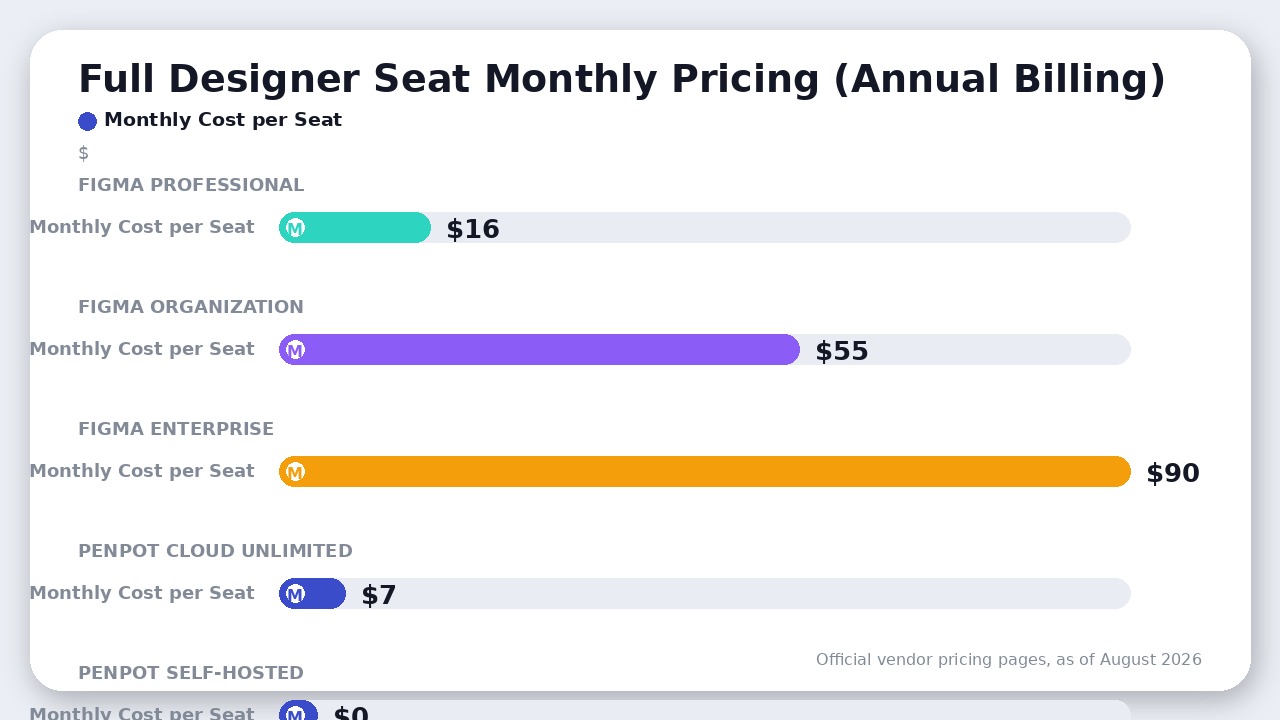
According to Figma’s official documentation as of August 2026, Figma shifted to role-based seats across four tiers (Starter, Professional, Organization, and Enterprise):
* Full Seats (for designers creating and editing files) cost $16/user/month on Professional ($20/mo billed monthly), $55/user/month on Organization, and $90/user/month on Enterprise (billed annually).
* Dev Seats (for engineers inspecting specs) cost $12 to $35/user/month depending on the plan tier ($12/mo Pro, $25/mo Org, $35/mo Enterprise).
* Collab Seats cost $3 to $5/user/month ($3/mo Pro, $5/mo Org and Enterprise).
Furthermore, Figma’s Starter free plan restricts teams to 1 project containing up to 3 Figma design files and 3 FigJam files per team, forcing growing organizations into paid upgrades quickly.
Penpot disrupts this model entirely (as of August 2026):
* Cloud Free Tier: Allows up to 8 active editors, 10GB cloud storage, and unlimited files with all core vector and layout features unlocked.
* Cloud Unlimited Tier: Costs $7/editor/month, but includes a hard monthly bill cap of $175/month total regardless of how many editors join your cloud team.
* Self-Hosted Open Source: $0 software fee under the Mozilla Public License 2.0 (MPL-2.0). Organizations pay only for their server infrastructure (typically $5 to $20/month on a cloud VPS).
* Self-Hosted Enterprise: Offers flat enterprise rates starting at $950/month, providing dedicated support, SAML SSO, SOC2/HIPAA compliance options, and air-gapped deployments with zero per-seat scaling costs.
If you are evaluating web builders for direct deployment rather than app interface prototyping, tools like those reviewed in our Webflow vs Framer matchup offer publishing capabilities, but for pure product design software, Penpot’s flat-fee structure saves mid-market engineering teams thousands of dollars annually.
3. Developer Handoff: Paid Dev Mode vs. Open Inspect
In Figma, inspecting designs for production implementation requires a dedicated Dev Mode seat (costing $12 to $35/mo per developer) or a Full seat. While Dev Mode offers code snippets, design system tracking, and VS Code extension integration, charging $12 to $35 per developer per month to view design specs creates organizational friction.
Penpot includes native Inspect Mode across every tier at no extra cost. Developers can click on any canvas element to view exact CSS properties, export SVG assets, and inspect component tokens without requiring a paid editor seat. Because Penpot files are native SVG structures under the hood, exported code is unusually clean and predictable.
Where Penpot Actually Wins
While Figma dominates enterprise market share, Penpot holds decisive advantages in key operational scenarios:
- Data Sovereignty & Air-Gapped Deployments: Organizations operating under strict regulatory compliance (healthcare, finance, defense) can self-host Penpot inside private networks. Design IP never touches third-party cloud servers.
- Zero Vendor Lock-In: Penpot uses open standards. Design files are stored in open formats rather than proprietary binary clouds. If Penpot ever changes its business model, your data remains accessible via open-source code.
- Capped SaaS & Flat Enterprise Costs: Penpot’s $175/mo SaaS cloud cap and $950/mo flat self-hosted enterprise tier mean adding 50 software developers to view and edit designs won’t increase your software bill.
- Developer-First CSS Fidelity: Designers working in Penpot build with CSS Grid track sizes and flex properties, making design system outputs directly readable by front-end engineers.
Where Figma Still Rules
To be clear, Figma’s dominance is earned. Teams migrating from Figma to Penpot should be prepared for specific trade-offs:
- Ecosystem & Community Plugins: Figma’s plugin and widget directory contains tens of thousands of community-built tools, UI kits, and integrations. Penpot’s plugin ecosystem is growing fast but remains significantly smaller.
- Advanced Prototyping & Motion: Figma’s Smart Animate, interactive component states, and variable bindings allow designers to create near-production micro-interactions. Penpot’s prototyping tools cover screen transitions and link flows but lack advanced variable logic.
- Component Property Logic: Figma allows boolean visibility toggles and text property overrides inside single components. In Penpot’s current release, boolean visibility toggles require managing variants across subcomponents, which requires more structured library organization.
The Verdict
Choose Figma if your team’s primary constraint is design speed, prototyping depth, and access to the industry-standard UI workforce. If you have dedicated product designers whose main output is high-fidelity interactive prototypes and complex design systems, Figma’s per-seat cost is justified by its execution velocity.
Choose Penpot if your primary constraint is software cost, data privacy, or design-to-engineering alignment. For developer-led startups, open-source projects, and mid-sized agencies tired of seat management overhead, Penpot provides 85% of Figma’s design power with 100% data ownership and a fraction of the cost.
Frequently Asked Questions
Can Penpot import Figma files?
Yes. Penpot supports importing Figma files directly or via the official Penpot Exporter plugin. However, because Figma uses proprietary abstractions and Penpot uses native SVG/CSS formats, complex component variants and custom plugin data may require manual adjustment post-import.
Is self-hosting Penpot completely free?
Yes. Penpot’s core application is open-source under the MPL-2.0 license. You can deploy it via Docker containers on your own infrastructure with zero software licensing costs. You only pay for your underlying server hosting (typically $5–$20/month on AWS, DigitalOcean, or Hetzner).
Does Penpot have an offline desktop app?
Penpot is primarily browser-based and web-native. While you can run a local Penpot instance on localhost via Docker for offline access, Figma offers desktop applications for macOS and Windows that allow editing previously opened files offline before syncing when reconnected.
Final Recommendation
Figma remains the industry-standard UI design powerhouse with unmatched prototyping depth and design system scale. However, Penpot is the far smarter choice for developer-centric teams and cost-conscious organizations seeking open-source data sovereignty without per-seat price hikes.

Leave a Reply