

Grammarly wins this matchup for roughly 85% of professionals, knowledge workers, and teams, but not because it has a deeper grammatical engine. It wins because it is an invisible, ultra-low-latency utility that works across more than 500,000 web apps, desktop tools, and mobile operating systems without forcing you to change how you write.
However, if you are editing an 80,000-word book manuscript in Scrivener or looking to escape recurring SaaS subscription fees, picking Grammarly is a mistake. For long-form fiction and developmental prose analysis, ProWritingAid operates in an entirely different class.
Comparing Grammarly vs ProWritingAid is often framed as a battle of two identical spelling and grammar checkers. In practice, they represent two fundamentally opposing philosophies of editing: instant surface-level polish versus deep diagnostic craft analysis.
The 30-Second Answer
- Choose Grammarly if: You write dozens of short- to medium-form pieces every day—emails, Slack messages, Notion specs, Google Docs, LinkedIn posts, or customer tickets. You want real-time spelling, punctuation, clarity, and tone adjustments that execute inline in milliseconds, backed by 2,000 monthly generative AI prompts on the paid tier.
- Choose ProWritingAid if: You are an author, novelist, academic, or long-form essayist working on multi-chapter manuscripts. You need macro-level structural analysis—pacing graphs, sticky sentence ratios, dialogue tag distribution, and repetition checks—and you prefer a one-time $399 lifetime license over recurring monthly fees.
Grammarly vs ProWritingAid: Head-to-Head Comparison
| Dimension | Grammarly | ProWritingAid | Advantage |
|---|---|---|---|
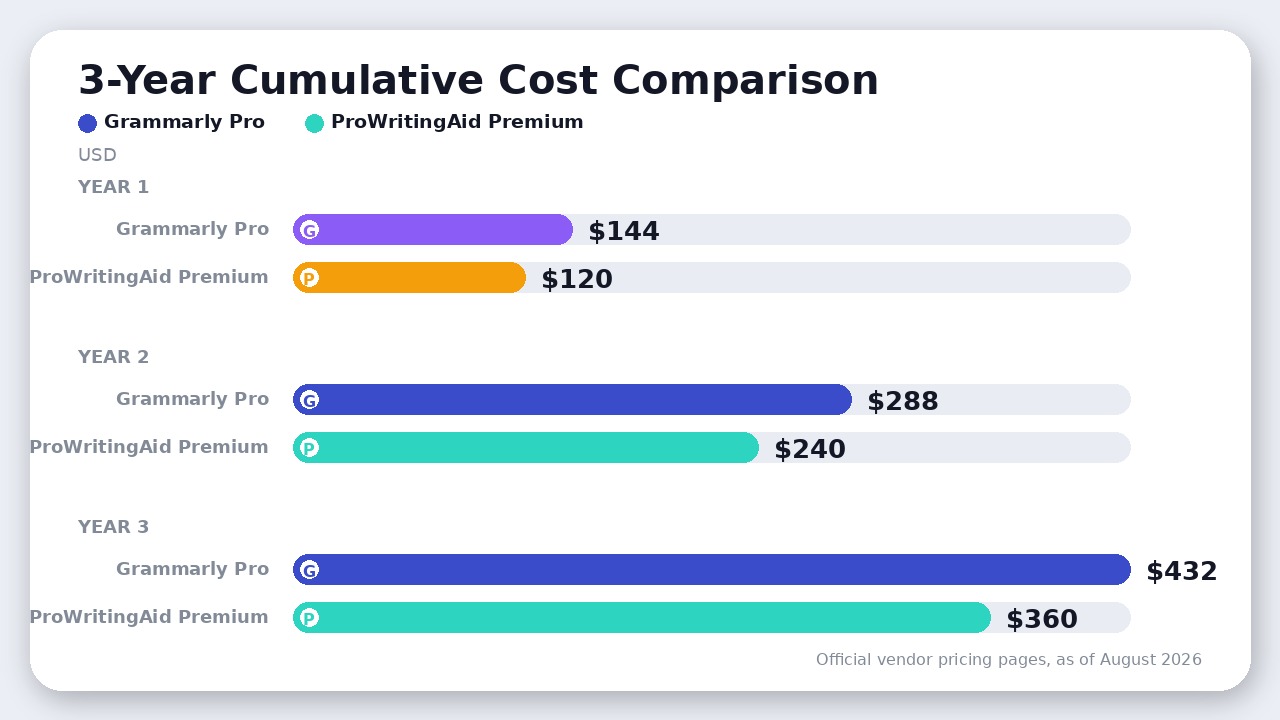
| Starting Price (Annual) | $12/user/mo ($144/yr as of August 2026) | $10/mo ($120/yr as of August 2026) | ProWritingAid |
| Monthly Billing Price | $30/user/mo (as of August 2026) | $30/mo (as of August 2026) | Tie |
| Lifetime License | None (subscription only) | $399 one-time (Premium) / $699 (Premium Pro, as of August 2026) | ProWritingAid |
| Free Tier Quota | Unlimited basic checks, 100 AI prompts/mo | 500 words/check, 2 report runs/day, 10 Rephrases/day, 3 Sparks/day | Grammarly |
| Analysis Mode | Real-time inline floating widget | 25+ discrete diagnostic reports & sidebar | Split (Depends on Job) |
| Scrivener Integration | None (manual copy-paste only) | Native desktop integration (Mac & Windows) | ProWritingAid |
| Everyday App Ubiquity | Exceptional (system-wide desktop, browser, mobile) | Moderate (browser extension, Word, Docs, desktop app) | Grammarly |
| Generative AI Quota | 2,000 prompts/mo on Pro | Unlimited Rephrases + 5 Sparks/day on Premium | Grammarly |
| Plagiarism Checker | Included in Pro subscription | Credit packs add-on (not unlimited in base plan) | Grammarly |
Pricing and limits verified from official vendor documentation as of August 2026.
Core Engine Philosophy: Real-Time Polish vs Deep Prose Diagnostics
The fundamental difference between these two platforms is how and when they process text.
Grammarly is designed for continuous background execution. When you type inside an email client or web form, Grammarly’s algorithm parses the sentence buffer and underlines errors in red (correctness) and blue (clarity) with virtually zero perceptible latency. Its suggestions are binary and actionable: fix a comma splice, remove redundant words, or switch from passive to active voice. It is built to make you type faster without second-guessing mechanics.
ProWritingAid treats text as a manuscript to be audited. While it offers a browser extension with inline checks, its real power lies in running full-document diagnostic passes across 25+ specialized writing reports:
- The Sticky Sentence Report: Calculates your glue word percentage (conjunctions, prepositions, and filler words like in order to, just, or that). It identifies sentences where high glue-word density drags reading momentum below the recommended target of under 40%.
- The Pacing and Dialogue Reports: Analyzes narrative balance by visualizing fast-paced dialogue exchanges against dense exposition, flagging repetitive dialogue tags (such as overuse of shouted, murmured, or gasped).
- Sentence Length Variation: Generates an interactive bar chart of every sentence in your chapter, highlighting visual monotony where consecutive sentences share identical syllable counts.
- The Echoes and Repetition Check: Spots unintentional word reuse within adjacent paragraphs—a subtle flaw that standard spellcheckers miss entirely.
If you run a 300-word outreach email through ProWritingAid’s 25 reports, the interface feels slow and overwhelming. But if you run an 8,000-word chapter through Grammarly, you get superficial line edits that frequently recommend stripping out necessary character voice or stylistic rhythm.
Pricing, Quotas, and the Lifetime Math
Both vendors restructured their tiers significantly heading into 2026.
Grammarly consolidated its individual Premium and team Business plans into a unified Grammarly Pro tier. As of August 2026, Grammarly Pro costs $12 per member/month on annual billing ($144 billed upfront per year) or $30 per member/month on monthly billing. It supports teams up to 149 members and includes 2,000 generative AI prompts per user per month alongside unlimited plagiarism checking.
ProWritingAid retired its legacy $79/year plan and established two main paid tiers:
1. Premium: $10 per month on annual billing ($120 billed upfront per year) or $30 per month on monthly billing as of August 2026. It includes unlimited word counts, unlimited report runs, unlimited AI Rephrases, and 5 generative AI Sparks per day.
2. Premium Pro: $12 per month on annual billing ($144 billed upfront per year) or $36 monthly as of August 2026, expanding Sparks to 50 per day and adding 3 chapter critiques daily.
The Pricing Trap and the Lifetime License
The most important financial differentiator is ProWritingAid’s $399 one-time Lifetime license for Premium (and $699 for Premium Pro, as of August 2026). Grammarly has never offered a lifetime option; it is strictly a recurring SaaS expense.
When calculating total cost of ownership:
* At $144 per year, Grammarly Pro costs $432 over 3 years and $720 over 5 years.
* ProWritingAid Premium’s $399 lifetime purchase reaches break-even against its own annual plan ($120/year) at month 40 (roughly 3.3 years). Against Grammarly’s $144/year rate, ProWritingAid Lifetime breaks even in under 34 months (roughly 33.25 months), saving hundreds of dollars over a writer’s active career.
However, beware of month-to-month billing traps. Both platforms charge $30 per month for monthly commitments on standard paid tiers—a steep penalty over annual rates (a 67% discount on ProWritingAid and a 60% discount on Grammarly when paying yearly). If you plan to use either tool for more than four months, paying monthly is financially inefficient.
The Free Plan Reality: Generous Word Count vs Restrictive Limits
If you plan to use either tool without a credit card, the experience differs radically:
Grammarly’s Free tier is one of the most generous in the writing ecosystem. It offers unlimited word count checking for critical grammar, spelling, and punctuation across all integrated platforms, along with tone detection and 100 AI prompts per month. You can paste a 20,000-word draft into Grammarly Free and receive instantaneous baseline corrections without hitting a paywall.
ProWritingAid’s Free tier imposes a hard ceiling of 500 words per check, caps report runs at 2 per report per day, and limits AI tools to 10 Rephrases and 3 Sparks daily. The free tier exists strictly as an interactive demo; attempting to edit a manuscript or article of realistic length on ProWritingAid Free is virtually impossible without slicing your text into 500-word chunks.
Workflow Ecosystems: Scrivener vs Everywhere-You-Type
Where each tool lives on your machine dictates which one you will actually use.
Grammarly’s engineering focus has always centered on ecosystem ubiquity. Its desktop app hooks into macOS and Windows system inputs, meaning it works natively inside Slack, Discord, Apple Mail, WhatsApp desktop, Notion, and Jira without requiring dedicated browser tabs. If your work is distributed across half a dozen communication channels, Grammarly is omnipresent.
ProWritingAid cannot match Grammarly’s seamless floating widget across non-browser apps, but it holds one decisive advantage for authors: direct native integration with Scrivener. Novelists and scriptwriters organize complex manuscripts containing dozens of scenes, character profiles, and research folders inside Scrivener. ProWritingAid can open your Scrivener .scriv project file directly, run analyses on specific binders or scenes, apply edits, and save changes back without breaking your project structure. Grammarly offers zero native Scrivener support, forcing authors to export, check, and manually paste text back and forth.
(If your workflow centers on generating brand-aligned enterprise marketing copy from scratch rather than proofing human prose, dedicated platforms like those explored in our Jasper vs Copy.ai comparison address prompt-to-publish campaigns more directly than either grammar checker.)
Generative AI and Rephrasing: Sparks vs Grammarly AI
Both platforms have added generative capabilities to assist drafting and sentence restructuring:
- Grammarly: Bundles 2,000 generative AI prompts per month on Pro. Its AI engine excels at conversational context—you can instruct it to adjust tone for executive readers, condense passages into bullet points, or draft replies to incoming messages. The tone slider allows granular shifting between formal, casual, empathetic, and direct phrasing.
- ProWritingAid: Uses its Sparks engine alongside a dedicated Rephrase tool. While Grammarly focuses on executive clarity, ProWritingAid’s generative features target narrative craft: adding sensory details, varying sentence starters, expanding descriptive metaphors, or rephrasing dialogue to reflect emotional tension.
Grammarly delivers significantly more generative throughput out of the box (2,000 monthly prompts vs 5 daily Sparks on ProWritingAid Premium), making it much more capable for daily high-volume workplace communication.
Where ProWritingAid Actually Wins
ProWritingAid decisively beats Grammarly in three specific scenarios:
- Fiction and Narrative Crafting: Grammarly evaluates prose using standard business and academic rules. Consequently, it persistently flags deliberate sentence fragments, dialogue cadence, and unconventional stylistic flair as errors. ProWritingAid lets you set 40+ document types (including Fantasy Fiction, Romance, Memoir, and Screenplay), adjusting its algorithms so it never penalizes intentional stylistic decisions.
- Long-Term Software Cost: The availability of the $399 Lifetime license completely eliminates recurring SaaS overhead for independent authors and freelance editors. Over a five-year writing career, ProWritingAid Premium Lifetime costs $399 flat as of August 2026, compared to $720 for Grammarly Pro ($144/year × 5).
- Granular Stylistic Diagnostics: No other consumer grammar tool matches ProWritingAid’s specific reports for visualizing sentence length rhythms, auditing passive verbs, and spotting overused crutch words across a 100,000-word corpus.
The Verdict
Grammarly wins this comparison for general users, marketers, and professional teams. Its background performance across desktop and web applications, generous 2,000 monthly AI prompt allocation, integrated plagiarism checking, and frictionless real-time editing make it the standard writing utility for modern work.
Buy ProWritingAid instead if: You write fiction, long-form creative nonfiction, or academic dissertations; your primary drafting environment is Scrivener; or you want to pay $399 once and never look at a monthly writing subscription invoice again.
Frequently Asked Questions
Is Grammarly or ProWritingAid better for novel writing?
ProWritingAid is distinctly better for novel writing. It features native Scrivener integration, 40+ genre-specific rule sets, and deep developmental reports covering dialogue tags, narrative pacing, and sticky sentences that Grammarly cannot match.
Can you use Grammarly and ProWritingAid together?
Yes. Many published authors use a two-stage editing pipeline: they first run chapters through ProWritingAid to fix structural pacing, repetition, and glue words, then execute a final real-time pass in Grammarly for catching lingering typos and punctuation errors.
Does Grammarly have a lifetime subscription?
No. Grammarly does not offer any lifetime licenses, gift subscriptions, or one-time payment options. It is available only through monthly, quarterly, or annual recurring subscriptions.
Which tool offers better data privacy for corporate writing?
Both Grammarly and ProWritingAid maintain SOC 2 compliance and enterprise data protection standards, confirming that user text submitted for analysis is not used to train public foundation models without explicit agreement. Grammarly Enterprise adds advanced data loss prevention (DLP) and Bring-Your-Own-Key (BYOK) encryption for large organizations.
Final Recommendation
Grammarly wins for everyday professionals and teams needing instant, ubiquitous editing across all apps, while ProWritingAid remains the superior choice for novelists and long-form authors dissecting prose structure.

Leave a Reply