

Grammarly wins for professionals, teams, and daily writers who need real-time grammar, style, and tone correction across every desktop and browser app. QuillBot wins for students, researchers, and content rewriters who primarily need deep sentence restructuring, synonym control, multi-mode paraphrasing, and built-in citation generation at a lower price point.
Grammarly and QuillBot approach the writing process from fundamentally opposite philosophies. Grammarly acts as an invisible editorial guardrail, checking your grammar, syntax, tone, and punctuation in real time across every browser tab and desktop app without altering your underlying meaning. QuillBot, by contrast, is a transformation engine designed to take sentences you have already written—or source material you need to synthesize—and reconstruct them using customizable rewrite modes, synonym adjustments, and academic citations.
Choosing between them comes down to a clear distinction: Grammarly fixes your writing, while QuillBot rewrites it.
If you want your daily emails, Slack messages, reports, and articles to look professional without thinking about opening a separate editing tab, Grammarly is the superior product. But if your workflow centers on processing research papers, breaking through writer’s block by testing alternate sentence structures, or rewording dense paragraphs on a budget, QuillBot delivers capabilities that Grammarly simply does not attempt.
The 30-Second Answer
- Pick Grammarly if: You need continuous, real-time grammar checking, tone adjustments, and clarity enhancements integrated directly into macOS, Windows, Google Docs, Microsoft Office, Gmail, and Slack. It preserves your unique authorial voice while cleaning up mechanics and typos.
- Pick QuillBot if: You frequently rephrase research sources, synthesize complex ideas, require structured academic citations (APA, MLA, Chicago), or need an affordable writing suite with adjustable paraphrasing levels.
Comparison Overview
| Feature / Dimension | Grammarly | QuillBot |
|---|---|---|
| Core Strength | Real-time grammar, tone, clarity, and proofreading | Multi-mode sentence paraphrasing and summarization |
| Free Tier Limit | Unlimited grammar/spelling checks, 100 AI prompts/mo | 125-word limit per paraphrase run, 2 modes |
| Annual Subscription Price | $12.00 / month ($144.00 billed upfront) | $8.33 / month ($99.95 billed upfront) |
| Quarterly Subscription Price | $20.00 / member / mo ($60 billed every 3 mos) | $13.31 / mo ($39.95 billed every 3 mos) |
| Monthly Subscription Price | $30.00 / member / month | $19.95 / month |
| Paraphrasing Modes | 1 general full-sentence clarity rewrite | 9 modes (Standard, Fluency, Formal, Academic, Simple, Creative, Expand, Shorten, Custom) |
| Plagiarism Checker | Included in Pro (unlimited web scans) | Included in Premium (capped at 25,000 words/month) |
| Citation Generator | Basic autofill via web browser extension | Full APA, MLA, Chicago citation generator built-in |
| Ecosystem & Integrations | Deep system-wide desktop apps (Mac/Windows), mobile, Office, Docs | Web editor, Chrome/Edge/Safari extensions, Word plugin |
Pricing and plan specifications verified against official documentation as of August 2026.
1. Paraphrasing vs. Proofreading: The Core Architecture
The fundamental difference between these two tools lies in how they process input sentences.
Grammarly views your original sentence as authoritative. It highlights errors with colored underlines—red for grammatical mistakes, blue for clarity issues, green for engagement, and purple for tone. When Grammarly offers a “rewrite,” it focuses strictly on conciseness and clarity: stripping out fluff, fixing passive voice, or untangling awkward phrasing. You click to accept the change, and your core sentence structure remains recognizable.
QuillBot, on the other hand, is built to dismantle sentences and reassemble them. Its central interface is a side-by-side workspace: you paste your draft on the left, select one of nine rewrite modes, and click Paraphrase to receive an overhauled version on the right.
QuillBot’s killer feature is its interactive Synonym Slider. If the initial rewrite changes your meaning too drastically, you can lower the slider to retain more of your original vocabulary; if the output is still too close to the source text, you can slide it higher to introduce broader vocabulary variations. Furthermore, clicking on any individual word in the output generates an instant drop-down menu of alternative contextual synonyms, allowing line-by-line manual tuning that Grammarly does not provide.
Key Takeaway: Grammarly polishes what you meant to say. QuillBot gives you five different ways to say it completely differently.
2. Platform Ubiquity: Where You Actually Do the Work
A writing assistant is only valuable if it is present when you hit the keyboard.
Grammarly’s engineering advantage is its universal desktop footprint. Rather than limiting its intelligence to a web portal or a single word processor, Grammarly’s native desktop application for macOS and Windows hooks into virtually every text input field on your computer. Whether you are drafting a critical ticket in Jira, responding to a colleague on Slack, editing a slide deck in PowerPoint, or sending an email from Outlook, Grammarly’s floating widget suggests real-time edits without requiring a copy-paste detour. If you already read our analysis on Grammarly vs ProWritingAid, you know Grammarly’s low-latency real-time overlay is unmatched in daily use.
QuillBot has expanded its presence with a desktop app and plugins for Google Docs, Chrome, and Microsoft Word, but its strongest capabilities remain anchored inside its dedicated web workspace. For complex restructuring, users still consistently navigate to QuillBot’s web app to take advantage of QuillBot Flow—a document environment that unites its paraphraser, summarizer, citation builder, and grammar checker onto a single canvas.
For real-time communication, Grammarly creates minimal friction. For batch processing of essays, articles, and research chapters, QuillBot’s web dashboard is a focused command center.
3. Pricing Realities and the Plagiarism Trap
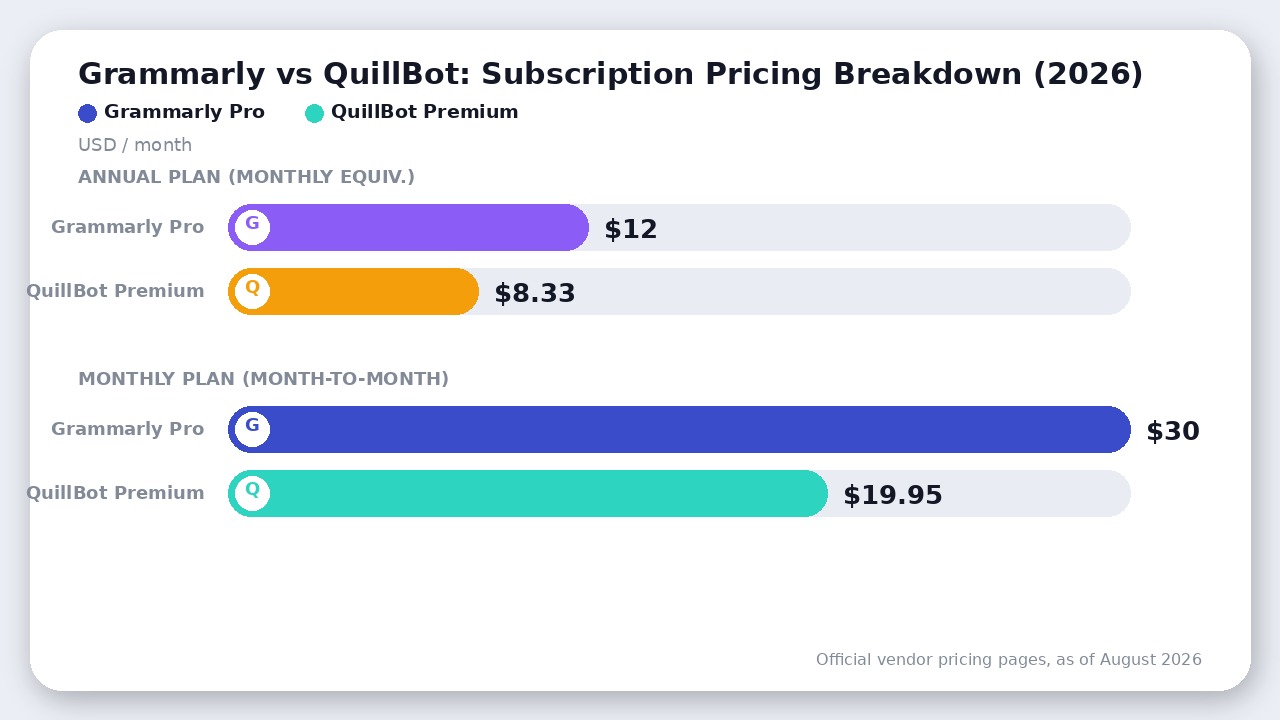
Looking strictly at entry-level sticker prices makes QuillBot appear vastly cheaper. However, both tools have nuances and limitations buried in their pricing tiers that can surprise buyers.
Grammarly Pricing Breakdown (as of August 2026)
Grammarly structured its individual and small-team offerings into a unified Grammarly Pro tier (retiring the distinct Premium and Business tiers for teams under 149 seats):
* Free Tier: $0. Provides real-time spelling, grammar, and punctuation checks across all platforms, tone detection, and 100 AI prompts per month.
* Pro (Annual): $12.00 per member/month ($144 billed upfront annually). Unlocks full-sentence rewrites, tone adjustments, vocabulary enhancements, unlimited plagiarism detection, and 2,000 AI prompts per member/month.
* Pro (Quarterly): $20.00 per member/month ($60 billed every 3 months).
* Pro (Monthly): $30.00 per member/month.
QuillBot Pricing Breakdown (as of August 2026)
QuillBot keeps its subscription straightforward under QuillBot Premium:
* Free Tier: $0. Includes the Paraphraser (strictly capped at 125 words per run and 2 modes: Standard and Fluency), Summarizer (up to 1,200 words), basic grammar checking, AI text detector, and citation generator.
* Premium (Annual): $8.33/month ($99.95 billed upfront annually). Unlocks unlimited paraphrasing word count, all 9 rewrite modes, custom modes, full synonym slider, summarizer up to 6,000 words, and the plagiarism checker.
* Premium (Quarterly): $13.31/month ($39.95 billed every 3 months).
* Premium (Monthly): $19.95/month.
The Fine-Print Gotchas
- QuillBot’s Plagiarism Cap: While QuillBot Premium is $44.05 cheaper per year than Grammarly Pro, its Plagiarism Checker includes a hard limit of 25,000 words per month. For graduate students, academic researchers, or editors scanning multiple manuscripts, 25,000 words can evaporate in a single week. Extra scans require purchasing additional page credits. Grammarly Pro, in contrast, includes continuous web-based plagiarism checks without a monthly word ceiling.
- Grammarly’s Monthly Penalty: If you only need a writing tool for a single month, Grammarly charges a steep $30.00. QuillBot is notably friendlier to short-term users at $19.95/month.
4. Academic Research & Synthesis: Summaries and Citations
For students, scholars, and content creators analyzing source documents, QuillBot provides an integrated research toolchain that Grammarly does not match.
QuillBot’s Summarizer can ingest long articles, PDFs, or research excerpts up to 6,000 words (on Premium) and condense them into either structured bullet points or coherent summary paragraphs. This makes extracting key arguments from scientific literature or industry reports exceptionally fast.
Additionally, QuillBot’s Citation Generator enables you to generate perfectly formatted bibliographies in APA, MLA, Chicago, and thousands of institutional styles. You simply paste a URL, DOI, or book title, and QuillBot pulls the metadata and formats both in-text citations and reference list entries.
Grammarly has added basic citation auto-detection in its browser extension, but it remains a secondary convenience rather than a full academic citation manager.
Where QuillBot Actually Wins
QuillBot is not just a cheaper Grammarly alternative; it is fundamentally better at specific compositional workflows:
- Non-Native English Fluency Transformation: For ESL writers who struggle with English idiom and sentence flow, QuillBot’s Fluency and Academic modes restructure clunky literal translations into natural-sounding prose far more effectively than basic grammar corrections.
- Granular Synonym Control: The ability to adjust the Synonym Slider and manually swap word choices directly in the rewritten output gives writers fine stylistic control.
- Content Repurposing & Bullet Expansion: Marketers who need to turn a bulleted outline into a paragraph—or expand a brief insight into a fleshed-out explanation—can utilize QuillBot’s Expand and Creative modes seamlessly.
- Student Budget Value: At $99.95/year (or $8.33/month), QuillBot gives cash-conscious students paraphrasing, summarizing, and citations in one subscription.
Where Grammarly Wins
Grammarly justifies its higher price tag for professional environments:
- Deep Contextual Grammar Engine: Grammarly catches misplaced modifiers, subject-verb agreement errors in complex compound clauses, misused prepositions, and subtle comma splices that QuillBot’s grammar checker glosses over.
- Tone Detection & Consistency: Grammarly analyzes how your message lands—whether it sounds dismissive, urgent, polite, or confident—and suggests wording adjustments to match professional workplace standards.
- Unmatched Ecosystem Integration: Grammarly works inside your native operating system, desktop email clients, Slack, and web browsers with zero lag, ensuring you never make embarrassing errors in client-facing communications.
- Unlimited Plagiarism Scans: For teams and professional writers publishing content publicly, Grammarly Pro scans drafts against billions of web pages without a 25,000-word monthly cap.
The Verdict
If you can only subscribe to one tool, Grammarly wins this matchup for most professional writers and everyday communicators.
Grammarly’s native desktop integration, sophisticated contextual error engine, and nuanced tone detection protect your professional reputation across every email, document, and message you send. It refines your natural voice rather than replacing it.
However, pick QuillBot instead if:
* You are a student or academic researcher who spends significant time paraphrasing secondary sources, summarizing journal articles, and formatting citations.
* You write primarily in a web browser and want flexible sentence-spinning modes with a budget under $100 per year.
* Your biggest hurdle isn’t catching typos, but getting unstuck when trying to reword repetitive phrasing.
Frequently asked questions
Can QuillBot replace Grammarly for grammar checking?
QuillBot cannot fully replace Grammarly for dedicated grammar checking. While QuillBot includes a functional grammar tool, Grammarly catches significantly more contextual subtleties, passive voice nuances, punctuation errors, and tone inconsistencies across desktop apps, emails, and web browsers.
Is QuillBot better than Grammarly for paraphrasing?
QuillBot is noticeably superior to Grammarly for paraphrasing. QuillBot provides 9 purpose-built rewrite modes (such as Academic, Formal, Simple, and Creative) alongside an adjustable Synonym Slider, whereas Grammarly focuses primarily on clarity rewrites without granular stylistic transformation.
Does Grammarly or QuillBot offer a better free plan?
Grammarly offers a better free plan for general typing because its core spelling and basic grammar suggestions have no document length limit. QuillBot’s free paraphraser is strictly capped at 125 words per run and restricts users to only two modes (Standard and Fluency).
Which tool is better for academic writing and research?
QuillBot is generally better suited for academic writing due to its integrated citation generator (supporting APA, MLA, and Chicago styles), text summarizer, and sentence restructuring tools. However, academic users with high-volume scanning must watch QuillBot’s 25,000-word monthly plagiarism cap.
Final Recommendation
Grammarly wins for most writers because its real-time, system-wide correction protects your original voice without interrupting workflow. QuillBot remains the budget champion for heavy paraphrasing and academic research.

Leave a Reply