

The battle between Cursor and GitHub Copilot is no longer a simple choice between a standalone editor and an IDE extension. In June 2026, the entire landscape shifted when GitHub Copilot retired its flat-rate “Premium Request Unit” (PRU) system and moved to token-metered “AI Credits”—a change that drew immediate developer backlash and altered the economics of AI-assisted development. Meanwhile, Cursor updated its own credit system and Teams tiers, splitting usage pools to optimize cost predictability. This head-to-head comparison of Cursor vs GitHub Copilot cuts through the marketing fluff to reveal the exact pricing traps, feature limitations, and workflow realities of these two giants.
If you’re evaluating Cursor against other standalone AI IDEs, check out our Cursor vs Windsurf matchup.
The 30-Second Answer
- Choose Cursor if: You want a highly autonomous, AI-native development environment. Cursor’s Composer 2.5 and deep codebase indexing make it the undisputed king of multi-file refactoring and complex agentic edits. Plus, its unlimited “Auto” mode protects you from surprise bills.
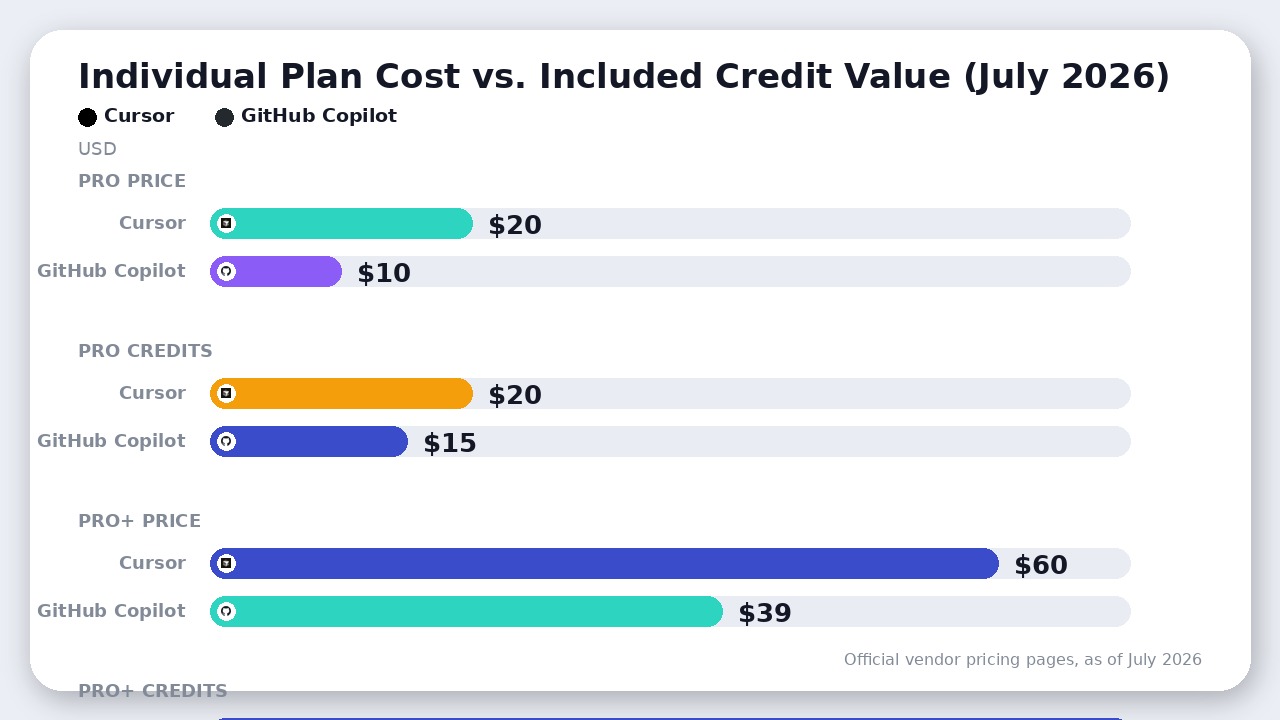
- Choose GitHub Copilot if: You are locked into JetBrains, Neovim, or Xcode, or your team requires native GitHub platform integration (Issues -> PRs -> CI/CD -> Code Review). It is also the cheaper option ($10/month vs. $20/month) for developers who only need simple inline autocomplete.
Cursor vs GitHub Copilot: Side-by-Side Specs
| Feature / Dimension | Cursor (as of July 2026) | GitHub Copilot (as of July 2026) |
|---|---|---|
| Architecture | Standalone VS Code Fork | Plugin for existing IDEs |
| IDE Support | Standalone editor only | VS Code, JetBrains, Neovim, Visual Studio, Xcode |
| Autocomplete | Unlimited Tab suggestions (Paid) | Unlimited Tab suggestions (Paid) |
| Agent Mode | Composer 2.5 + Background Agents | Copilot Agent Mode + GitHub Issues Agent |
| Starting Price | Free (Hobby) / $20/mo (Pro) | Free / $10/mo (Pro) |
| Included Credit Value | $20 in API credits (Pro) | $15 in AI credits (Pro) |
| Overage Handling | Unlimited Auto mode or opt-in pay-as-you-go | Auto-billing with no cap by default (must manually cap) |
| GitHub Integration | Basic git operations | Deep, native (PR reviews, Issues) |
| BYOK Support | Yes (Bring Your Own Key) | No |
Source: Official vendor documentation and pricing pages, as of July 2026.
Cursor vs GitHub Copilot: The June 2026 Billing Shift
The headline monthly prices for both tools ($10/month for Copilot Pro vs. $20/month for Cursor Pro) are deeply misleading. Since June 1, 2026, both platforms charge based on token consumption, but they handle overages in fundamentally different ways.
The GitHub Copilot “AI Credits” Trap
On June 1, 2026, GitHub Copilot moved all plans to token-based AI Credits, where 1 credit = $0.01 USD.
- What’s Free: Inline code completions (Tab) and Next Edit Suggestions remain unlimited and do not drain your credits.
- What’s Metered: Chat, Agent Mode, Copilot Cloud Agent, CLI, and Code Review all consume credits based on input, cached input, and output tokens.
- The Catch: By default, when you exhaust your included monthly credits, Copilot continues working and bills overages with no cap. You must manually go to
Settings -> Billing -> GitHub Copilot -> Set spending limitand set it to $0 to avoid surprise bills.
Under this system, heavy agentic workflows are incredibly expensive. One developer reported losing 82% of their monthly Pro allowance on day one; a single complex agentic session cost $38—nearly four times the entire $10 monthly subscription. Furthermore, features like Copilot Code Review dual-bill you: they consume Copilot AI Credits and drain your GitHub Actions run minutes.
The Cursor Credit Pool Safety Net
Cursor also uses a usage credit system, but with a major safety net:
- What’s Free: Unlimited Tab completions and unlimited Auto mode. When you run tasks in Auto mode, Cursor automatically routes them to cheaper, highly efficient models, meaning you do not drain your credit pool.
- What’s Metered: Your $20 Pro credit pool is only depleted when you manually select premium frontier models like Claude Sonnet or GPT-4o.
- The Overage Safety: If you run out of credits, you are not locked out or forced into uncapped auto-billing. You can simply continue on slower speeds, opt-in to pay-as-you-go, or Bring Your Own Key (BYOK) to pay your model provider directly. Copilot does not allow BYOK.
For teams, Cursor’s July 2026 update split Teams Standard ($40/user/month) and Premium ($120/user/month) seats into two distinct pools: a First-party models pool (for Auto and Composer 2.5) and a Third-Party API pool. This makes team-wide budgets far more predictable than Copilot’s pooled organizational credits.
Agentic Capabilities: Composer vs. Copilot Agent Mode
When it comes to writing code, the difference between these two tools is architectural. Copilot is an assistant bolted onto your editor; Cursor is an editor built from scratch around the AI.
Cursor’s Composer 2.5
Cursor’s killer feature is Composer, a multi-file editing interface that acts as an autonomous agent. Because Cursor is a standalone IDE, it has deep semantic indexing of your entire codebase. When you prompt Composer, it doesn’t just suggest edits in a sidebar. It:
- Reads and indexes file relationships across your entire repository.
- Plans and executes coordinated changes across multiple files simultaneously.
- Spawns Background Agents on cloud VMs to run terminal commands, compile code, and run tests to verify its own edits.
This level of autonomy allows you to delegate entire features or massive refactors to the AI while you focus on high-level architecture.
GitHub Copilot Agent Mode
Copilot has introduced multi-file editing and its own Agent Mode, but it still operates within the constraints of an IDE plugin. It lacks the deep, system-level IDE control that Cursor possesses. While Copilot is highly efficient at predicting your next line of code (Next Edit Suggestions) or answering chat questions, its agentic capabilities feel sluggish and prone to getting stuck during large, cross-file refactors.
Where GitHub Copilot Actually Wins
Despite Cursor’s technical superiority in agentic coding, GitHub Copilot remains the superior choice for specific workflows and enterprise environments.
1. IDE Portability
Cursor is a standalone fork of VS Code. If you write C# inside Visual Studio, Java in IntelliJ, or live in Neovim, Cursor is a non-starter. GitHub Copilot is a highly portable plugin that officially supports:
* VS Code
* JetBrains IDEs (IntelliJ, WebStorm, PyCharm, etc.)
* Neovim / Vim
* Xcode
* Visual Studio
2. Native GitHub Platform Integration
Copilot’s integration with the broader GitHub ecosystem is unmatched. On Business and Enterprise plans, you can assign GitHub Issues directly to the Copilot Coding Agent. Copilot will spin up a workspace, write the fix, and automatically open a Pull Request.
Additionally, Copilot can automatically review PRs on GitHub and suggest inline fixes before a human reviewer even opens the code, directly addressing the PR bottleneck. Cursor has no equivalent platform-level automation.
3. Enterprise Compliance and IP Indemnity
For corporate legal departments, Copilot is the only viable option. Copilot Business ($19/user/month) and Enterprise ($39/user/month) plans include:
* Contractual IP indemnification for copyright claims.
* Public code duplication filters.
* Full support for self-hosted GitHub Enterprise Server.
While Cursor offers a “Privacy Mode” to ensure your code is not used for model training, it does not provide legal indemnification or self-hosted deployment options.
The Verdict
There is no longer a middle ground in this matchup. The June 2026 billing changes have forced a hard split in the developer workflow.
Choose Cursor if you are a solo developer, startup founder, or small team working primarily in VS Code. Cursor’s Composer 2.5 is the most powerful agentic coding tool on the market, and its unlimited Auto mode protects you from the token-metered billing shocks that plague Copilot’s new AI Credits system.
Choose GitHub Copilot if you write code in JetBrains, Neovim, or Xcode, or if you run a large engineering organization already deeply integrated into GitHub Enterprise. Copilot’s platform-level automations (PR reviews and Issues agents) and ironclad IP indemnity make it the rational corporate standard. Just make sure your billing administrator sets a hard spending limit on day one to avoid uncapped overage charges.
Final Recommendation
Cursor wins for developers seeking maximum agentic capability and predictable costs via Auto mode. Copilot remains the default for teams requiring JetBrains/Neovim compatibility and native PR workflows.

Leave a Reply