

v0 by Vercel wins this matchup for most front-end developers and designers looking to build production-ready React layouts, but the reason isn’t just that it produces cleaner code. It is because v0 has built a dedicated, visual editing environment that solves the single biggest problem with chat-based AI generation: the “token burn” feedback loop.
If you are just looking to prototype a quick standalone widget, a game, or a Mermaid diagram inside your daily chat window, Claude Artifacts is the friction-free choice. But if you are building an interactive, multi-file web application with routing and a database, v0 is a different class of tool.
In this head-to-head comparison of v0 vs Claude Artifacts, we will look past the marketing pages to expose the structural limitations, pricing traps, and workflow gaps that determine which tool belongs in your stack.
The 30-Second Answer
- Pick v0 by Vercel if: You are building polished React, Tailwind, and shadcn/ui frontends, need multi-file full-stack capabilities (database connections, API routes, auth), want visual editing that doesn’t waste tokens, or need to sync code directly to GitHub and deploy to Vercel.
- Pick Claude Artifacts if: You already pay for a Claude Pro/Max subscription, want to generate quick standalone HTML widgets, SVGs, or interactive charts in-chat, or need to share temporary terminal session states with your team without leaving your workspace.
v0 vs Claude Artifacts: The Core Differences
| Dimension | v0 by Vercel | Claude Artifacts |
|---|---|---|
| Primary Focus | React, Next.js, Tailwind, and shadcn/ui full-stack apps | Multi-format chat outputs (HTML, React, SVG, Mermaid, Markdown) |
| Visual Editing | “Design Mode” (visual click-to-edit style adjustments) | Chat prompts only (no visual point-and-click editor) |
| Architecture | Multi-file Next.js, API routes, DB connections, auth | Single-file sandboxed preview |
| Deployment | One-click to Vercel, GitHub sync, CLI integration (npx v0 add) |
Private shared links, copy-paste to local files |
| Figma Integration | Native Figma URL importer | No native Figma importer (screenshot upload only) |
| Free Tier Limit | Hard limit of 7 messages/day ($5 credit baseline) | Rolling 5-hour limit (~15–40 messages per 5-hour window) |
| Paid Entry Price | $30/user/month Plus plan (Legacy $20/mo Premium plan is being sunsetted) | $20/month Pro plan (or $17/mo billed annually, covers chat, projects, Claude Code, and Artifacts) |
Pricing and feature data verified against official Vercel and Anthropic documentation as of July 2026.
1. The Iteration Loop: Visual Design Mode vs. Chat Prompting
In chat-based tools like Claude, every time you say “make the padding smaller” or “change the button color to red,” the AI has to regenerate the entire component. This consumes thousands of input/output tokens, eating into your rolling 5-hour limits or credit balance. If you have a complex React component, a few small styling tweaks can easily burn through your daily Pro limit.
To solve this, Vercel introduced Design Mode in June 2025. Design Mode allows you to select elements in the preview panel, adjust padding, margins, colors, and typography visually, and edit text directly without writing a prompt.
Visual adjustments made in v0’s Design Mode are applied directly to the underlying code in the DOM without consuming any AI tokens. This is a massive pricing trap solver for teams iterating on design polish.
Claude Artifacts forces you to prompt for every single change. If Sonnet misunderstands your layout request, you have to write another prompt, watch it rewrite the entire file, and hope it doesn’t break a previously working feature.
Additionally, v0 includes a native Figma to code AI importer. You can paste a Figma frame URL directly into v0, and it will extract the layout, styles, and assets to generate a matching React component. Claude Artifacts has no native Figma integration; you can upload screenshots, but it cannot parse your Figma layer hierarchy.
2. Scope & Architecture: Production Next.js vs. Single-File Sandboxes
v0 is built on Vercel’s infrastructure and is highly optimized for Next.js, React, Tailwind CSS, and shadcn/ui. The February 2026 rebuild transformed v0 from a simple component generator into a full-stack agentic environment. It can import existing GitHub repos, run previews in a sandbox-based runtime that matches production, and generate full-stack features like API routes, Next.js Server Actions, database integrations (Supabase, Neon, Upstash), and authentication.
If you want to pull the code into your local project, you don’t even have to copy-paste. You simply use the CLI command:
npx v0 add [component-id]
This command automatically pulls the code and installs any required shadcn/ui dependencies directly into your codebase. If you’re looking for an AI tool that handles full-stack stateful app generation beyond UI components, you might want to look at our comparison of Lovable vs Bolt.new.
Claude Artifacts is a general-purpose feature of the Claude.ai chat interface. It is strictly sandboxed. While Claude can write beautiful React code, the Artifact preview panel is limited to a single-file React sandbox. If you try to build a multi-file app with routing, state management across files, or a backend, the preview panel will break. You will be forced to copy the code to a local IDE like VS Code or Cursor to see if it actually works.
Even the newly launched Claude Code Artifacts (June 2026) inside the Claude Code CLI are designed for sharing terminal outputs and PR diffs privately with your team—they are not a hosting platform for production apps.
3. Pricing and Daily Limits: The Free Tier Trap
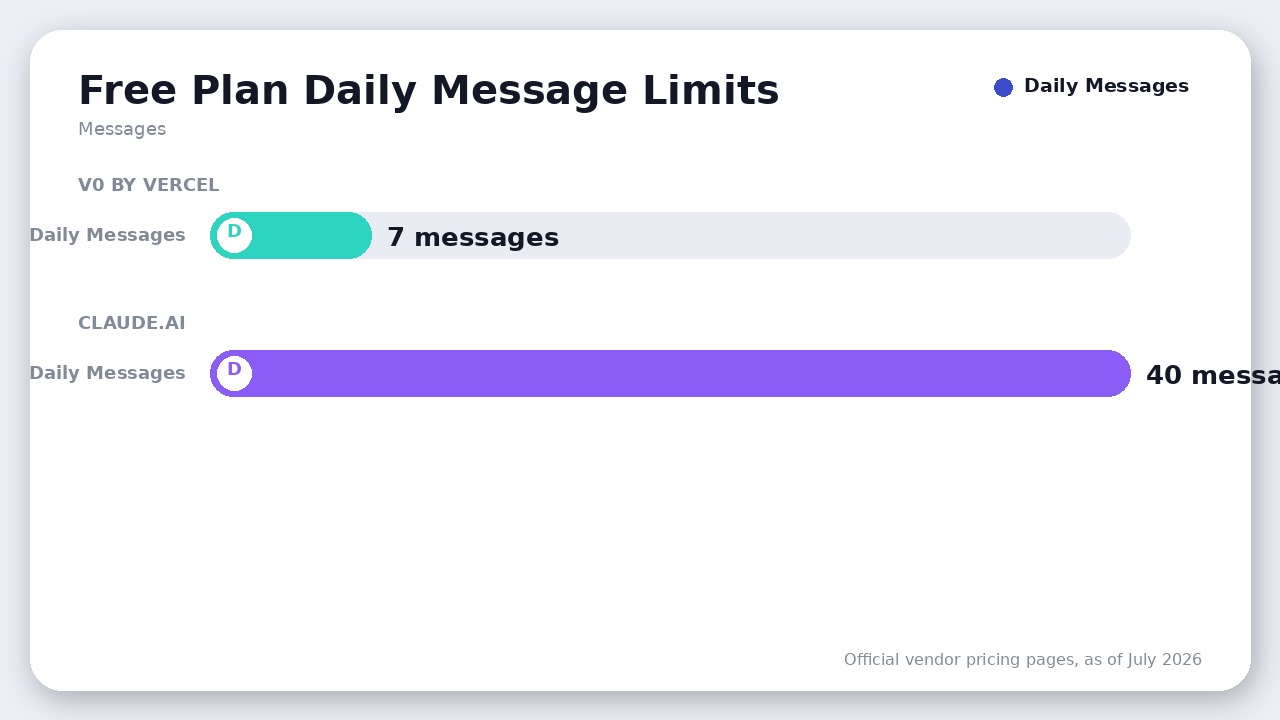
If you are evaluating the free tiers of these tools, the gap is massive. Vercel’s v0 Free plan imposes a strict limit of just 7 messages per day. Once you send your seventh message, you are locked out of generating or editing until the next day.
On the other hand, Claude’s Free tier uses a rolling 5-hour limit which, under normal demand, permits roughly 15 to 40 messages per 5-hour window—typically giving you around 40 messages per day under standard usage.
For paid tiers, both tools structure their limits differently:
- v0 Plus ($30/user/mo as of July 2026): Gives you a $30 credit balance per user, plus a $2 daily login bonus. Generations consume credits based on the model used (v0 Mini is cheaper, v0 Pro/Max are more expensive) and token count. Heavy users report burning through their monthly credit balance in a few days of active iteration, forcing them to pay-as-you-go for additional credits. Note that the individual Premium plan ($20/mo) is currently being sunsetted and is no longer available to new users.
- Claude Pro ($20/mo as of July 2026): Provides a flat usage quota that is roughly 5x the Free tier. However, this quota is shared across Claude.ai chat, Projects, Claude Cowork, and the Claude Code CLI. If you spend your morning chatting with Claude in the browser, you might find your afternoon coding session throttled.
Where Claude Artifacts Actually Wins
Despite v0’s technical advantages for React development, Claude Artifacts wins handily in two scenarios:
- General Versatility: Claude Artifacts is not locked into the Vercel ecosystem, Next.js, or React. It can preview plain HTML/CSS, SVGs, Mermaid diagrams, Markdown documents, and interactive Python/JavaScript games. If you want to visualize a quick flowchart, Claude wins hands-down.
- Cost Efficiency (No Double Subscriptions): If you already pay $20/month for Claude Pro (or $100/month for Max) to do general coding, copywriting, and research, you get Artifacts built-in. v0 Plus costs another $30/user/month, and its Free plan is severely throttled. If you only need occasional UI mockups, paying for v0 on top of Claude is hard to justify.
The Verdict
Pick v0 by Vercel if:
Your primary stack is React, Next.js, and Tailwind CSS, and you want to ship production-ready interfaces directly to Vercel. The visual Design Mode (which saves you from wasting AI tokens on minor styling tweaks), native Figma to code AI importer, and the npx v0 add CLI command make it a vastly superior tool for professional development workflows.
Pick Claude Artifacts if:
You are a generalist who wants quick, standalone visualizations (like Mermaid diagrams or SVGs), or if you already live inside the Claude ecosystem and only need occasional, low-complexity UI prototypes that you copy-paste into your own codebase anyway.
Frequently Asked Questions
Can I export code from Claude Artifacts to v0?
Yes. You can copy the JSX or HTML generated by Claude Artifacts, paste it into v0, and use v0’s Design Mode to visually polish the UI or sync it with GitHub.
Does v0 support backend code?
Yes. As of the February 2026 rebuild, v0 supports full-stack development in its sandboxed preview runtime, including Next.js API routes, Server Actions, and integrations with databases like Supabase, Neon, and Upstash.
Is Claude Code Artifacts the same as standard Artifacts?
No. Standard Claude Artifacts are generated in the Claude.ai browser chat and can be shared publicly. Claude Code Artifacts (launched in June 2026) are generated from terminal sessions inside the Claude Code CLI, are scoped to your organization, and are available in beta on Team and Enterprise plans.
Final Recommendation
v0 by Vercel wins for professional developers shipping production React and Next.js interfaces thanks to its visual Design Mode and native GitHub sync. Claude Artifacts is best for quick standalone widgets and general chat-based prototyping.

Leave a Reply