

For years, the choice between Zapier and Make was treated as a matter of personal taste. The industry consensus was lazy and predictable: Use Zapier if you want something easy; use Make if you want something cheap.
But as we move through 2026, that simple dichotomy has shattered. Major structural changes to how both platforms price their core execution units—specifically Zapier’s aggressive new AI task multipliers and Make’s transition from “operations” to “credits”—have fundamentally changed the math of workflow automation tools.
If you build on the wrong platform today, you aren’t just dealing with a slightly clunkier interface. You are signing up for a billing model that can quietly turn a basic automated workflow into your department’s largest software invoice.
The 30-Second Answer
- Pick Make if you are building complex, multi-branch workflows, handling large arrays of data, or incorporating heavy AI steps. Make’s visual, node-based canvas handles logic infinitely better than Zapier, and its pricing is roughly 3x to 5x cheaper at scale.
- Pick Zapier if your team is entirely non-technical, you need to connect niche or highly industry-specific SaaS tools from their massive directory of 9,000+ integrations, or you need to deploy simple, linear automations in under ten minutes.
Zapier vs Make: At a Glance
| Feature | Zapier | Make |
|---|---|---|
| Core Billing Unit | Tasks (successful actions only) | Credits (standard modules, dynamic AI, and polling) |
| Free Tier | 100 tasks/month, 2-step Zaps | 1,000 credits/month, 2 active scenarios |
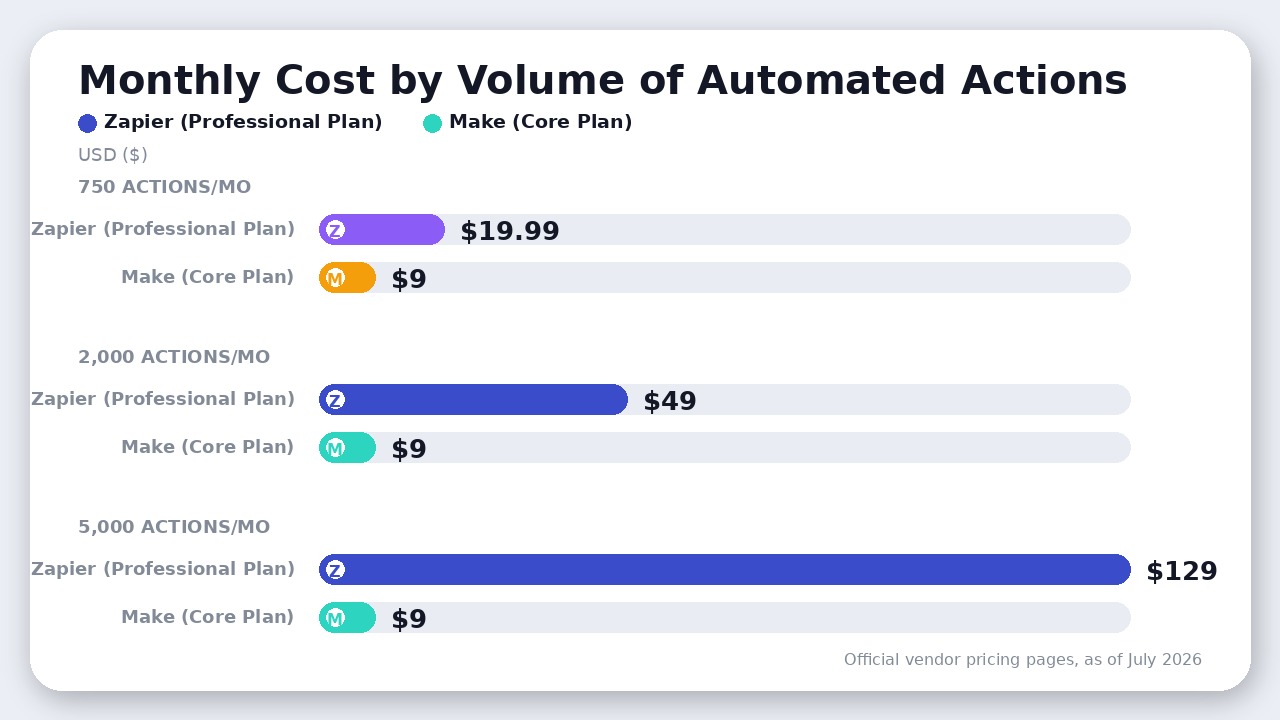
| Starting Price (as of July 2026) | $19.99/mo (billed annually) for 750 tasks | $9/mo (billed annually) for 10,000 credits |
| Ecosystem Size | 9,000+ integrations | 3,000+ integrations |
| Visual Canvas | Linear, vertical list (with basic branching) | Drag-and-drop, multi-directional graph |
| AI Model Pricing | Multipliers up to 5x + tool call surcharges | Dynamic credits (or flat 1 credit via custom API keys) |
| Data Loop Support | Poor (requires custom code or workarounds) | Native (Iterators and Aggregators built-in) |
| Data Residency | US-only | US and EU hosting options |
The AI Task Trap: Zapier’s New Multipliers vs. Make’s Credit System
If you plan to run AI-powered automations, this is the single most critical section of this guide.
Historically, adding an AI step to a workflow on either platform cost a flat execution unit. That changed on June 15, 2026, when Zapier rolled out model-based pricing for its “AI by Zapier” steps.
Instead of charging one task per run, Zapier now bills based on the model tier and your workflow’s complexity:
* Standard Models (1x multiplier): Lightweight models like GPT-4o-mini.
* Advanced Models (3x multiplier): Mid-tier models.
* Premium Models (5x multiplier): Flagship models like GPT-4o or Claude 3.5 Sonnet.
Here is the trap: Zapier’s task calculation formula is:
$$\text{Tasks used per run} = (1 \times \text{model rate}) + (\text{number of tool calls} \times \text{model rate})$$
If you configure an AI step using a Premium model (5x multiplier) and that AI successfully calls two tools during its run (e.g., querying a database and writing to a CRM), a single execution of that step consumes:
$$(1 \times 5) + (2 \times 5) = 15 \text{ tasks}$$
If that workflow runs just 50 times in a month, it will burn 750 tasks—completely draining your entire entry-level paid plan on a single automation step.
How Make Handles AI Differently
On August 27, 2025, Make transitioned its billing unit from “operations” to “credits”. While this sounds similar to Zapier’s shift, the execution is vastly friendlier to your wallet.
If you use Make’s native, built-in AI modules, you are billed dynamically based on tokens and file sizes. However, Make offers a massive loophole that Zapier does not: Custom AI Provider Connections.
If you connect your own OpenAI, Anthropic, or Google Gemini API keys directly inside Make:
1. Make bills you a flat 1 credit for the module run.
2. You pay the AI provider directly for the raw tokens (which is pennies compared to SaaS markups).
By bypassing native AI credits, high-volume AI workflows on Make remain incredibly cheap, while identical workflows on Zapier will scale your bill exponentially.
The Shape of Your Workflows: Tasks vs. Credits
To understand why Make is so much more cost-effective, you have to look past the sticker prices and analyze how the two platforms define “work.”
Zapier Bills on Completed Tasks (Triggers are Free)
Zapier only charges you when an action step successfully runs. Triggers, filters that stop a workflow, and path logic that doesn’t execute do not count toward your monthly quota.
- The Upside: If you have a high-frequency “polling” trigger (for example, checking an RSS feed or a Google Sheet every 5 minutes for new rows), and it only finds new data 10 times a month, you only pay for those 10 successful runs.
- The Downside: Multi-step automations get punished. A 5-step workflow (Trigger $\rightarrow$ Action 1 $\rightarrow$ Action 2 $\rightarrow$ Action 3 $\rightarrow$ Action 4) consumes 4 tasks per run.
Make Bills on Every Credit (Including Polling and Fails)
Make charges a flat 1 credit for almost every module execution, including triggers.
- The Polling Tax: If you set a Make scenario to poll a Google Sheet every 15 minutes, it will execute 2,880 times a month. Even if the sheet is completely empty and no data is found, Make will still charge you 2,880 credits just for checking.
- The Array Advantage: If you retrieve 100 rows from a database in a single step, Make treats this as 1 credit. If you want to loop through those 100 rows, Make uses an “Iterator” module. Each loop execution costs 1 credit. On Zapier, looping through 100 items is a nightmare that will quickly burn through thousands of tasks.
The golden rule of automation shape: If your workflows are short, run constantly, and use polling triggers, Zapier’s task model is highly efficient. If your workflows are long, use instant webhooks (which don’t poll), or process batches of data, Make’s credit model is vastly superior.
Where Zapier Actually Wins
Despite Make’s clear cost advantages, Zapier remains a massive player in the enterprise space for three distinct reasons:
1. The Long-Tail Integration Advantage
Zapier has over 9,000 native integrations, compared to Make’s 3,000+. If you use niche real estate CRMs, regional payment gateways, or proprietary industry tools, Zapier is often the only platform that supports them out of the box. Building custom API connections in Make using HTTP modules is possible, but it requires technical expertise that defeats the purpose of no-code automation.
2. The First-Hour Speed
Zapier’s linear, step-by-step editor is incredibly intuitive. A marketer with zero technical background can build a lead capture Zap in ten minutes. Make’s visual canvas, while beautiful, requires you to understand complex technical concepts like JSON mapping, arrays, and data types from day one.
3. Enterprise-Grade Security and Governance
Zapier’s administrative features are exceptionally mature. On their Team and Enterprise plans, you get robust user provisioning, SAML SSO, and advanced app restrictions. More importantly, Zapier allows you to restrict which third-party apps your employees can connect to, preventing data leaks. Make offers team roles, but its administrative controls are less restrictive for decentralized corporate teams.
The Verdict
Choose Make if:
- You are running complex workflows: If you need conditional branching, complex data looping, or multi-stage error handling, Make’s visual canvas is lightyears ahead of Zapier’s clunky “Paths”.
- You are conscious of cost: Make’s Core plan gives you 10,000 credits for $9/month (as of July 2026, billed annually). An equivalent volume of 10,000 tasks on Zapier’s Professional plan will cost you $129/month (as of July 2026, billed annually). Over a year, this difference represents over $1,400 saved.
- You are building AI agents: Make’s ability to use custom API keys and charge a flat 1 credit per HTTP execution makes it the only viable hosted option for high-volume AI processing.
Choose Zapier if:
- Your stack relies on niche tools: If your software stack includes lesser-known SaaS applications, Zapier’s 9,000+ integration library will save you from having to write custom API code.
- Your team is non-technical: If the people building and maintaining your automations do not know what an array or a webhook is, Make’s learning curve will lead to constant frustration and broken scenarios.
If you are looking for self-hosted, developer-centric alternatives that completely remove execution limits from the equation, check out our deep dive on n8n vs Make.
FAQ
What is the difference between a Zapier task and a Make credit?
Zapier tasks are only consumed when an action step successfully executes (triggers and filters are free). Make credits are consumed by every single module run inside a scenario, including polling triggers that find no new data, filters, and dynamic AI token usage.
Does Zapier have a free plan in 2026?
Yes. Zapier’s free plan includes 100 tasks per month, but it limits you to simple two-step Zaps (one trigger, one action). It does not support multi-step logic or premium app integrations.
Why did Make change from operations to credits?
On August 27, 2025, Make transitioned to credits to allow for more flexible, usage-based pricing. While standard modules still cost 1 credit per run, native AI modules now consume varying amounts of credits based on token volume, file size, and page processing.
Final Recommendation
While Zapier remains the undisputed king of long-tail integrations and beginner-friendly setup, Make wins this matchup for any scaling business. Make's visual canvas, superior data mapping, and vastly cheaper credit-based pricing model make it the only logical choice once your automation volume scales.

Leave a Reply