

If you are comparing Typeform vs Tally, you are likely trying to solve a classic SaaS headache: you need to collect structured data from users, but you are tired of paying a premium “response tax” just to keep your forms online.
On paper, both tools let you build clean, modern forms. But under the hood, they operate on completely opposite philosophies. Tally wins this matchup for 90% of teams by offering a genuinely unlimited free tier, highly customizable design controls, and flat-rate pricing. However, Typeform remains the undisputed king for high-stakes marketing campaigns where its signature slide-by-slide user experience acts as a conversion engine.
Before you commit your team to a platform, you need to understand the structural limitations, the pricing traps, and the design constraints buried in both vendors’ documentations.
The 30-Second Answer
- Pick Tally if: You want to collect unlimited responses without watching a meter, need to build complex forms (with logic, file uploads, and Stripe payments) for free, or want to use custom CSS to fully white-label your forms.
- Pick Typeform if: You are running high-budget paid acquisition campaigns where a 1% lift in form completion rate directly translates to thousands of dollars in revenue, and you require a cinematic, slide-by-slide user experience.
Typeform vs Tally: The Core Differences
| Dimension | Typeform | Tally |
|---|---|---|
| Free Plan Response Cap | 10 responses / month | Unlimited |
| Entry Paid Price | $39/mo (or $28/mo billed annually) | $29/mo (or $24/mo billed annually) |
| 1,000 Responses Cost | $79/mo (Plus Plan) | $0/mo (Free Plan) |
| Remove Branding Cost | $79/mo (Plus Plan) | $29/mo (Pro Plan) |
| Custom Domain Cost | Enterprise only | $29/mo (Pro Plan) |
| Stripe Payments Fee | Paywalled (requires Basic plan) | Free (0% Tally commission) |
| Custom CSS Support | ❌ Blocked by design | ✔️ Supported (Pro plan) |
| Team Seats | 1 (Basic), 3 (Plus), 5 (Business) | Unlimited (Pro plan) |
Pricing and limits verified against official vendor pages as of July 2026.
The Response-Cap Trap: Typeform’s Private Mode vs. Tally’s Unlimited Freedom
The single most critical difference between these two platforms is how they meter usage. Typeform charges you for volume (responses), while Tally charges you for features (branding, custom domains, and analytics).
If you use Typeform, you are buying responses. The meter is strict, and the consequences of hitting your limit are severe. According to Typeform’s official help documentation, when your account hits 100% of its monthly response limit, your forms automatically enter Private Mode.
This isn’t a soft limit where you get billed for overages at the end of the month. Typeform actively shuts down your form. Any live user attempting to fill out your form will see a screen stating that the form is closed. For a marketing team running active paid ads on Google or Meta, this can silently break your acquisition pipeline, wasting ad spend on dead landing pages.
To prevent this, Typeform requires you to either manually upgrade to a higher tier or turn on their “auto-upgrade” feature, which automatically bumps you to the next pricing tier (and bills you the difference) the moment you overshoot your limit.
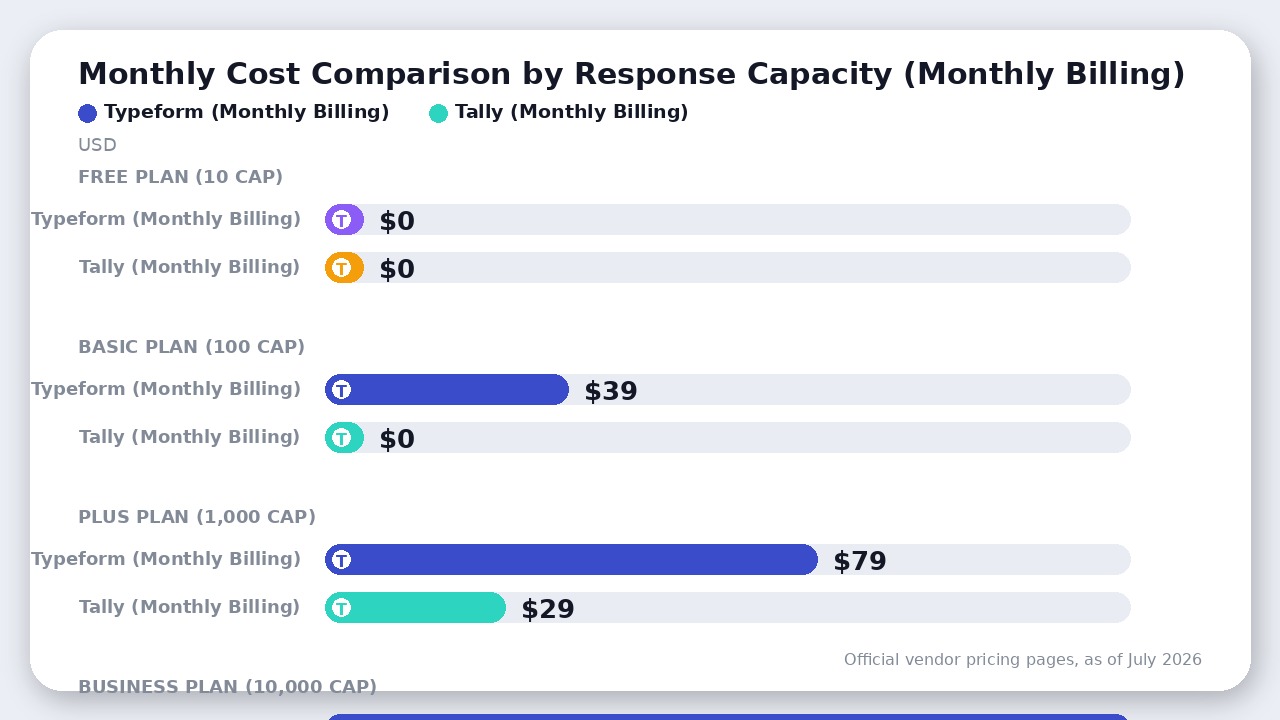
Tally, on the other hand, provides unlimited forms and unlimited responses on its Free plan. Whether you receive 10 responses or 100,000, Tally will never take your forms offline or charge you a response tax.
If your team of 3 wants to remove branding and run a feedback form that gets 1,200 responses per month:
* On Typeform, you must upgrade to the Business plan (since the Plus plan caps at 1,000 responses). This will cost you $129/month (or $91/mo billed annually) as of July 2026.
* On Tally, you only need the Pro plan to remove the “Made with Tally” badge. This costs a flat $29/month (or $24/mo billed annually) as of July 2026, with no response caps.
By choosing Tally, you save $100/month on monthly billing while enjoying complete peace of mind that your forms will never randomly go offline mid-campaign.
The Stripe Commission Myth & Hidden Paywalls
If you read older Typeform vs Tally reviews or Reddit threads from a couple of years ago, you will consistently see users warn that Tally’s free plan charges a 5% commission on Stripe payments.
This is a myth. Tally has quietly retired this commission fee entirely. According to Tally’s official payment documentation, “We do not add any extra fees on top of Stripe’s pricing”. You can build payment forms, calculate prices in real-time, and collect credit card payments on Tally’s free plan with 0% platform commission—you only pay Stripe’s standard processing fees.
Contrast this with Typeform, which gates payment collection entirely on its free tier. To collect payments via Stripe in Typeform, you must subscribe to at least the Basic plan ($39/mo) as of July 2026.
Furthermore, Tally includes advanced features like conditional logic, calculated fields, file uploads (up to 10MB per file), and custom thank-you pages on its Free plan. Typeform, by comparison, restricts you to just 10 responses per month on its free tier, making it practically unusable for anything other than basic testing.
Design Control: Typeform’s Hard Lockout vs. Tally’s Custom CSS
If you are embedding these forms on a website built with Webflow or Framer, you will care deeply about visual consistency. You want your forms to look like a native part of your website, not a third-party widget.
This is where Typeform’s design philosophy becomes highly restrictive. Typeform does not support custom CSS. If you search Typeform’s community forums, their developers explicitly state that overriding Typeform’s CSS is “not advised” because it “might break the functionality” and that this is “intentionally by design”. Typeform does this to protect the responsive layout of their slide-based forms. If you want to customize your form on Typeform, you are limited to their built-in theme builder, Google Fonts library, and basic color palettes.
Tally Pro ($29/mo) takes the opposite approach. It gives you full custom CSS support and code injection. You can target Tally’s CSS classes directly to change input borders, adjust button padding, upload custom corporate fonts, and completely overhaul the layout of your forms.
Additionally, Tally uses a Notion-inspired document editor. Building a form is as simple as typing / and selecting blocks (e.g., /text, /multiple-choice, /payment). This open-canvas layout makes it highly flexible for multi-column structures, which Typeform’s rigid slide layout cannot support.
Where Typeform Actually Wins: The Completion Rate Premium
With all of Tally’s economic advantages, why does anyone still pay for Typeform?
The answer lies in the completion rate.
Typeform pioneered the “one-question-at-a-time” conversational layout, and they have spent a decade optimizing its micro-animations, keyboard navigation, and mobile responsiveness. According to Typeform’s official data, their forms average a 47% completion rate, compared to an industry average of 21.5% for standard scrollable forms.
When a user is presented with a long, intimidating vertical form (which is Tally’s default layout, though you can add page breaks), cognitive load increases, and drop-off rates spike. By showing only one question at a time and auto-advancing on click, Typeform keeps the user engaged.
This completion rate premium changes the math for high-ticket lead generation:
* Imagine you spend $5,000/month on Google Ads to drive traffic to an onboarding form.
* With Tally’s standard layout, you get a 22% completion rate, yielding 220 leads (cost per lead: $22.73).
* With Typeform’s optimized conversational layout, you get a 44% completion rate, yielding 440 leads (cost per lead: $11.36).
In this scenario, paying Typeform $129/month to double your lead volume is an absolute no-brainer. The software cost is completely dwarfed by the efficiency gain in your ad spend.
The Verdict
Choose Tally if:
You are a startup founder, developer, or operations manager who needs a reliable, highly flexible form builder for product research, user onboarding, waitlists, or payment collection. Tally’s Notion-like editor is incredibly fast to use, and its lack of response caps means you will never face unexpected bills or sudden form closures. It is the best free Typeform alternative in the form-building market by a wide margin.
Choose Typeform if:
You are a growth marketer or enterprise brand running high-stakes paid acquisition campaigns. If your business depends on squeezing every single percentage point of conversion out of your traffic, Typeform’s psychologically optimized, slide-by-slide user experience is worth the premium price and the restrictive response limits.
Final Recommendation
Tally wins this matchup for 90% of teams by offering unlimited responses and free conditional logic. Typeform is reserved strictly for high-budget marketing campaigns where its slide-by-slide layout boosts conversion rates.

Leave a Reply