

If you’re trying to escape the complexity of AWS or the legacy pricing of Heroku, you’ve inevitably narrowed your choices down to Render and Railway. Both promise the holy grail of modern cloud application hosting: connect your GitHub repo, push code, and let the platform handle the servers, SSL, databases, and scaling.
But under the hood, these two platforms are built on completely opposing philosophies of cloud billing, resource allocation, and team collaboration. If you make the wrong choice, you’ll either wake up to a surprise overage bill or find yourself paying a massive collaboration tax just to invite a co-founder to your workspace.
Railway wins this matchup for 90% of solo developers, indie hackers, and early-stage startups. Its consumption-based billing is highly efficient, its visual infrastructure canvas is unmatched, and it doesn’t penalize you for collaborating. However, Render is the necessary choice if you require SOC 2 compliance, automated horizontal autoscaling, or predictable flat-rate compute.
Here is the raw, un-hyped reality of how they stack up.
The 30-Second Answer
- Pick Railway if: You want a stellar developer experience with a visual infrastructure canvas, instant containerized database provisioning, and a pay-per-second billing model that includes free team collaboration. It’s the ultimate modern Heroku alternatives for shipping fast.
- Pick Render if: You are a growing team that needs predictable flat-rate monthly instance pricing, native automated horizontal autoscaling, or must satisfy strict enterprise security requirements like SOC 2, ISO 27001, or HIPAA.
Render vs Railway: Key Differences at a Glance
| Feature | Render | Railway |
|---|---|---|
| Primary Billing Model | Hybrid: Flat workspace fee + flat per-service compute + metered bandwidth | Consumption-based: Per-second CPU/RAM usage + metered egress |
| Entry Price (Always-On) | $7/month (Starter web service, 512 MB, 0.5 vCPU) | ~$10.18/month (Metered always-on 512 MB, 0.5 vCPU) |
| Team Workspace Fee | $25/month flat (Pro workspace) | $0/month (Included in Pro plan’s $20 minimum usage credit) |
| Included Bandwidth | 5 GB (Hobby) / 25 GB (Pro) / 1 TB (Scale) | None (All egress metered) |
| Bandwidth Overage | $0.15 per GB | $0.05 per GB |
| Databases Supported | Managed PostgreSQL, Redis-compatible Key Value | Managed PostgreSQL, MySQL, MongoDB, Redis |
| Autoscaling | Native horizontal autoscaling (Pro workspace and higher) | Vertical scaling only; manual replica scaling |
| Compliance | SOC 2 Type II, ISO 27001 (Pro), HIPAA (Scale) | HIPAA (Enterprise only) |
Pricing and features verified as of July 2026.
1. The Core Billing Architecture (Flat vs. Metered)
The fundamental difference between these two platforms lies in how they measure and charge for compute resources as of July 2026.
Render’s Plan-Based Model
Render functions like traditional hosting. You select an instance tier for each service. For example, as of July 2026, the Starter tier costs $7/month for 512 MB RAM and 0.5 vCPU, and the Standard tier costs $25/month for 2 GB RAM and 1 vCPU.
Your compute bill is highly predictable: if you run one Starter web service and one Starter PostgreSQL database ($7/mo compute + $0.30/GB storage under Render’s flexible database plans), your base compute bill is exactly $14/month, regardless of how much CPU your app actually spikes.
Railway’s Metered Model
Railway operates on a utility model. It charges you by the second for the exact CPU and memory your containers consume as of July 2026:
* CPU: $20 per vCPU per month (~$0.00000772 per vCPU-second)
* Memory: $10 per GB per month (~$0.00000386 per GB-second)
If your app is idling, it consumes very little CPU, making it incredibly cheap. However, if your app experiences a sudden traffic spike or a rogue background process runs wild, your bill will scale dynamically.
To prevent runaways, Railway requires you to choose a subscription plan that acts as a minimum usage commitment as of July 2026:
* Hobby Plan ($5/mo): Includes $5 of monthly usage credit. If your metered resources cost $3, you pay $5. If they cost $12, you pay $12.
* Pro Plan ($20/mo): Includes $20 of monthly usage credit. If your metered resources cost $15, you pay $20. If they cost $50, you pay $50.
2. The Team Workspace Tax: Render’s $25 Flat Fee
In April 2026, Render drastically restructured its workspace pricing. They eliminated their legacy per-seat fees ($19/member/month) and moved to a flat-rate workspace model:
* Hobby Workspace ($0/mo): Limited to 1 team member and 25 total services. Services spin down after 15 minutes of inactivity.
* Pro Workspace ($25/mo flat): Allows unlimited team members, unlocks autoscaling, preview environments, and SOC 2 compliance reports.
This flat $25/month fee is a platform subscription fee that is charged on top of your compute costs.
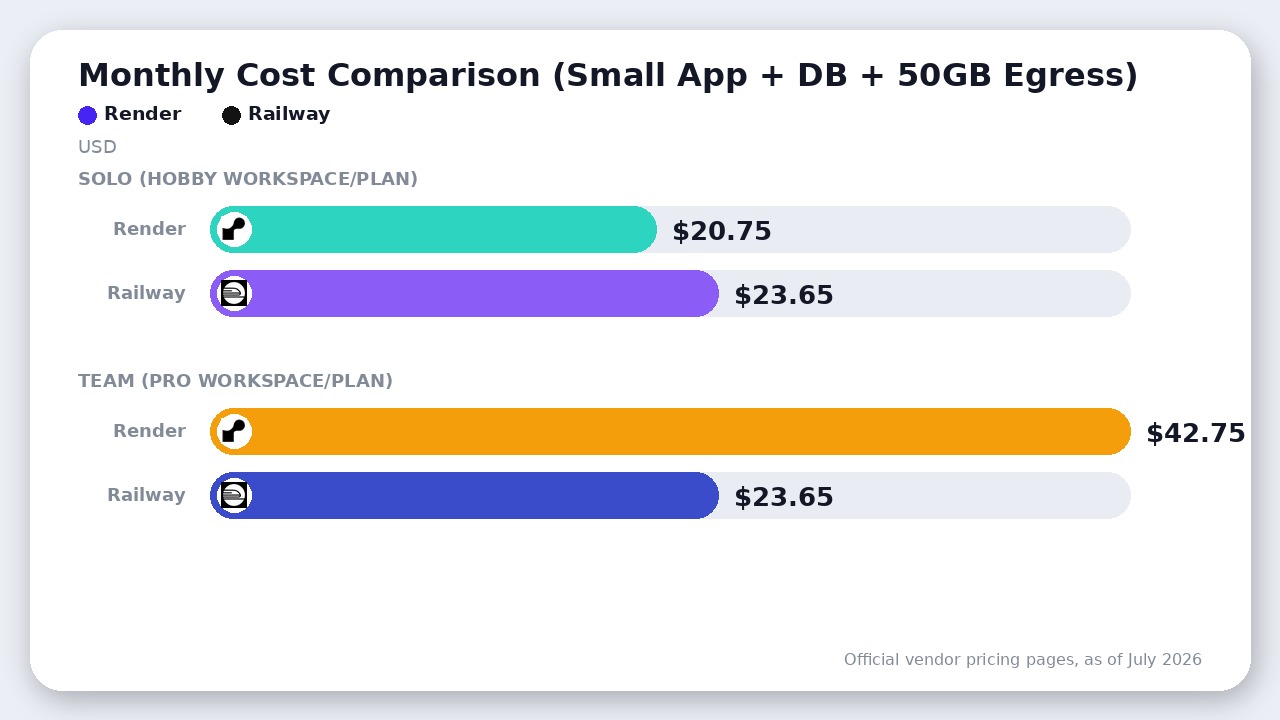
To see how these models compare in practice, let’s look at a typical small app setup as of July 2026: a single always-on web service (512 MB RAM, 0.5 vCPU), a small database (512 MB RAM, 0.5 vCPU on Railway, or a Starter PostgreSQL on Render), and 50 GB of egress a month.
Solo Developer (Hobby Plan/Workspace)
- Render Solo:
- Workspace fee: $0.00
- Web compute (Starter): $7.00
- Database compute (Starter Postgres): $7.00
- Egress (50 GB total, 5 GB included): 45 GB overage × $0.15 = $6.75
- Total Solo Render Cost: $20.75/month
- Railway Solo:
- Hobby Plan subscription: $5.00 (acts as a minimum usage commitment and includes $5.00 credit)
- Web App compute (always-on 512 MB RAM + light CPU): ~$6.00
- Database compute (always-on 512 MB RAM + light CPU): ~$14.40
- Database volume storage (5 GB): $0.75
- Egress (50 GB × $0.05): $2.50
- Gross resource usage: $6.00 + $14.40 + $0.75 + $2.50 = $23.65.
- Since this exceeds the Hobby plan’s $5 minimum, the Total Solo Railway Cost is $23.65/month.
Team Workspace (Pro Plan/Workspace)
If you are a 2-person startup running the same stack on a Pro workspace:
* Render Team:
* Workspace fee: $25.00
* Web compute (Starter): $7.00
* Database compute (Starter Postgres): $7.00
* Egress (50 GB total, 25 GB included): 25 GB overage × $0.15 = $3.75
* Total Team Render Cost: $42.75/month
* Railway Team:
* Pro Plan subscription: $20.00 (acts as a minimum usage commitment and includes $20.00 credit)
* Gross resource usage: $23.65 (same as above, as there is no per-seat charge)
* Since $23.65 exceeds the $20 minimum, the Total Team Railway Cost is $23.65/month.
For small, early-stage teams, Render’s Pro workspace acts as an immediate $25/month tax just to collaborate, whereas Railway lets you collaborate for free while only charging for actual hardware usage.
3. The Bandwidth and Egress Trap
Bandwidth is the most common hidden cost in cloud hosting, and Render’s April 2026 pricing update introduced a massive bandwidth squeeze.
Render’s Bandwidth Squeeze
Render drastically reduced the outbound bandwidth included in its plans as of July 2026.
* Hobby Workspace: Includes only 5 GB of outbound bandwidth.
* Pro Workspace: Includes only 25 GB of outbound bandwidth (down from 100 GB in legacy plans).
* Overage: Billed at a steep $0.15 per GB.
Furthermore, Render’s bandwidth tracking is highly aggressive. It includes not just web responses to users, but also all service-initiated outbound traffic (such as calling external APIs, backing up to AWS S3, or maintaining WebSocket connections). If your app frequently communicates with external LLM APIs, you will blow through the 25 GB limit rapidly.
Railway’s Flat Egress
Railway does not bundle bandwidth into arbitrary plan tiers. Instead, as of July 2026, it charges a flat, highly competitive utility rate of $0.05 per GB for all outbound service traffic.
If your application transfers 100 GB of data in a month as of July 2026:
* On Render Pro: You pay for 75 GB of overage ($0.15 × 75) = $11.25.
* On Railway: You pay flat egress ($0.05 × 100) = $5.00.
At scale, Render’s bandwidth pricing is 3x more expensive than Railway’s, making Render a dangerous choice for data-heavy applications, media-rich sites, or API-heavy backends.
4. Developer Experience: Canvas vs. Dashboard
While pricing determines your invoice, the Developer Experience (DX) determines your daily sanity.
Railway’s Visual Project Canvas
Railway’s DX is widely considered the gold standard for modern PaaS. Instead of managing services through a traditional list-based dashboard, Railway provides a visual Project Canvas.
You can visually see your web services, background workers, cron jobs, and databases as connected nodes on a single board. Drag-and-drop variables, instant database provisioning (Postgres, MySQL, MongoDB, and Redis are spun up in one click), and seamless private networking make managing multi-service architectures incredibly intuitive.
Render’s Infrastructure-as-Code Edge
Render uses a more traditional dashboard. While clean and highly functional, it lacks the visual charm of Railway’s canvas.
However, Render has a massive advantage for teams that want to treat infrastructure as code: Render Blueprints. By checking a render.yaml file into your repository, you can define your entire stack—services, databases, environment variables, and disks. When you push the file, Render automatically provisions the entire architecture. While Railway supports config-based deployments, Render’s Blueprint engine is far more mature and robust for production environments.
Where Render Actually Wins
Despite Railway’s pricing and DX advantages, Render remains the superior choice for established businesses due to three critical production features:
- Strict Compliance & Security: If your startup sells to enterprise clients, you will eventually face security questionnaires. Render’s Pro plan ($25/mo) provides self-serve access to SOC 2 Type II and ISO 27001 compliance reports, as well as audit logs. Its Scale plan ($499/mo) supports HIPAA-compliant workspaces. On Railway, HIPAA compliance and advanced access controls are locked behind custom Enterprise contracts.
- Automated Horizontal Autoscaling: Render Pro natively supports horizontal autoscaling. It can automatically add or remove container instances based on CPU or memory usage. Railway does not support native automated autoscaling; scaling is done vertically by adjusting container sizes or horizontally by manually increasing the replica count in the dashboard.
- Predictable Compute Costs: If your workload is consistently highly active, Railway’s per-second CPU billing will compound quickly. Render’s flat-rate compute tiers ensure that even if your app runs at 90% CPU utilization 24/7, your compute bill remains locked to the flat monthly tier price.
The Verdict
Choose Railway if:
- You are a solo developer, indie hacker, or early-stage startup.
- You want to collaborate with teammates without paying a flat subscription tax.
- You need to quickly provision diverse databases like MySQL, MongoDB, or Redis alongside Postgres.
- Your application has high bandwidth or API-egress needs.
Choose Render if:
- You are a VC-backed startup or established team that requires immediate SOC 2 Type II or HIPAA compliance.
- Your application experiences highly variable traffic and requires automated horizontal autoscaling.
- You prefer predictable, flat-rate monthly instance pricing over metered utility billing.
- You manage infrastructure using structured YAML files via Render Blueprints.
If you are building a full-stack SaaS and need a backend database, you might also compare Supabase vs Firebase to pair with your PaaS hosting. Similarly, for transactional emails, you’ll likely want to hook up Resend vs SendGrid to handle your automated user notifications.
Final Recommendation
Railway wins this matchup for most developers and early-stage startups due to its superior developer experience, consumption-based billing that scales to zero, and the lack of a flat-rate team tax. Render remains the choice only when SOC 2 compliance, predictable flat-rate compute, or automated horizontal autoscaling are strict requirements.

Leave a Reply