

FlutterFlow wins this matchup for most teams building production applications, but not for the reason non-code marketers advertise. The decision comes down to architectural portability: FlutterFlow generates clean Dart and Flutter code that you own and can run anywhere, eliminating the existential risk of SaaS vendor lock-in. Bubble remains a titan for browser-based web products, but its closed ecosystem and metered Workload Unit billing create financial and technical ceilings that hit right when your business starts scaling.
That said, if your product is a web-first SaaS with intricate multi-tenant database logic and zero mobile requirements, choosing FlutterFlow can mean forcing yourself to integrate and maintain a separate backend layer from day one. Here is how to navigate the architectural trade-offs between the market’s two leading visual development platforms.
The 30-Second Answer
- Pick FlutterFlow if: You are building a native mobile app (iOS and Android), want full control over your source code, need predictable seat-based software costs, or already plan to run a dedicated backend on Firebase or Supabase.
- Pick Bubble if: You are non-technical, need an all-in-one platform where the database, workflow engine, and front-end interface live in a single editor, and are building a browser-first web application or complex internal portal.
Core Comparison: Bubble vs FlutterFlow
| Dimension | Bubble | FlutterFlow |
|---|---|---|
| Primary Architecture | Full-stack web monolith (Visual backend + hosted DB) | Visual UI generator for Flutter (Client-first design) |
| Code Export | None (Zero source code access) | Full Dart & Flutter source code download |
| Database Layer | Built-in managed relational database | Requires external backend (Firebase, Supabase, REST APIs) |
| Mobile Support | Native mobile builder sharing web backend | Native Flutter compilation (iOS, Android, Web, Desktop) |
| Billing Model | Seat tier + Usage-based (Workload Units) | Flat per-seat licensing (Tiered by developer features) |
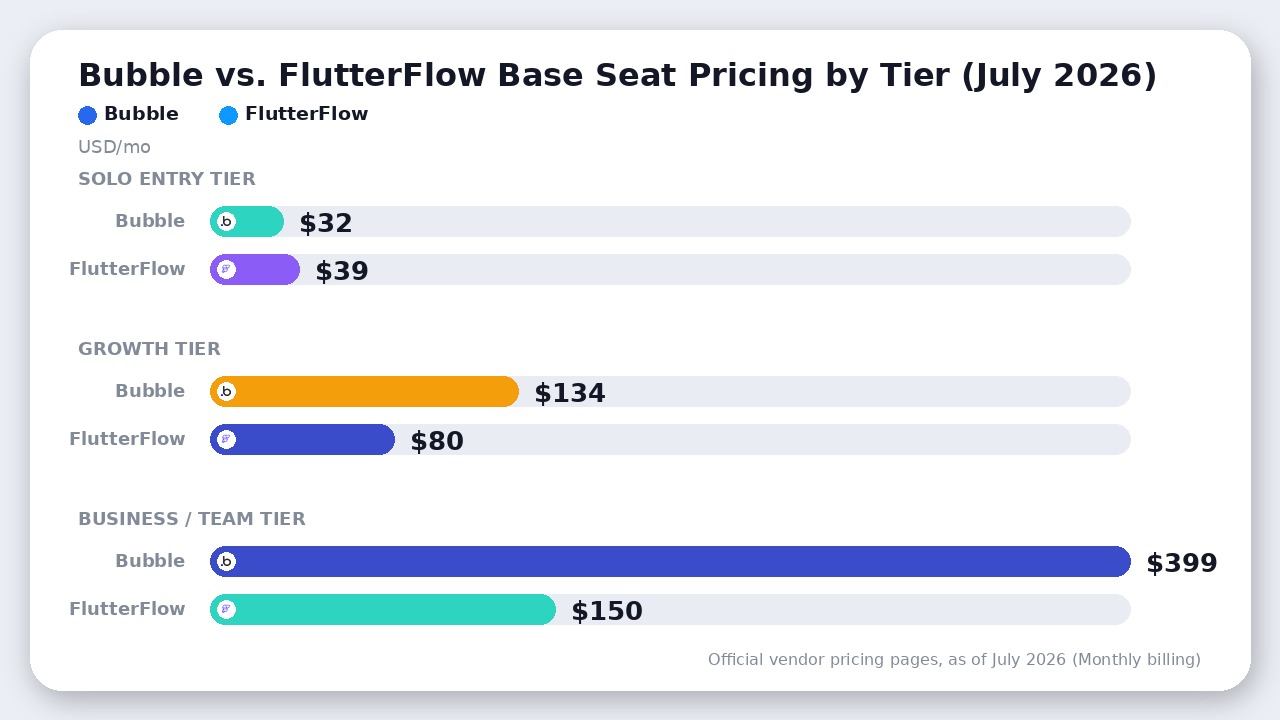
| Entry Paid Price | $32/mo (Starter Web, billed monthly as of July 2026) | $39/mo (Basic Plan, billed monthly as of July 2026) |
| Team Pricing | $399/mo (Team Plan, 5 seats included as of July 2026) | $80/mo (Growth Plan, 1st seat as of July 2026) |
Pricing verified against official vendor documentation as of July 2026.
1. Code Ownership vs. Vendor Lock-In
The fundamental architectural rift between these two platforms comes down to what happens if you decide to leave.
FlutterFlow operates as a visual IDE. When you build pages, wire up actions, and bind data in FlutterFlow, the editor writes human-readable, standard Flutter/Dart code in the background. Starting on the $39/month Basic plan (as of July 2026), you can click a button to download your full application source code or compile APKs. Upgrading to the $80/month Growth plan (as of July 2026) enables direct push integrations to a GitHub repository. If FlutterFlow raises its prices, goes down, or changes its feature set, your engineering team can clone the repository or open the downloaded project in VS Code or Android Studio, and continue hand-coding without losing a single screen or logic branch.
Bubble takes the opposite philosophy: it is a fully proprietary, closed runtime. Your workflows, data schemas, and UI elements are stored in Bubble’s internal JSON format and interpreted by Bubble’s proprietary server engine. You cannot export your code at any price point—not on the Starter plan, not on the Team plan, and not on Enterprise. If you outgrow Bubble or need to migrate off the platform, your only option is to rewrite the entire application from scratch in code or another platform.
For venture-backed startups, agencies delivering client assets, or enterprises with security compliance mandates, FlutterFlow’s code export provides a structural safety net that Bubble cannot match.
2. Integrated Backend vs. External Database Management
While FlutterFlow dominates code portability, Bubble holds a massive advantage in developer velocity for complex data relationships.
Bubble is an all-in-one full-stack builder. When you create a new Data Type in Bubble (such as “Invoice” or “Organization”), Bubble automatically provisions the database table, handles relational field mapping, sets up server-side Privacy Rules, and generates an automatic Data API. You do not need to configure database connections, write SQL migrations, or manage API keys between frontend and backend. Everything happens inside a unified visual workspace where server-side workflows run directly against your application data.
FlutterFlow, by design, is primarily a frontend client generator. While it offers deep native integrations with Firebase and Supabase, you must set up, schema-design, and pay for those database services independently. Connecting FlutterFlow to a backend requires setting up authentication rules, indexes, and API endpoints outside of FlutterFlow’s editor. For developers evaluating database backends, our Supabase vs Firebase comparison outlines how those infrastructure options scale.
If you want an operational MVP running multi-tenant database logic without setting up third-party database infrastructure, Bubble lets a single non-technical builder ship significantly faster.
3. Pricing Models: Workload Units vs. Seat-Based Billing
How these tools charge you as you scale represents a major risk factor for cash-strapped startups.
Bubble uses a usage-based billing metric called Workload Units (WUs). A Workload Unit aggregates server CPU, database operations, workflow actions, and API calls into a single metered tally. As of July 2026, Bubble’s plan tiers include fixed monthly WUs:
- Starter Plan: $32/month ($29/month billed annually as of July 2026) — Includes 175,000 WUs/month.
- Growth Plan: $134/month ($119/month billed annually as of July 2026) — Includes 250,000 WUs/month and 2 editor seats.
- Team Plan: $399/month ($349/month billed annually as of July 2026) — Includes 500,000 WUs/month and 5 editor seats.
If an unoptimized search loop, heavy scheduled backend job, or sudden traffic spike consumes your monthly allocation, Bubble charges overage fees at $0.30 per 1,000 WUs (unless overages are manually disabled, which causes the application to reject incoming user requests). Developers on community forums regularly document surprise monthly bills when a database query scales inefficiently across thousands of users.
FlutterFlow charges flat seat-based licensing for its editor features, without metering your app’s operational traffic (as of July 2026):
- Free Plan: $0 — Up to 2 projects, visual builder, 10 AI Lite credits/month (as of July 2026).
- Basic Plan: $39/month ($29.25/month billed annually as of July 2026) — Unlimited projects, code download, custom domains, APK compilation.
- Growth Plan: $80/month for the 1st seat ($60/month billed annually as of July 2026), plus $55/month for the 2nd seat — Adds GitHub integration, real-time collaboration, branching, and VS Code extension.
- Business Plan: $150/month for the 1st seat ($112.50/month billed annually as of July 2026) — Up to 5 team seats ($85/seat for seats 2–5), automated testing, CLI access, and Figma imports.
Because FlutterFlow does not host your production server operations, your platform bill remains completely predictable whether you have 100 users or 1,000,000 users. Your hosting costs shift entirely to your backend cloud provider (e.g., Firebase, Supabase, or AWS), where standard infrastructure rates apply.
4. Mobile Performance: Native Flutter vs. Web Wrappers
If your product roadmap prioritizes app store distribution on iOS and Android, the technical gap between these two engines becomes obvious on device.
FlutterFlow compiles to native C/C++ code via Google’s Flutter framework. UI elements render at 60 to 120 FPS directly on the hardware GPU. Native device features—such as offline SQLite caching, Bluetooth pairing, push notifications, background geolocation, and biometric authentication—work smoothly out of the box because the compiled binary executes natively on the mobile operating system.
Bubble historically relied on web-only rendering. While Bubble introduced native mobile app capability, the platform’s core architecture remains web-centric. Mobile apps built on Bubble utilize native device wrappers around server-rendered components. For simple forms or content-consumption apps, this performance is adequate. However, for applications requiring heavy offline functionality, smooth gesture animations, or complex local state management, FlutterFlow’s native execution outperforms Bubble significantly.
Where Bubble Actually Wins
Despite FlutterFlow’s code export and superior mobile performance, Bubble remains the undefeated choice for specific web application workflows:
- Web-First Complex SaaS: If you are building an intricate desktop SaaS dashboard with dozens of interconnected tables, visual data aggregations, and PDF generation, Bubble’s responsive web engine and integrated server backend outclass FlutterFlow’s web compiler.
- Ecosystem & Talent Density: Operating since 2012, Bubble has built a massive decade-deep ecosystem. Its plugin store contains thousands of pre-built integrations for everything from specialized payment gateways to complex file processing. Furthermore, if you need to hire visual developers, the market for experienced Bubble agencies and freelancers is vast compared to newer tools.
- Zero-Code Server Logic: Creating scheduled background CRON jobs, recursive workflow triggers, and complex webhook listener pipelines in Bubble requires zero code. In FlutterFlow, equivalent server logic requires writing custom Firebase Cloud Functions or setting up backend automation tools like n8n or Make.
The Verdict
Choose FlutterFlow if you are building a native iOS/Android mobile application, require complete code ownership with zero platform lock-in, or want predictable fixed software costs paired with an external database like Firebase or Supabase. It is the superior tool for mobile-first products, cross-platform apps, and teams with developer oversight.
Choose Bubble if you are a non-technical founder or small team building a browser-first web SaaS or multi-sided marketplace. Its all-in-one database and integrated server-side workflow engine allow you to build complex web logic faster without writing backend code or managing external API pipelines—provided you accept usage-based Workload Unit billing and platform lock-in.
Frequently Asked Questions
Can I convert a Bubble app to FlutterFlow automatically?
No. Because Bubble uses a proprietary closed JSON runtime and FlutterFlow generates Flutter/Dart code, there is no automated converter between the platforms. Migrating from Bubble to FlutterFlow requires rebuilding the frontend interface in FlutterFlow and setting up an external database (such as Supabase or Firebase) to replace Bubble’s integrated data layer.
Does FlutterFlow require coding skills?
FlutterFlow is a low-code platform. You can design complete UI layouts, configure data bindings, and set up basic app navigation entirely visually. However, to get maximum value from FlutterFlow—such as writing complex data transformations, custom widgets, or advanced backend functions—having a basic understanding of programming concepts, Dart, or SQL is highly beneficial.
Is Bubble’s Workload Unit (WU) limit easy to hit?
Yes, inefficient app architecture can burn through WU allowances quickly. Simple database queries with unindexed search filters, page loads that fetch thousands of full records instead of paginating, or recursive backend workflows can consume tens of thousands of WUs daily. Optimizing database privacy rules, search constraints, and backend workflows is essential on Bubble to prevent sudden bill spikes.
Final Recommendation
FlutterFlow takes the overall verdict for modern cross-platform development because it exports clean Flutter/Dart source code and eliminates platform lock-in. Bubble remains the superior engine strictly for complex web-only SaaS products with multi-tenant databases built by non-technical teams.

Leave a Reply