

If you are deciding between n8n vs Make to run your company’s automation engine, you are likely trying to escape the eye-watering bills of Zapier. Both tools are exceptional, but they represent two entirely different philosophies.
Here is the unfiltered verdict: n8n is the superior choice for developers, technical founders, and teams building complex data pipelines or AI agents. Its execution-based billing and free self-hosting option make it scale-proof. Make (formerly Integromat) wins for non-technical teams, marketers, and rapid prototyping. Its library of 3,000+ pre-built SaaS connectors is unmatched, and its visual builder is the most intuitive on the market.
However, the real decision does not come down to UX or features. It is decided by a fundamental billing trap that can make one tool 10x more expensive than the other overnight.
The 30-Second Answer
- Pick n8n if: You can write basic JavaScript/Python, you want to build advanced AI agents with custom tools, or you need to process large batches of records without your monthly bill exploding. Choosing a self-hosted n8n setup bypasses cloud limits entirely.
- Pick Make if: You are non-technical, you need to connect niche SaaS tools that do not have open APIs, or your workflows are simple, linear, and run infrequently.
Core Comparison: n8n vs Make.com
| Dimension | n8n | Make |
|---|---|---|
| Billing Unit | Execution (One complete run of a workflow) | Credit (Every single module, filter, or router step) |
| Free Tier | Free self-hosted Community Edition | 1,000 credits/month (Cloud only) |
| Entry Price | $20/mo (Starter, billed annually) | $12/mo (Core, billed annually) |
| Active Workflows | Unlimited on all plans (Updated August 2025) | Unlimited on all paid plans (Free tier is limited to 2 active scenarios) |
| Self-Hosting | Yes (Free licensing, pay server costs) | No (Enterprise on-premise agent only) |
| AI Native Nodes | Advanced LangChain orchestration | Basic AI assistant and API integrations |
| App Library | 500+ native nodes (plus community nodes) | 3,000+ native SaaS connectors |
Pricing verified as of July 2026. n8n Cloud Starter is $20/mo and Pro is $50/mo, billed annually. Make prices reflect the base 10,000 credit tier, which costs $12/mo for Core, $21/mo for Pro, and $38/mo for Teams, billed annually.
The Pricing Trap: Executions vs. Credits
To understand Make.com pricing 2026, you have to understand the “Credit Economy”. Make bills you per credit (formerly called operations). Every single bubble on your canvas that executes counts as one credit. If you have a router, a filter that blocks data, or an iterator that loops through an array, each step eats into your monthly quota.
Conversely, n8n pricing 2026 is built on executions. One execution is a single run of your entire workflow from trigger to final node, regardless of whether that workflow has 2 steps or 200, and regardless of how many loops it performs.
Let’s look at the math for a real-world scenario: You fetch 100 new leads from a CRM, run them through an AI model to analyze their intent, and save the qualified ones to a database. You run this hourly.
The Make Credit Calculation:
- Trigger: Fetch leads = 1 credit.
- Iterator: Splits 100 leads into individual bundles = 1 credit.
- AI Module: 100 runs = 100 credits.
- Router/Filter: 100 runs = 100 credits.
- Database Update: 50 qualified leads = 50 credits.
- Total per run: 252 credits.
- Monthly cost (720 runs): 181,440 credits.
To run this on Make, you cannot use the entry-level 10,000 credit tier. You will need to purchase a much higher credit tier, pushing your bill to over $199/month (as of July 2026, even the 150,000 credit tier costs $199/month, and you would still need to purchase overage credits to cover the 181,440 total).
The n8n Execution Calculation:
- Total per run: 1 execution.
- Monthly cost (720 runs): 720 executions.
This workflow fits comfortably inside n8n’s Cloud Starter plan ($20/month billed annually), leaving you with 1,780 executions to spare. If you use self-hosted n8n, it costs you $0/month in software licenses, and you only pay for a basic server (around $5/month on a VPS).
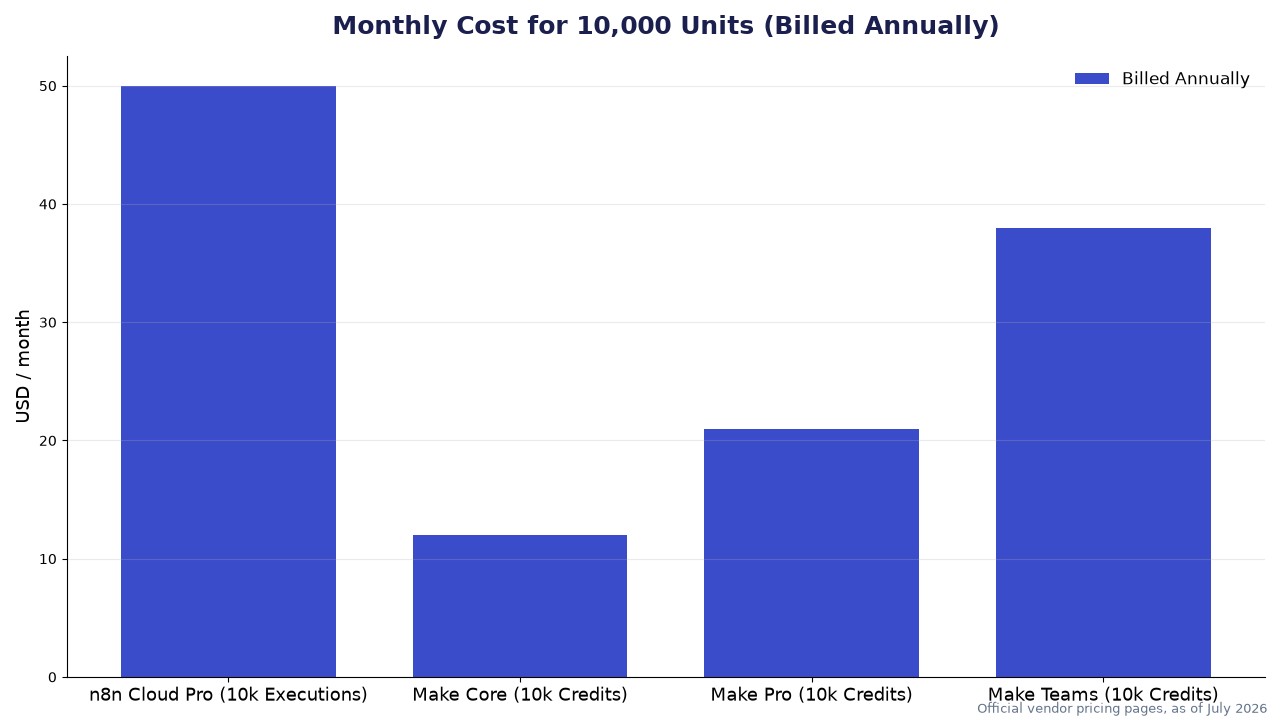
As shown in the chart, if you only look at the base entry price for 10,000 units, Make Core at $12/month seems like a steal compared to n8n Cloud Pro at $50/month. But because 10,000 n8n executions can easily do the work of 500,000 Make credits in complex looping workflows, Make’s actual cost scales exponentially while n8n’s stays flat.
The “Active Workflow” Myth Debunked
If you read older comparison reviews of n8n vs Make.com, you will find a common complaint that the n8n Starter plan restricts you to only 5 active workflows while Make is unlimited.
This information is completely stale. In August 2025, n8n officially revamped its pricing structure. They completely removed active workflow limits, step limits, and user seats across all plans. Whether you are on the $20/mo Starter plan, the Pro plan, or self-hosting, you can build and activate as many workflows as you want. You are only metered on successful executions.
Where Make Actually Wins: The Integrations King
Make’s biggest edge is its sheer volume of native integrations. With over 3,000 apps ready to drag and drop, Make has built-in support for almost any SaaS tool you can think of. If a vendor updates their API, the Make team updates the module behind the scenes, so your workflow rarely breaks.
In n8n, the native integration library is smaller (around 500+ native nodes, though community nodes push it higher). If you are connecting niche marketing tools, you will regularly find yourself using n8n’s generic HTTP Request node and writing custom JSON payloads. For non-developers, this is a massive roadblock.
Make also handles visual data mapping beautifully. You can visually parse nested arrays and map variables without writing a single line of code. In n8n, while the visual UI has improved, you will still occasionally need to write a line or two of JavaScript (e.g., return item.json.myField;) to extract data from complex API responses.
Where n8n Wins: Deep AI Agents and Self-Hosting
If you are building an n8n vs Make AI agent, n8n is in a completely different league. n8n has visual nodes designed specifically for LangChain. Instead of just calling an AI API, you can visually assemble an agent by connecting:
* LLM Nodes (OpenAI, Anthropic, Ollama)
* Memory Nodes (Redis, Postgres, Buffer memory)
* Vector Store Nodes (Pinecone, Qdrant)
* Tool Nodes (Giving the AI agent the ability to trigger other n8n workflows dynamically)
Furthermore, Make charges a “credit premium” if you use their native AI modules without your own API key. This hidden complexity billing can drain your credit limits in hours. In n8n, AI workflows run on the exact same execution model—you plug in your own API keys, pay the model provider directly, and n8n only bills you for the execution run.
Finally, for enterprise compliance and data privacy, self-hosted n8n is a massive cheat code. You can run n8n on your own VPC, ensuring that sensitive customer data never leaves your infrastructure. Make is a closed SaaS platform; your data must flow through their cloud servers.
The Verdict
To settle the debate, use this decision framework:
Choose Make if:
- Your team consists of marketers, sales ops, or PMs who do not know how to write code or read API documentation.
- You need to connect long-tail, niche SaaS applications that do not have major global developer footprints.
- Your automations are simple, linear (Trigger -> Action -> Action), and run at low volumes.
Choose n8n if:
- You have at least one team member who can write basic JavaScript or Python to manipulate data.
- You are building multi-step, looping, or database-heavy workflows that would consume hundreds of thousands of credits on Make.
- You are building custom AI agents that require memory, vector search, and tool-calling.
- You have strict data privacy requirements and want to self-host your automation engine for free.

Leave a Reply