

If you are building a modern web application today, you are likely choosing between two radically different philosophies for transactional email: Resend vs SendGrid. While SendGrid has been the industry default for over a decade, a series of aggressive pricing changes and a stagnant developer experience have opened a massive gap.
The ultimate verdict is straightforward: Resend wins this matchup for almost every modern developer and startup, but the decision flips if you need massive enterprise volume (>2.5 million emails/month) or require a bundled, drag-and-drop marketing campaign suite under a single contract.
Here is the unfiltered breakdown of Resend vs SendGrid to help you decide which tool to wire into your application today.
The 30-Second Answer
- Pick Resend if: You are building with React, Next.js, or modern Node.js frameworks and want to write your templates in JSX (via React Email). You want a generous, permanent free tier for staging and side projects, clean developer logs, and no surprise “runaway loop” overage bills.
- Pick SendGrid if: You send millions of emails monthly, require a dedicated IP address on a lower-priced tier, or need non-technical marketing teams to build and trigger complex visual newsletters and automated campaigns from the same platform.
Resend vs SendGrid: Feature Comparison
| Feature | Resend (as of July 2026) | SendGrid (as of July 2026) |
|---|---|---|
| Free Tier | 3,000 emails/month (100/day limit, permanent) | 60-day trial only (100/day limit, then locked) |
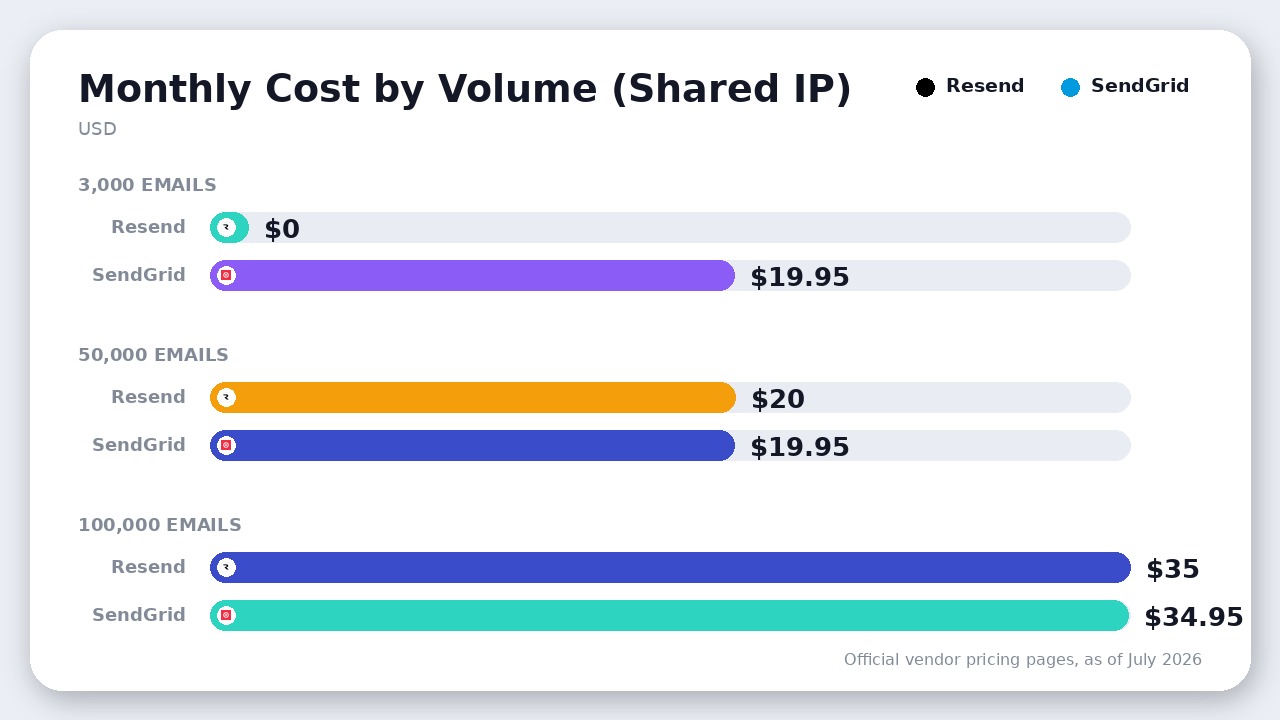
| Entry Paid Plan | $20/month (Pro – 50,000 emails) | $19.95/month (Essentials – 50,000 emails) |
| Template Language | Native React Email (JSX) or raw HTML | Mustache/Handlebars syntax ({{variable}}) or raw HTML |
| Data Retention | 30 days (Free, Pro, and Scale plans) | 3 days (Essentials), 7 days (Pro) |
| Dedicated IP Cost | $30/month (requires Scale plan, starts at $90/mo) | Included in Pro plan (starts at $89.95/mo) |
| Overage Handling | Opt-in pay-as-you-go or hard pause | Automatic pay-as-you-go charges |
| SMTP Relay | Yes (smtp.resend.com) | Yes (smtp.sendgrid.com) |
1. The Free Tier and Overage Traps
The most impactful change to occur recently is the quiet death of SendGrid’s permanent free tier. For years, developers relied on SendGrid’s 100 free emails per day to run staging environments, side projects, and low-volume apps. As of July 2026, SendGrid has completely eliminated its permanent free plan, replacing it with a strict 60-day trial. Once those 60 days are up, you are forced to upgrade to the $19.95/month Essentials plan (as of July 2026), or your sending is disabled.
Resend, by contrast, offers a permanent free tier of 3,000 emails per month (capped at 100 per day). This makes Resend the undisputed king for local development, staging servers, and bootstrapping new ideas.
Additionally, how each transactional email API handles overages is a major operational risk. If a bug in your application triggers an infinite sending loop, SendGrid will automatically process the emails and bill you pay-as-you-go overages ($1.30 per 1,000 emails on Essentials 50K, $0.90 per 1,000 on Essentials 100K; $0.85 per 1,000 on Pro as of July 2026) with no safety valve.
Resend defaults to a “no-surprise” model. When you hit your plan limit, sending simply pauses and alerts you. If you want to continue sending, you must explicitly opt-in to pay-as-you-go overages ($0.90 per 1,000 emails on the Pro plan as of July 2026).
2. Developer Experience: React Email vs. Legacy Mustache Templates
If you have ever built transactional emails in SendGrid, you know the pain of their “Dynamic Templates”. You are forced to design the layout in a clunky, browser-based drag-and-drop editor, insert Mustache-style variables ({{user_name}}), copy a template ID, and pass a JSON payload to their REST API.
Resend was built by the creators of React Email, a popular open-source framework for building emails with React components. Instead of wrestling with nested HTML tables and inline CSS, you write clean JSX:
import { Button, Html } from '@react-email/components';

export const WelcomeEmail = ({ url }) => (
  <Html lang="en">
    <Button href={url}>Click me</Button>
  </Html>
);
You import this component directly into your server-side code and pass it to the Resend SDK. The template lives in your Git repository, undergoes standard code reviews, and utilizes your existing TypeScript types.
Even if you prefer sending via SMTP rather than the REST API—for instance, when configuring custom auth emails in a backend like Supabase—Resend’s developer experience shines. Its dashboard features real-time, searchable delivery logs, click-tracking graphs, and detailed bounce metadata that actually tell you why an email failed, whereas SendGrid’s dashboard feels like a relic of the late 2000s.
3. Deliverability, Dedicated IPs, and the Scale Trap
While Resend dominates the developer experience, SendGrid strikes back when it comes to the economics of a dedicated IP address.
To maintain high email deliverability, high-volume senders must isolate their sending reputation from the noisy “shared IP pools” that spammy accounts degrade.
- SendGrid includes a dedicated IP address in its Pro plan, which starts at $89.95/month as of July 2026 (covering 100,000 emails). On Essentials, you cannot easily get a dedicated IP address.
- Resend charges a $30/month add-on fee for a dedicated IP address as of July 2026, and this add-on is only available if you upgrade to their Scale plan (which starts at $90/month as of July 2026). Furthermore, Resend’s documentation states that dedicated IPs are reserved for customers sending at least 3,000 emails per day on the Scale plan.
This means if you need a dedicated IP for 100,000 emails/month as of July 2026:
* On SendGrid, you pay $89.95/month flat.
* On Resend, you pay $120/month ($90 Scale plan + $30 IP add-on).
If your business has strict compliance guidelines that demand a dedicated IP from day one, SendGrid is the more cost-effective option. However, Resend’s shared IP pool reputation is exceptionally clean because they aggressively police and ban bad actors (specifically banning cold email outreach).
4. Data Retention and Inbound Routing
Debugging delivery issues requires looking at historical message payloads. If a user claims they didn’t receive their password reset token four days ago, you need logs.
SendGrid’s Essentials plan only retains message logs and event history for 3 days as of July 2026 (Pro extends this to 7 days). If a delivery issue occurs over a long holiday weekend, the logs are gone before your engineers log back in on Tuesday.
Resend provides a generous 30-day data retention period across all its plans (Free, Pro, and Scale) as of July 2026. This single difference saves developers countless hours of troubleshooting.
For inbound email processing (e.g., parsing replies to support tickets), the tools differ structurally:
* SendGrid parses the entire inbound email—including attachments up to 30MB—and posts a massive, pre-parsed JSON payload directly to your webhook.
* Resend‘s inbound webhook is metadata-only. When an email is received, Resend sends a lightweight webhook alert. Your server must then make an outbound API call back to Resend to retrieve the actual email body and attachments.
Where SendGrid Actually Wins
SendGrid remains a powerhouse for two specific scenarios:
- Massive Scale & Procurement: If you are sending 10 million transactional emails a month, SendGrid’s Twilio-backed infrastructure is battle-tested. Their sales team can offer aggressive volume discounts that startups like Resend cannot match, and corporate procurement departments will approve a Twilio contract with zero hesitation.
- Unified Marketing Campaigns: SendGrid offers a separate “Marketing Campaigns” module. This allows marketing teams to upload lists, build newsletters with a visual builder, and set up automated drip campaigns. If you use Resend, you are strictly getting a developer API; you will need to pay for a separate tool for your marketing broadcasts.
The Verdict
Choose Resend as your default. It is the modern standard for developer experience, native React Email support, and staging-friendly pricing. Unless you are forced onto SendGrid by corporate procurement or require their bundled marketing campaign builder, writing code against Resend’s API is a dramatically better experience for your engineering team.
Final Recommendation
Resend is the clear winner for modern developer experience, native React Email templates, and 30-day data retention. SendGrid only wins if you need a dedicated IP on a sub-$100 plan or require massive enterprise procurement.

Leave a Reply