

If you are looking for visual, UI-based workflow builders, you should read our comparison of n8n vs Make or Zapier vs Make. But if you are a developer who wants to build robust, code-first workflows, you are looking at durable execution platforms like Trigger.dev and Inngest.
At first glance, both platforms promise the exact same thing: a way to write reliable, type-safe TypeScript background jobs that survive server restarts, automatically retry on failure, and handle complex orchestration without managing Redis queues or state machines.
But under the hood, these two platforms are built on fundamentally opposing architectural philosophies. One is a managed compute host that runs your code in its own isolated containers, while the other is an orchestration traffic controller that triggers code running on your own servers via HTTP.
This single architectural difference changes everything—from how you write your code to how you are billed, and whether your tasks will crash due to serverless timeouts. Here is the unfiltered breakdown of Trigger.dev vs Inngest to help you choose the right tool for your stack.
The 30-Second Answer
- Choose Trigger.dev if you have long-running, compute-heavy tasks (like video transcoding, web scraping with Puppeteer, or multi-turn AI agents) that easily exceed standard serverless timeouts. Because Trigger.dev hosts and runs your code on its own secure, isolated containers, you bypass serverless platform timeouts entirely, avoid double billing, and can write linear async TypeScript without wrapping every side-effect in step-level boilerplate.
- Choose Inngest if you want to build highly event-driven workflows (like drip campaigns or multi-day onboarding flows) that live entirely inside your existing application codebase and run on your own servers. Inngest keeps your execution in-house, making it ideal for strict data-sovereignty compliance, and its event-coordination engine makes waiting for arbitrary user events incredibly elegant.
Trigger.dev vs Inngest: Core Differences
| Dimension | Inngest | Trigger.dev |
|---|---|---|
| Primary Abstraction | Durable Execution Coordinator (Orchestrator) | Managed Compute Platform for Durable Tasks |
| Code Execution Location | Your own servers / serverless functions (Vercel, AWS Lambda, Render) | Trigger.dev’s secure, isolated AWS/Kubernetes containers |
| Execution Timeout Limit | Bound by your hosting provider (e.g., Vercel’s limits) | No timeouts (tasks can run for hours or days) |
| State & Resume Model | Re-execution model: caches step.run outputs; re-runs function on events |
Checkpoint-resume model: snapshots execution state using CRIU; resumes process |
| Double Billing | Yes: you pay Inngest for coordination + Vercel/AWS for function run-time | No: you only pay Trigger.dev for compute-seconds; your backend is idle |
| Pricing Model | Metered per step execution | Metered per compute-second + tiny run invocation fee |
| Local Dev Server | Yes (npx inngest-cli dev) |
Yes (npx trigger.dev@latest dev) |
| Self-Hosting | Yes (Open-source engine) | Yes (Fully open-source Apache 2.0, Docker Compose) |
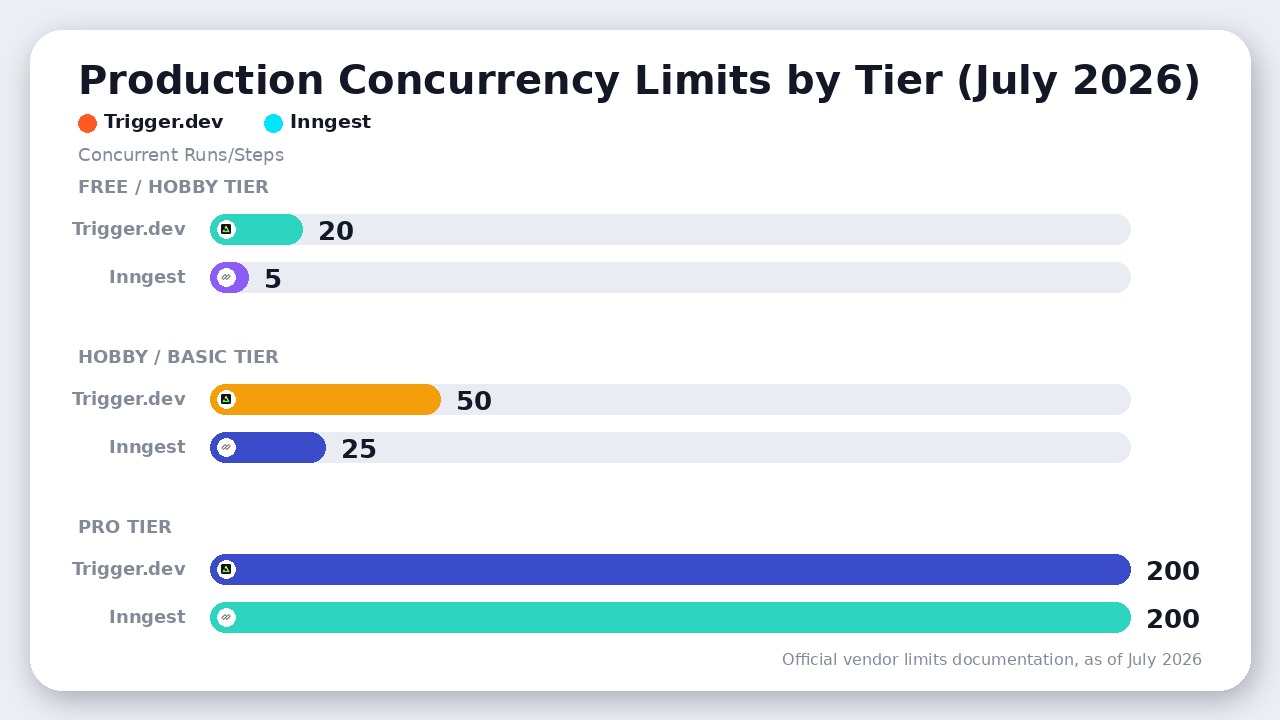
| Production Concurrency Limits | 5 (Hobby) / 25 (Basic) / 200 (Pro) | 20 (Free) / 50 (Hobby) / 200 (Pro) |
1. The Architectural Divide: Managed Compute vs. HTTP Orchestration
The single most critical difference between these two platforms is where your code actually executes.
Inngest: The Traffic Controller
Inngest does not run your code. Instead, your code lives inside your existing application (e.g., a Next.js app deployed to Vercel). When an event occurs, Inngest’s cloud service sends an HTTP POST request to your application’s dedicated Inngest endpoint (e.g., /api/inngest). Your serverless function wakes up, executes a step, returns the result to Inngest via HTTP, and goes back to sleep.
When the next step is ready, Inngest calls your endpoint again. Because of this, Inngest is bound by your hosting provider’s execution timeouts. If you deploy to Vercel’s Hobby tier, you are bound by a default timeout of 10–15 seconds (though configurable up to 5 minutes). Even on Vercel Pro, you face execution ceilings (typically up to 5 minutes by default, or up to 30 minutes for long-running functions if explicitly configured) that can easily cut off intensive tasks.
Trigger.dev: The Isolated Container Host
Trigger.dev v3 took a radically different path. When you run npx trigger.dev deploy, your task code is bundled, containerized, and deployed directly to Trigger.dev’s managed AWS/Kubernetes infrastructure. Your main application simply triggers a task via the SDK, and Trigger.dev executes it on its own workers.
Because Trigger.dev owns the compute, there are absolutely no execution timeouts. Your tasks can run for minutes, hours, or even days. If you need to run a heavy AI agent loop or transcode a video using FFmpeg, you can configure your task to run on a dedicated machine preset (ranging from a micro 0.25 vCPU instance up to a large-2x 8 vCPU, 16 GB RAM machine) and it will execute flawlessly without choking your main application server.
2. Programming Models: Re-Execution vs. Checkpoint-Resume
Because of their different execution models, the way you write TypeScript is fundamentally different on each platform.
Inngest’s Re-Execution Model
To achieve durability, Inngest uses a re-execution model. When your function runs, every side-effect must be wrapped in a step.run() block:
inngest.createFunction(
  { id: "generate-report" },
  { event: "report/requested" },
  async ({ event, step }) => {
    const data = await step.run("fetch-data", async () => {
      return db.getData(event.data.id);
    });

    const aiResult = await step.run("call-ai", async () => {
      return openai.chat.completions.create({...});
    });

    await step.sleep("wait-one-day", "1d");

    await step.run("send-email", async () => {
      return email.send(data.email, aiResult);
    });
  }
);
The catch: Every time a step finishes, the function terminates. When Inngest calls your endpoint to run the next step, the entire function runs from the beginning. Inngest’s SDK intercepts the completed step.run blocks, returns their cached results instantly without re-running them, and executes the next pending step.
If you forget to wrap a database mutation or API call in step.run(), it will execute multiple times during these re-runs. Additionally, all step inputs and outputs must be fully JSON-serializable.
Trigger.dev’s Checkpoint-Resume Model
Trigger.dev v3 uses an advanced technology called CRIU (Checkpoint/Restore in Userspace). Instead of terminating and re-running your function, Trigger.dev literally snapshots the memory state and CPU registers of your running container when you trigger a wait or a sub-task.
export const generateReport = task({
  id: "generate-report",
  run: async (payload) => {
    const data = await db.getData(payload.id);
    const aiResult = await openai.chat.completions.create({...});

    await wait.for({ days: 1 }); // Snapshots and pauses compute

    await email.send(data.email, aiResult);
  }
});
You write standard, linear TypeScript. No step.run() wrappers are required. When wait.for() is called, Trigger.dev pauses your container, tears down the active compute so you aren’t charged for idle time, and restores the exact memory state 24 hours later. Your local variables remain in scope, and execution resumes seamlessly.
3. The Pricing Trap: Step Metering vs. Compute-Seconds
SaaS pricing changes constantly, but the core metric used for billing is what determines your long-term costs.
Production Concurrency Limits Compared
When scaling your workflows, concurrency limits dictate how many runs or steps can execute in parallel. As of July 2026, the platforms offer different limits across their respective tiers:
- Free / Hobby Tier: Trigger.dev’s Free plan includes 20 concurrent runs, while Inngest’s Hobby (Free) plan includes 5 concurrent steps.
- Hobby / Basic Tier: Trigger.dev’s Hobby plan includes 50 concurrent runs, while Inngest’s Basic plan includes 25 concurrent steps.
- Pro Tier: Trigger.dev’s Pro plan includes 200 concurrent runs, while Inngest’s Pro plan includes 200 concurrent steps (which can be scaled higher).
Inngest’s Step Metering
As of July 2026, Inngest’s Pro plan starts at $99/month, which includes 1 million executions (additional executions are billed at $50 per million).
The trap: Inngest defines an “execution” as either a function run or a step execution. If you have a single workflow that contains 9 step.run blocks, a single run of that workflow consumes 10 executions (1 for the function run + 9 for the steps).
If you run this workflow 10,000 times, you have already consumed 100,000 executions. If you build complex, multi-step state machines or loops that run a step for each item in an array, you will blow through your quota and face steep metered overages very quickly.
Trigger.dev’s Compute-Second Metering
As of July 2026, Trigger.dev’s Pro plan is $50/month, which includes $50 in usage credits. Trigger.dev bills you purely for active compute-seconds based on the machine preset you choose, plus a tiny invocation fee of $0.000025 per run ($0.25 per 10,000 runs).
For example, running a task for 5 seconds on the default small-1x machine (0.5 vCPU, 0.5 GB RAM at $0.0000338/sec) costs:
$$\text{Compute: } 5 \times \$0.0000338 = \$0.000169$$
$$\text{Invocation: } \$0.000025$$
$$\text{Total: } \$0.000194 \text{ per run}$$
With your $50 in included Pro credits, you can execute that 5-second task over 257,000 times before paying an extra cent. Even better, because Trigger.dev does not charge you for idle wait time, using wait.for() costs exactly $0.
Where Inngest Actually Wins
Despite Trigger.dev’s architectural advantages, Inngest is still the superior tool for several specific use cases:
1. Complex, Event-Driven Orchestration
If you need to coordinate workflows based on real-time external events, Inngest is unmatched. Primitives like waitForEvent and cancelOn allow you to easily build complex state machines:
// Pause execution until the user submits an approval event, or timeout after 3 days
const approval = await step.waitForEvent("approval/submitted", {
  timeout: "3d",
  if: "event.data.userId == async.data.userId"
});
Doing this in Trigger.dev requires managing waitpoint tokens and subscribing to external runs, which is significantly more verbose.
2. Zero-Trust Data Sovereignty
Because Inngest only coordinates execution via HTTP and does not host your code, your sensitive database credentials, private API keys, and customer data never reside on Inngest’s servers. For enterprise teams with strict compliance requirements, keeping code execution entirely on self-managed infrastructure makes security audits a breeze.
3. Local Development Friction
Inngest’s dev server (npx inngest-cli dev) is arguably the gold standard of developer experience. It auto-discovers your endpoints locally and provides a beautiful local UI to send mock events and step through traces without needing to deploy a single container.
The Verdict
Choose Trigger.dev if:
- You are building AI agents, long-running LLM completions, or heavy background tasks (video processing, PDF generation, web scraping) that easily exceed serverless timeouts.
- You want to avoid the cognitive overhead of wrapping every side-effect in
step.run()boilerplate. - You want to eliminate the double-billing of paying both Vercel/AWS and an orchestrator for execution time.
Choose Inngest if:
- You are building highly event-driven user journeys (e.g., drip marketing campaigns, complex transactional billing flows) that require waiting for, or canceling on, arbitrary user events.
- Your security compliance mandates that code execution and database connections must remain strictly within your own virtual private cloud (VPC).
- You prefer a purely serverless-native deployment where your background tasks deploy seamlessly as part of your existing Next.js monorepo without separate container deployments.
Final Recommendation
While both platforms excel at durable execution, Trigger.dev wins for most modern TypeScript teams by executing your code on its own managed compute—completely bypassing serverless timeouts and eliminating double billing.

Leave a Reply